· ReadyStack
Worked example
Real numbers from this tool, line by line.
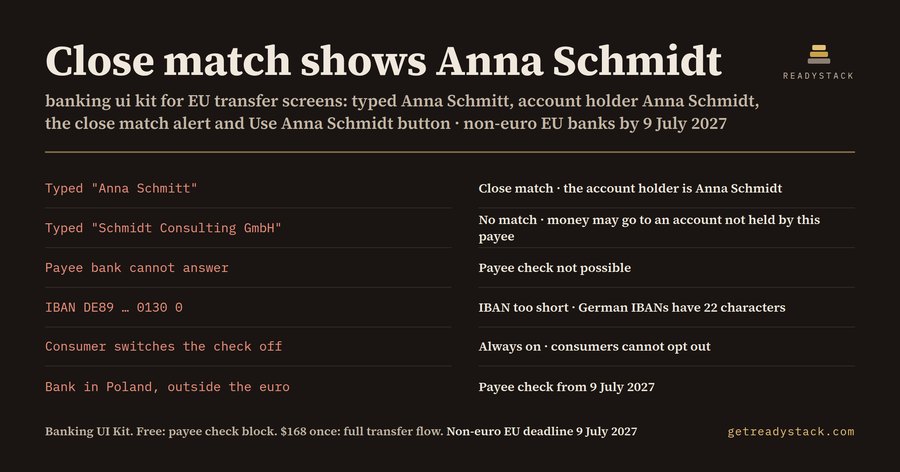
Close match shows Anna Schmidt. That is the finished screen for one transfer: the payer typed "Anna Schmitt", the IBAN DE89 3704 0044 0532 0130 00 belongs to Anna Schmidt, and the bank must say so before the payer authorises.
| Payer types | Account holder | Result the kit draws | Button the kit draws |
|---|---|---|---|
| Anna Schmitt | Anna Schmidt | Close match · the account holder is Anna Schmidt | Use Anna Schmidt |
| Schmidt Consulting GmbH | Anna Schmidt | No match · the money may go to an account not held by this payee | Send anyway |
| Anna Schmidt | no answer | Payee check not possible | Send anyway |
The rule
Regulation (EU) 2024/886, the Instant Payments Regulation, amended the SEPA Regulation 260/2012. Before a payer authorises a credit transfer, the payer's bank checks the payee name against the IBAN. There are four outcomes. A match needs no extra screen. A close match shows the payer the name of the account holder. A no match warns that authorising may send the money to an account not held by the payee the payer named. If the check cannot be done, the payer is told that too.
The dates depend on the country of the bank. Euro-area banks have had to offer the check since 9 October 2025. Banks in EU countries outside the euro, such as Poland, Sweden, Czechia, Hungary, Romania and Denmark, must offer it from 9 July 2027.
Consumers cannot switch the check off. Business users may opt out only when they submit payment orders as a package, a bulk file, and they can opt back in.
Three situations, three different screens
- A German bank, typed name "Anna Schmitt", account holder "Anna Schmidt": close match. The alert names Anna Schmidt and offers a "Use Anna Schmidt" button.
- Same IBAN, typed "Schmidt Consulting GmbH": no match. The warning goes red and "Send anyway" sits next to "Edit payee".
- A Polish bank with a 28-character IBAN: the same four states, required from 9 July 2027 instead of 9 October 2025.
Change one input and the screen changes.
Try it on your own names
The free preview on the product page runs in your browser. Pick the country of the payer's bank from 20 EU countries, paste an IBAN, type a payee name and the account holder name. It checks IBAN length and check digits, then switches state. The name comparison there is a demo rule. Each bank sets its own matching rule; the kit draws the screens.
What is in the kit
8 components, 29 variants, delivered as a Figma plugin, a .sketch file and one SVG per variant.
Free, 8 variants: the IBAN and payee name field (empty, valid, error, payee name) and the Verification of Payee result (match, close match, no match, check not possible). That is the whole check step.
Full kit, 21 more variants: transfer buttons (send, use the holder's name, send anyway, disabled), transfer status (instant within 10 seconds, pending, completed, rejected), the review card, the business opt-out toggle, a three-step progress bar and payee chips.
Six color tokens carry the whole kit. Set primary, onPrimary, surface, text, danger and warning to your bank's HEX codes and every variant follows.
Getting it into Figma
Drag the .sketch file onto the Figma file browser, paste single SVGs as vectors, or import the plugin from manifest.json to rebuild the labelled variant sets. Part of the component structure is simplified in the .sketch.
This is a design file, not a payee-check service and not legal advice. Agree the wording with your compliance team.
15 seconds — what it actually does
Questions people ask
What does this banking UI kit do?
It gives you 8 Figma components with 29 variants for the EU transfer screen: the IBAN field with the right length per country, the four Verification of Payee results (match, close match, no match, not possible), the use-holder-name and send-anyway buttons, instant and pending status, the business opt-out toggle, the review card and the steps bar.
Who is it for?
Product designers at banks, neobanks, payment institutions and fintech agencies who design the SEPA transfer flow. Euro-area banks have had to show the payee check since 9 October 2025; banks in EU countries outside the euro, such as Poland, Sweden or Czechia, must do so by 9 July 2027. Sketch users open the same file.
Why not use a free banking UI kit?
Free banking kits draw one IBAN field and a Send button. Regulation (EU) 2024/886 requires the bank to check the payee's name before the payer authorises, and to show close match with the account holder's name or a no-match warning. Those are the screens a compliance review asks for, and a chatbot cannot hand you Figma variants.
What is free?
The payee check block: the IBAN and payee name field and the Verification of Payee result, 8 variants, as Figma plugin, .sketch and SVG, plus the browser preview. Example: IBAN DE89 3704 0044 0532 0130 00, typed name Anna Schmitt, account holder Anna Schmidt: close match, and the alert shows Anna Schmidt.
What does it cost compared to the alternative?
The full kit is $168, paid once, not a subscription. It adds the 6 transfer-flow components: send, use-holder-name and send-anyway buttons, instant status, the review card, the business opt-out toggle, the steps bar and payee chips. Paid banking UI kits on the market cost up to $168 (shelf measured September 2026).
Ask about this tool
One question, answered by the person who built it. Your email only if you want the answer sent.