Admin dashboard UI kit — NIS2 incident reporting clock

For designers of security and operations admin consoles at EU essential and important entities. Enter your incident dates; the Article 23 deadlines appear below, drawn with the kit's free components.

Full version — $168 once · get the whole kit

The full kit adds the 6 components for the reporting screens themselves: notification form fields with error state, the Article 23(3) significance checklist, deadline alerts, report stage tabs, essential/important entity filters and submit buttons (8 components, 32 variants in total). One payment, not a subscription. Try your own dates here first; nothing is uploaded.

Why the console needs three clocks, not one

A console that shows only a 72-hour timer lets the 24-hour early warning pass unnoticed. NIS2 Article 34 sets fines of at least €10,000,000 or 2% of total worldwide annual turnover for essential entities, and at least €7,000,000 or 1.4% for important entities. The final report runs from the notification, not from awareness, so the console has to store the notification date.

A free admin dashboard kit has buttons and tables, but no Article 23 states. A chatbot can list the deadlines, but it cannot hand you Figma components with variants.

What is in the kit

ComponentVariants
Article 23 deadline bar4Free
Incident status badge4Free
Notification form field4Full kit
Significance test (Art. 23(3)) checkbox4Full kit
Deadline alert4Full kit
Report stage tabs4Full kit
Entity and scope filters4Full kit
Report actions (buttons)4Full kit

Delivered as a Figma plugin (manifest.json + code.js), a .sketch file and one SVG per variant. In Figma, drag the .sketch onto the file browser, or paste an SVG as an editable vector. The .sketch carries each variant as a named, colored shape without its text label, and part of the component structure is simplified; the SVGs and the plugin carry the labels. Menu names differ by Figma version and UI language.

How this page counts: early warning = awareness + 24 h (Art. 23(4)(a)); notification = awareness + 72 h (Art. 23(4)(b)); final report = the same date and time one month after the notification was sent, or the last day of that month if the date does not exist (Art. 23(4)(d)). Not legal advice; your national transposition and CSIRT may add steps.
Get the complete version $168

This page is the working piece. The full pack has everything below.

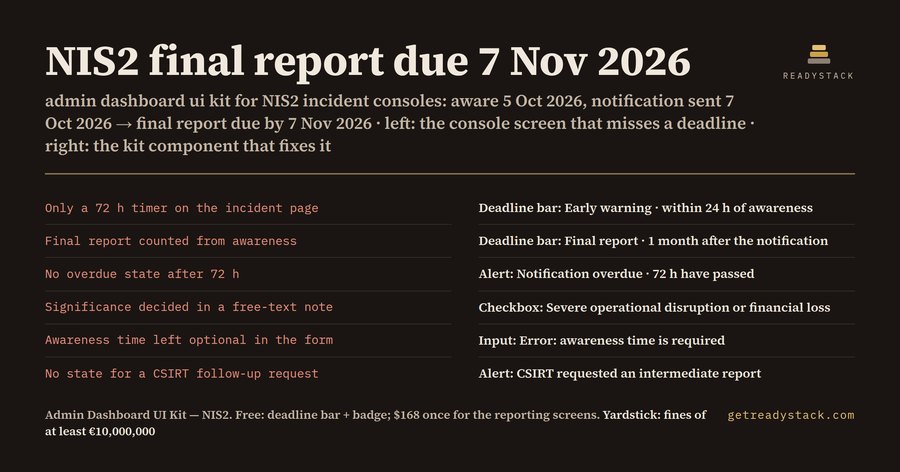
Admin dashboard UI kit for NIS2 incident consoles: the final report is due 1 month after the notification, not after awareness. 8 components, 32 variants, fines of at least €10,000,000 under

NIS2 Directive (EU) 2022/2555, Article 34(4): essential entities face a maximum fine of at least €10,000,000 or 2% of total worldwide annual turnover, whichever is higher; important entities at least €7,000,000 or 1.4% (Article 34

Buy the full version — $168
Want the full version?
Enter your email and we send the download link.
ENDEJAESPT

Find a tool

· ReadyStack

Worked example

Real numbers from this tool, line by line.

Admin Dashboard UI Kit — NIS2 Incident Reporting Console (Figma + Sketch)

NIS2 Article 23 does not give an incident one deadline. It gives it three, and they do not all start at the same moment.

The early warning is due within 24 hours of becoming aware of a significant incident. The incident notification is due within 72 hours of becoming aware. The final report is due not later than one month after the incident notification was submitted. In between, the CSIRT or the competent authority can ask for an intermediate report at any time.

That third clock is the one most dashboards get wrong. It does not run from awareness. It runs from the day the notification went out, so the console has to store that date and count from it.

Take one worked example. The team became aware on 5 Oct 2026 at 09:30. The early warning is due by 6 Oct 2026 at 09:30. The notification is due by 8 Oct 2026 at 09:30. The notification was actually sent on 7 Oct 2026, so the final report is due by 7 Nov 2026, not by 5 Nov 2026.

If you design admin dashboards for EU essential or important entities, or for the managed security providers that report on their behalf, this is a screen you will be asked to draw. It is also a screen where the design decides what the operator sees. A console that shows only a 72-hour countdown lets the 24-hour early warning pass without anyone noticing. Article 34 sets the stakes: for essential entities, a maximum fine of at least €10,000,000 or 2% of total worldwide annual turnover, whichever is higher. For important entities, at least €7,000,000 or 1.4%.

A generic admin dashboard kit gives you buttons, tables and cards. It does not give you a deadline bar that knows which clock it is on, a badge for "significant incident", or an overdue alert. You end up drawing each of those states by hand, and each designer on the team draws them a little differently.

So we built an admin dashboard UI kit for exactly this screen. It has 8 components and 32 variants. The Article 23 deadline bar has four states: early warning, notification, final report and overdue. The incident status badge has four: significant, not significant, early warning sent and final report sent. The notification form fields cover the awareness time, the suspected unlawful or malicious act, cross-border impact and an error state. The significance checklist follows Article 23(3): severe operational disruption or financial loss, and considerable damage to other persons. Then come the deadline alerts, the report stage tabs, the essential and important entity filters, and the submit buttons.

The colors are six tokens. Set them to your brand HEX codes and the whole kit follows.

The deadline bar and the status badge are free, together with a browser calculator that runs the same three dates on your own incident. Enter the awareness time and the notification time, and the page shows each deadline and whether it was met. Nothing is uploaded.

The kit arrives as a Figma plugin, a .sketch file and one SVG per variant. In Figma you drag the .sketch onto the file browser, or paste an SVG as an editable vector. The .sketch carries each variant as a named, colored shape without its text label. The plugin rebuilds every component with its label and combines the variants into a set.

15 seconds — what it actually does

Questions people ask

What does this admin dashboard UI kit do?

It gives you 8 Figma components with 32 variants for the incident screens of a security or operations admin console under NIS2 Article 23: a deadline bar for the 24-hour, 72-hour and one-month reports, status badges, the notification form fields, the significance checklist, deadline alerts, stage tabs, entity filters and submit buttons. It ships as a Figma plugin, a .sketch file and SVGs.

Who is it for?

Product designers and front-end teams who build admin dashboards for EU essential and important entities, or for the managed security providers that report incidents for them. If your console has to show a NIS2 reporting clock, a significance decision and a CSIRT submission, the states are already drawn. Sketch users open the same .sketch file.

Why not use a free admin dashboard kit?

A generic admin kit has buttons and tables but no Article 23 states: no bar that runs the final report from the notification date, no significance checklist, no overdue alert. You would draw each state by hand, and a chatbot cannot hand you Figma components with variants. NIS2 Article 34 sets fines of at least €10,000,000 or 2% of total worldwide annual turnover for essential entities.

What is free?

The deadline bar and the incident status badge, 8 variants, as a Figma plugin, .sketch and SVG, plus the browser calculator. Example: you became aware on 5 Oct 2026, so the early warning is due by 6 Oct 2026 and the notification by 8 Oct 2026. If the notification went out on 7 Oct 2026, the final report is due by 7 Nov 2026.

What does it cost compared to the alternative?

The full kit is $168, paid once, not a subscription. It adds the 6 components for the reporting screens themselves: the notification form, the significance checklist, alerts, tabs, filters and action buttons. The alternative is drawing 32 states by hand, and the risk you design against is a NIS2 Article 34 fine of at least €10,000,000 or 2% of turnover.

Ask about this tool

One question, answered by the person who built it. Your email only if you want the answer sent.