Checkout UI Kit — Card Surcharge & Fee Screens by Market (Figma)

For designers of online store, SaaS billing and booking checkouts that pass card costs on to the customer. Type your order amount and what your card processor charges you, and see the card fee you may add in your market, the total, and the text your pay button has to show.

Full version — $168 once · get all 8 components, 31 variants

One payment, not a subscription. The result above is yours for free, as often as you like.

The rules this calculator applies

Visa caps US credit card surcharges at 3% of the transaction and Mastercard at 4%, and neither may exceed what the card actually costs you. Debit and prepaid cards cannot be surcharged. The fee must be shown before the customer pays and as its own line on the receipt, and Visa asks for 30 days' written notice to your acquirer before you start. Connecticut and Massachusetts ban credit card surcharges; Colorado caps them at 2%. In the EU, Art. 62(4) of PSD2 (Directive (EU) 2015/2366) bars surcharges on consumer cards, and the UK has banned them since 13 January 2018. Other US states add their own conditions, so check yours before you switch surcharging on.

Free: the card fee notice, 4 variants

Capped (US credit) · Capped (Colorado) · Debit / prepaid · Banned market — as a Figma plugin, SVGs and a .sketch. That is the whole card fee notice on your payment step.

Full kit: the payment step around the notice

Card fee notice · 4Pay button · 4Card number field · 4Payment method chip · 4Order summary card · 4Fee status badge · 4Checkout steps · 4Card fee explainer · 3

8 components, 31 variants, 31 SVGs, one .sketch and the plugin source. Once the notice is on screen, the rest of the payment step has to agree with it: the pay button total, the summary line, the field that drops the fee when a debit card is entered, and the explanation the customer reads before paying.

Why not a free kit? Free Figma Community checkout UI kits draw one pay button and one summary with a single price, and a chatbot will not draw you component variants.

Yardstick: rival checkout UI kits on this shelf list at up to $168 (our shelf measurement, 2026) without the card fee states.

How to get it into Figma

  1. In Figma, drag the .sketch file onto the file browser to open it. It holds the variants as named, coloured shapes without text layers.
  2. Copy an SVG and paste it into a frame — it comes in as vectors with its label.
  3. Plugin: it ships as TypeScript source (code.ts). Run tsc to get code.js, then import manifest.json as a development plugin; it rebuilds the components as real variant sets with text.
  4. Replace #1D4ED8 with your brand colour in Selection colors.
Menu names differ by Figma version and UI language. Some component structure is simplified in the .sketch. Sketch users open the same file.

Get the full version $168

8 components, 31 variants for the payment step that adds — or must not add — a card fee: Visa's 3% cap, debit cards at zero, Colorado's 2%, and no surcharge at all in the EU, the UK, Connect

One payment, one licence key for this tool. The key is shown right after payment.

Visa caps US credit card surcharges at 3% of the transaction and Mastercard at 4%, never above the merchant's cost of acceptance; debit and prepaid cards cannot be surcharged; the surcharge must be shown before payment and as a re

Buy the full version — $168
Get the steps by email
We send the link and three steps to a first result now, then a real example and what the full version adds over the next week, and one email if a rule behind this tool changes. No newsletter.
ENDEJAESPT

Find a tool

· ReadyStack

Worked example

Real numbers from this tool, line by line.

Checkout UI Kit — Card Surcharge & Fee Screens by Market (Figma)

If your checkout adds a card fee, the number on the pay button is set by rules you do not control, and they change at every border.

Start with the United States. Visa caps a surcharge on a credit card at 3% of the transaction. Mastercard caps it at 4%. Neither lets the fee exceed what the card actually costs you. Debit and prepaid cards cannot be surcharged at all, whatever your processor charges. The fee has to be shown to the customer before they pay and printed as its own line on the receipt, and Visa asks you to give your acquirer 30 days' written notice before you start.

Then the states. Connecticut and Massachusetts ban credit card surcharges. Colorado allows them but caps them at 2%. Other states add their own conditions, so a store that sells nationally cannot draw one pay button and be done.

Cross the Atlantic and the answer flips. In the EU, Article 62(4) of the second Payment Services Directive bars surcharges on consumer cards. The UK has banned them since 13 January 2018. A store that sells in dollars, euros and pounds needs three different payment steps.

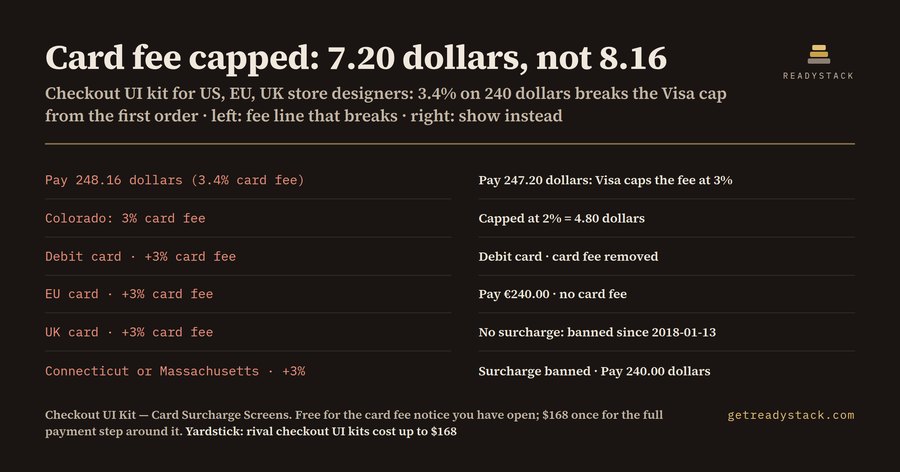
Here is what that looks like with one order. A customer buys 240 dollars of goods with a Visa credit card. Your processor charges you 3.4%, so the fee you would like to pass on is 8.16. The Visa cap is 3%, which is 7.20, so the pay button must read Pay 247.20, including the 7.20 card fee. Over the cap by 96 cents on every order of that size. Switch the same order to Colorado and the cap falls to 2%, or 4.80. Switch the card to debit and the fee is zero. Move the customer to Connecticut, Massachusetts, Germany or London and the fee is zero again, for a different reason each time.

We built the free calculator on the kit page to do exactly that sum. You type your order amount, your card cost, your market, the card network and the card type. It returns the fee you may add, the fee at your own cost, how far over the limit you are, what the customer pays, the reason, and whether the receipt needs a card fee line. Change any one input and the answer changes with it.

The free part of the Figma kit is the card fee notice, the line that tells the customer what is happening, in four variants: capped US credit fee, Colorado cap, debit or prepaid with no fee, and banned market. It comes as a Figma plugin, SVG files and a .sketch file, and it is complete for that one job.

Once the notice is on your screen, everything around it has to agree with it. The full kit draws that payment step: a pay button with and without the fee, a card number field that switches between credit and debit and drops the fee, payment method chips, an order summary card for each market, fee status badges, checkout steps and an explainer tooltip. That is 8 components and 31 variants in all.

Getting it into Figma takes a minute. Drag the .sketch file onto the Figma file browser, and the variants open as named, coloured shapes. Paste any SVG into a frame and it arrives as vectors with its label. Or compile the plugin source with tsc and run it as a development plugin to get real variant sets with text. Swap the blue for your brand colour and you are done.

Run your own order through the calculator first. It is free, and it is yours as often as you like.

15 seconds — what it actually does

Questions people ask

What does this checkout UI kit contain?

Eight Figma components for the card fee on the payment step, 31 variants in total: Card fee notice (4), Pay button (4), Card number field (4), Payment method chip (4), Order summary card (4), Fee status badge (4), Checkout steps (4) and Card fee explainer tooltip (3). They ship as a Figma plugin, 31 SVGs and one .sketch file.

Who is it for?

Product designers and e-commerce leads whose online store, SaaS billing page or booking site passes card costs on to the customer and sells in more than one market. In the US, Visa caps credit card surcharges at 3%, Colorado at 2%, and Connecticut and Massachusetts ban them; the EU and the UK ban surcharges on consumer cards. Sketch users open the same file.

Why not use a free Figma Community checkout UI kit?

Free checkout UI kits draw one pay button and one order summary with a single price. None we know of ships the capped fee, the debit card with no fee, the Colorado cap and the banned-market state as variants that agree with each other. A chatbot cannot draw component variants for you. This kit does, and you restyle it in one step.

What is free?

The card fee notice with 4 variants (capped US credit fee, Colorado 2% cap, debit or prepaid with no fee, banned market) as plugin, SVG and .sketch, plus the web calculator: type your order amount, your card cost and your market, and it shows the fee you may add, the total and the pay button text. The paid kit adds the button, field, summary and badges around it.

What does getting the card fee wrong cost?

A 3.4% card fee on a $240.00 order is $8.16, which is 96 cents over the Visa 3% cap of $7.20. Adding any fee to a debit card, or to a consumer card in the EU, the UK, Connecticut or Massachusetts, breaks the card network rules or the law. Rival checkout UI kits list at up to $168. This kit is a single payment, not a subscription.

Ask about this tool

One question, answered by the person who built it. Your email only if you want the answer sent.