· ReadyStack
Worked example
Real numbers from this tool, line by line.
If you run a WordPress site for an Ontario business, there is one accessibility duty that applies from your first employee, and most sites miss it: the feedback process. The Customer Service Standard under the Accessibility for Ontarians with Disabilities Act, now Part IV.2 of Ontario Regulation 191/11, says every provider of goods, services or facilities must set up a way to receive and respond to feedback about how it serves people with disabilities, and must make information about that process readily available to the public.
Section 80.50 is short, and it is specific. The process has to let people give feedback in person, by telephone, in writing, or by email or other electronic text. It has to say what the provider does when a complaint arrives. And section 11 adds that the feedback process itself must be accessible: when someone asks, you provide accessible formats and communication supports.
Size changes what else you owe. With 20 or more employees in Ontario, section 80.46 requires the customer service policies, including the feedback process, to be written down and given to anyone who asks. The same businesses and non-profits file an accessibility compliance report every three years, and 2026 is a reporting year: the next report is due by Thursday 31 December 2026. A senior officer attests to it, and one of the things it asks about is whether you have that feedback process.
The stakes are set in section 37 of the Act. An individual convicted of an offence faces a fine of up to $50,000 for each day it continues; a corporation, up to $100,000 for each day.
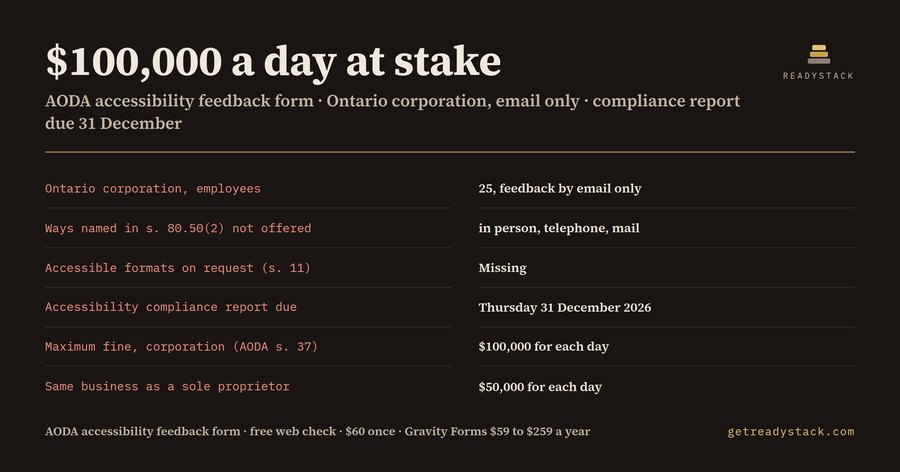
Here is what the free check on this page returns for a common case. An Ontario corporation with 25 employees takes feedback by email only and has never offered accessible formats. Three of the four ways named in section 80.50(2) are not offered: in person, by telephone and in writing by mail. Accessible formats on request are missing. The process must be in writing, and the compliance report is due by Thursday 31 December 2026. The maximum fine on conviction is $100,000 for each day. Change the business to 12 employees and the feedback process is still required, but the written-policy duty and the report drop away. Change it to a sole proprietor with 25 employees and the report stays, while the maximum becomes $50,000 a day.
The plugin handles the part a website can carry. One shortcode puts a feedback form on a page. It has 9 fields: where it happened; whether the feedback is a complaint, suggestion, compliment or question; what it is about, from 8 topics the Customer Service Standard covers, including service animals, support persons, assistive devices and service disruptions; what happened; the reply format the person needs, from large print to Braille or a communication support; how they want a reply; and name, email and telephone, all optional, so people can write in anonymously. Five fields are required, every field has a label, and above the form your other channels and what you do with a complaint are printed, so the page itself tells the public how the process works. Every submission is listed in WordPress admin.
The free plugin is complete for taking and keeping feedback. The full version adds what you miss once it runs: an email to you for each submission, a copy to the writer, a dated CSV to keep with your written policy, a filter by location, and a tagged form per location.
Start with the check: enter your employee count, legal form, the ways you take feedback today and whether you offer accessible formats. It is free and runs in your browser.
15 seconds — what it actually does
Questions people ask
What does this AODA accessibility feedback form do?
It adds an accessible feedback form to your WordPress site with one shortcode. Nine fields ask where it happened, what kind of feedback it is, what it concerns (eight Customer Service Standard topics), the details, the reply format and method, and an optional name, email and phone, so people can write in anonymously. Every submission is listed in admin, 50 per page.
Who needs an AODA feedback process?
Every business and non-profit in Ontario with at least one employee. The Customer Service Standard (O. Reg. 191/11, s. 80.50) requires a process for feedback on how you serve people with disabilities, accepted in person, by phone, in writing or by email. With 20 or more employees you also keep it in writing and file a compliance report by 31 December 2026.
Why not use a free contact form?
A contact form does not ask where the barrier was, what it concerned or which reply format the person needs, and no free WordPress plugin ships an AODA feedback form. Many businesses post a PDF form instead, which people using screen readers often cannot fill in. The paid version alerts you at once, emails the writer a copy and exports a dated record.
What do I get for free?
The free plugin works on its own: the nine-field form, your other feedback channels and complaint steps shown above it, spam protection, a label on every field and the full list of submissions in admin, 50 per page. The free web check tells you which feedback channels you are missing, whether you file the 2026 report and your maximum daily fine.
How does the price compare?
It is $60 once, not a subscription. Gravity Forms, a general form builder, costs $59 to $259 every year and ships no AODA fields, so you would still build and word the form yourself. Under AODA section 37 a convicted corporation faces up to $100,000 for each day an offence continues, and an individual up to $50,000 a day.
Ask about this tool
One question, answered by the person who built it. Your email only if you want the answer sent.