 AI Limit Meter + Chat Handoff
AI Limit Meter + Chat Handoff
AI Limit Meter + Chat Handoff
One browser extension for all three AIs. It shows each limit and the exact time it comes back. When you hit the wall in the middle of a long chat, it carries the chat to another AI — every code block word for word — so you keep working instead of waiting.
One browser extension for all three AIs. It shows each limit and the exact time it comes back. When you hit the wall in the middle of a long chat, it carries the chat to another AI — every code block word for word — so you keep working instead of waiting.
Get the extensionUse the handoff in your browserCopy this key. In the extension: toolbar icon → paste it into "Licence key" → Unlock. On this page, paste it into the key box of the handoff tool below.
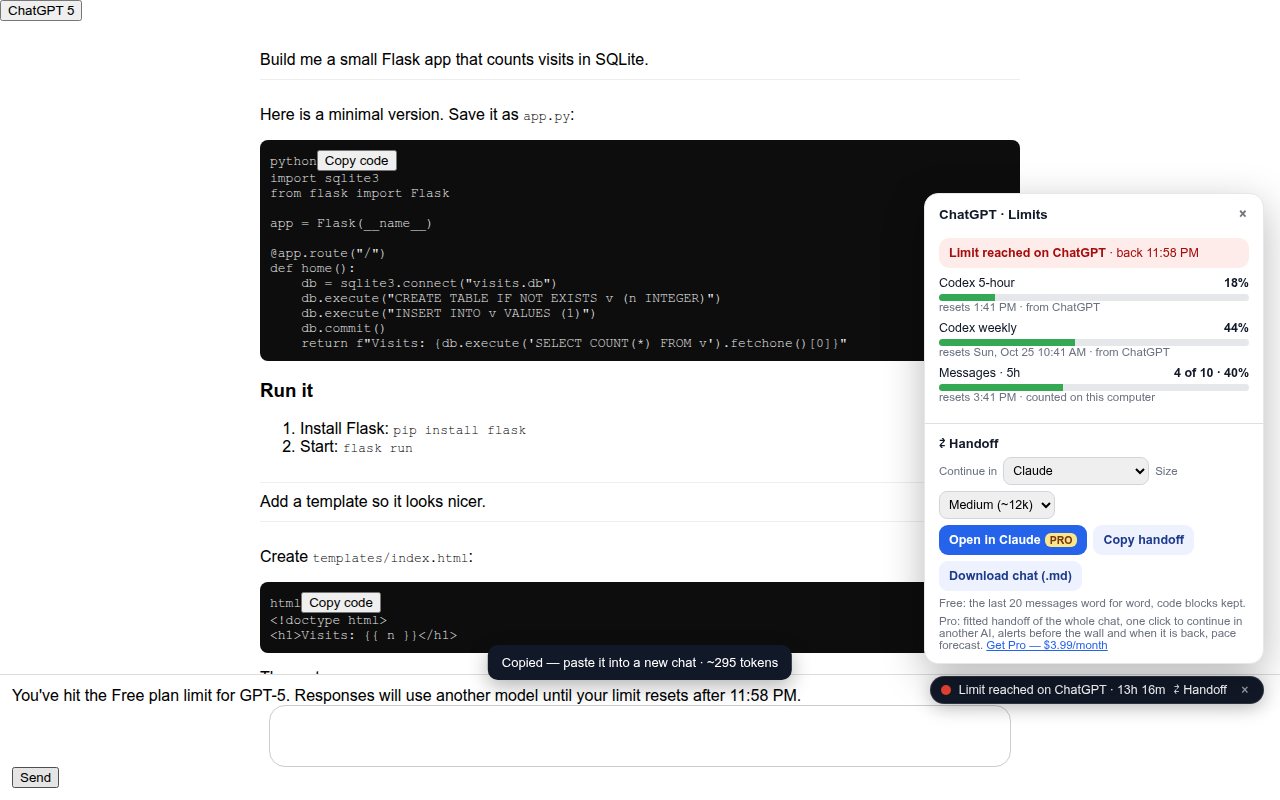
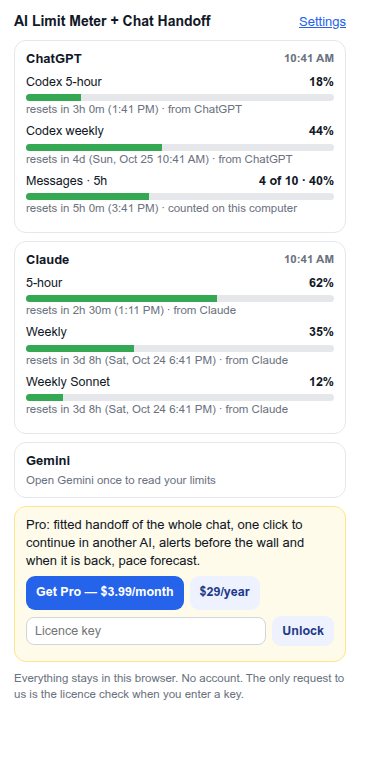
The popular meters read claude.ai only. This one shows ChatGPT, Claude and Gemini side by side, so you know which AI still has room before you start a long task.
Claude: your 5-hour, weekly and per-model use straight from claude.ai's own usage data. ChatGPT: Codex windows when your plan has them, plus your messages counted against the cap you set. Any "limit reached" message is read for its reset time.
Other tools flatten code or need your own AI API key to shorten a chat. Here the shortening runs in your browser: every request you made, the latest version of each code block, the last messages word for word — fitted to the size you pick.
Pro opens a new ChatGPT, Claude or Gemini chat and fills the message box with the handoff. You read it and press Send — nothing is sent for you.
No account, no sign-in, no server. Counts, settings and chats stay in the extension's storage. The only request to us is the licence check when you enter a key.
English, Deutsch, Español, Português and 日本語 — and the handoff note is written in the language of your chat.
Open your chat, select all (Ctrl+A / ⌘A), copy, and paste it here. ChatGPT's "You said: / ChatGPT said:" markers are recognised. Nothing is uploaded.
| Free | Pro | |
|---|---|---|
| Limits of ChatGPT, Claude and Gemini with reset times (popup, badge, meter on the page) | ✓ | ✓ |
| Reads "limit reached" messages for the time it comes back | ✓ | ✓ |
| Handoff of the last 20 messages, code kept · whole chat as .md | ✓ | ✓ |
| Whole-chat handoff fitted to a size, latest code first | ✓ | |
| One click: new chat in another AI with the box filled | ✓ | |
| Alerts before the wall (80% / 95%) and when a limit is back | ✓ | |
| Pace forecast: "at this pace you hit the limit around 9:40 PM" | ✓ |
Free from the browser add-on stores. Pro opens with the licence key you receive after paying.
Firefox — in reviewMicrosoft Edge — in reviewChrome: use the handoff on this page
For Claude it shows claude.ai's own numbers. ChatGPT and Gemini do not publish a live counter for chat messages, so the extension counts your messages on this computer against the cap you set, and as soon as the site shows a "limit reached" message it uses that message's reset time.
No. The handoff is built in your browser. The only request to us is the licence check when you enter a key.
Each site has two readers plus a last-resort reader; if only part of a page can be read, the handoff says so.
Firefox and Microsoft Edge (extension). In any browser, including Chrome, you can use the handoff tool on this page.