SaaS Dashboard UI Kit — Cancel Button §312k BGB & Billing Screens
For product designers and front-end leads of B2C SaaS and subscription apps selling to consumers in Germany. 5 inputs → the date your customer's contract really ends, and what you lose if your dashboard has no cancel button.
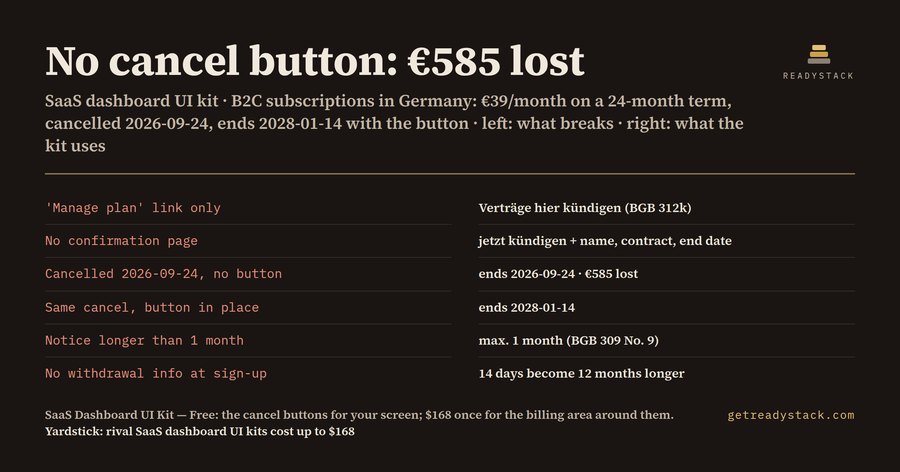
€585 lost without the cancel button
| Lawful end with the button (§309 No. 9 BGB) | 2028-01-14 |
| Without the button (§312k(6) BGB) | ends 2026-09-24 |
| Monthly payments you lose | 15 × €39 |
| Revenue lost per cancelling customer | €585 |
| 14-day withdrawal deadline (CRD Art. 9) | 2026-01-29 |
| Deadline if withdrawal info is missing (Art. 10) | 2027-01-29 |
This is the kit's Plan card and Billing alert, filled with your numbers. Change any value on the left — it recomputes.
One-time payment, not a subscription. You have already seen your own answer above before paying anything.
Free: the Cancel button set (4 variants)
Free download: these four variants as a Figma plugin, 4 SVGs and a .sketch file — complete for one job, the two buttons §312k BGB words for you, in German and English.
What you lose if the billing area is wrong — and when
- Cancel button (§312k BGB, in force since 2022-07-01): a consumer subscription concluded on a website needs a button labelled "Verträge hier kündigen" or equally unambiguous wording, leading to a confirmation page with a "jetzt kündigen" button. If it is missing, the customer may terminate at any time without notice (§312k(6)) — the term you priced stops holding.
- Confirmation page (§312k(2)–(4)): asks for the customer's identity, the contract, the type of termination and the end date, and you must confirm receipt on a durable medium with date and time.
- Notice cap (§309 No. 9 BGB, contracts from 1 March 2022): initial term at most 2 years, notice at most 1 month, and after the initial term the contract continues only indefinitely, cancellable with at most 1 month's notice.
- Withdrawal: 14 days from sign-up for a service (CRD Art. 9); if the withdrawal information is missing, the period runs 12 months longer (Art. 10). Since 19 June 2026, EU sign-ups also need a "withdraw from contract here" function (Art. 11a, Directive 2023/2673).
Why a free kit or a chatbot does not do this
Free Figma Community SaaS dashboard kits hide cancelling behind "Manage plan" or a grey text link and have no confirmation page. A chatbot will not draw you component variants. This kit ships the §312k wording, the confirmation fields and the notice-cap states as real Figma variants — 27 of them, every text/fill pair at 4.5:1 contrast or more.
How to get it into Figma
- In Figma, drag the .sketch file onto the file browser to open it. It holds the 27 variants as named, brand-coloured shapes without text layers.
- SVG files: copy and paste them into a frame — they come in as vectors with their labels.
- Plugin: it ships as TypeScript source (code.ts). Run tsc to get code.js, then import manifest.json as a development plugin; it rebuilds the 8 components as real variant sets.
- Replace #4338CA with your brand colour and the example plan and dates with your own.
Menu names differ by Figma version and UI language. Some component structure may be simplified in the .sketch import (not measured). Sketch users open the same .sketch file. This is a design kit, not legal advice.
Yardstick
Rival SaaS dashboard UI kits on this shelf list at up to $168 (our 2026 shelf measurement), without a §312k cancel flow.