Mobile App UI Kit — Account Deletion Flow for App Store 5.1.1(v) & Google Play

For iOS and Android developers whose app lets people sign up. Tick what your app does and see which deletion screens the stores and GDPR expect, and the date your reply is due.

Full version — $168 once · get all 8 components and 28 variants

One payment, not a subscription. Check your own app above before you pay; the answer stays free on this page.

Your app
Free kit: Delete account button (4 variants) + deletion alert (4 variants)

The whole in-app deletion entry, usable on its own. Download the free kit (plugin code.ts, 8 SVGs, .sketch).

Delete account Deleting account… Keep my account Request deletion on the web Delete account? Your profile, posts and data are removed. Subscriptions: billing continues through Apple until you cancel. Deletion request received. We reply within one month. Deletion failed. Check your connection and try again.
What the full kit adds (28 variants in total)

Button 4 · Alert 4 · Consent checkbox 4 (unticked by default, ticked by user, disabled, error) · Privacy toggle 3 (off by default, on, locked on) · Account data card 3 (your data, Sign in with Apple, deletion scheduled) · Settings tab 3 · Rule badge 4 · Deletion progress 3.

Once your Delete account entry is in, the rest of the privacy settings screen is missing. The full kit covers it.

How to get it into Figma
  1. In Figma, drag the .sketch file onto the canvas to open it. It holds one named, coloured shape per variant, without text layers.
  2. Copy an SVG and paste it into Figma: it arrives as a vector with its label.
  3. Or compile code.ts with tsc and run it as a development plugin to build all 28 variants with text.

Some component structure may be simplified. Menu names differ by Figma version and UI language. Sketch users open the same .sketch file.

Why not a free kit: free mobile app UI kits ship login and profile screens but no Delete account path, so the screen App Review checks under 5.1.1(v) is the one you would still have to draw.

Get the complete version $168

This page is the working piece. The full pack has everything below.

Apps with sign-up that ship without an in-app Delete account path break App Store rule 5.1.1(v) (in force since 2022-06-30) and Google Play's account deletion policy. EU users get a GDPR rep

Apple App Store Review Guideline 5.1.1(v): apps that support account creation must let users initiate account deletion within the app (required for submissions from 2022-06-30). Google Play: apps with account creation must offer d

Buy the full version — $168
ENDEJAESPT

Find a tool

· ReadyStack

Worked example

Real numbers from this tool, line by line.
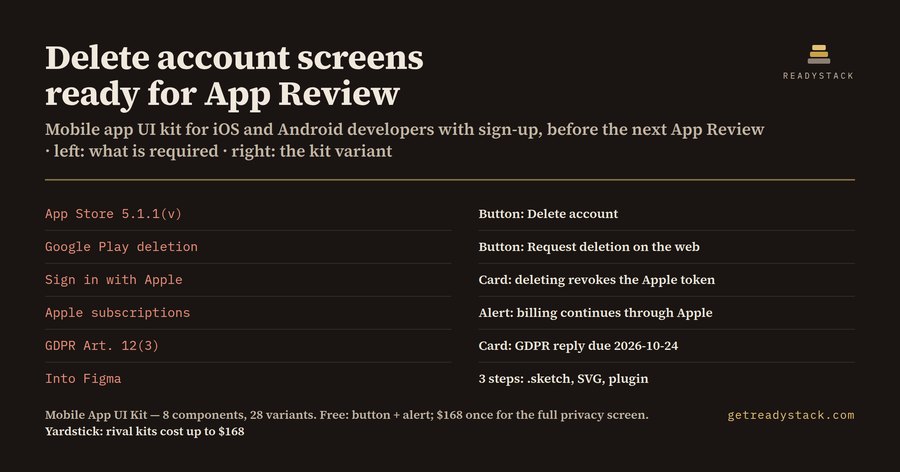
Mobile App UI Kit — Account Deletion Flow for App Store 5.1.1(v) & Google Play

Your app lets people sign up. Since 2022-06-30, that one fact brings in App Store rule 5.1.1(v): an app that supports account creation must let people start deleting their account inside the app. When App Review finds the path missing, the submission can come back rejected, and your release waits for another round.

Google Play asks for the same thing from another angle. An app with account creation must offer deletion inside the app and also a web link where people can ask for deletion without reinstalling. That link goes in the Data safety form. Ship to both stores and you need both paths.

Then there is the EU. Under GDPR Art. 17 people can ask for their data to be erased, and Art. 12(3) gives you one month to reply. A request that arrives on 2026-09-24 needs a reply by 2026-10-24. A request that arrives on 2026-01-31 needs a reply by 2026-02-28, because February has no 31st. Show that date on screen.

The free checker asks seven yes-or-no questions about your app (stores, sign-up, Sign in with Apple, subscriptions, EU users, ad tracking) and one date. It lists the screens you need, the rule behind each one and the kit variant that draws it.

Here are three results I measured with it.

An app on both stores with sign-up, Sign in with Apple, subscriptions, ad tracking and EU users needs 8 screens, and 7 of them are required by a rule. The eighth is good practice: showing what deletion removes before the final tap. The Apple-specific ones are easy to miss. When an account signed in with Apple is deleted, the Apple token should be revoked through the Sign in with Apple REST API. When the app sells subscriptions through Apple, people should be told that billing continues through Apple until they cancel, because deleting the account does not stop the subscription.

An Android-only app with sign-up and EU users needs 4 screens, 3 of them rule-backed: the in-app deletion path plus the web link, the GDPR reply date, and consent checkboxes that start unticked. That last one comes from the CJEU Planet49 ruling (C-673/17): a pre-ticked box is not valid consent. GDPR Art. 7(3) adds that withdrawing consent must be as easy as giving it, which is why the toggles in the kit start in the off position.

An iOS game with no sign-up but with an ads SDK and EU users needs 2 screens, both rule-backed: unticked consents and the App Tracking Transparency prompt that App Store rule 5.1.2(i) requires before any tracking. There is no deletion screen at all, because there is no account to delete.

The kit itself is a mobile app UI kit for Figma with 8 components and 28 variants. I counted each list in the file. Button 4, alert 4, consent checkbox 4, privacy toggle 3, account data card 3, settings tab 3, rule badge 4, deletion progress 3. The free kit is the button and the alert, 8 variants: the whole in-app entry. The rest of the privacy settings screen is in the full kit.

It reaches Figma in 3 steps. The .sketch file opens when you drag it into Figma. It holds one named, coloured shape per variant, and the labels come through the other two routes. Each of the 28 SVGs pastes into Figma as a vector with its label. The plugin source, code.ts, builds all 28 variants with text once you compile it with tsc and run it as a development plugin. Some component structure may be simplified, and menu names differ by Figma version and language. Sketch users open the same file.

Run the checker with your own answers first; the list is free and stays on the page.

15 seconds — what it actually does

Questions people ask

What is in this mobile app UI kit?

8 Figma components with 28 variants for the account deletion flow: 4 Delete account buttons, 4 deletion alerts, 4 consent checkboxes, 3 privacy toggles, 3 account data cards, 3 settings tabs, 4 rule badges and 3 progress steps. They ship as a Figma plugin source (code.ts), 28 SVGs and a .sketch file you open in Figma.

Who is it for?

Indie iOS and Android developers and small studios whose app lets people create an account and ships to the App Store and Google Play. App Store rule 5.1.1(v) asks for an in-app deletion path, Google Play also wants a web deletion link, and EU users can demand a GDPR reply within one month.

Why not use a free UI kit?

Free mobile app UI kits ship login and profile screens but no Delete account path, no web deletion link and no scheduled-deletion state. Those are the screens App Review checks under 5.1.1(v). A chatbot can quote the rule, but it cannot hand you Figma variants you recolour and give to a developer.

What do I get for free?

The free checker on this page lists the deletion screens your app needs from your own answers, with the rule behind each one and your GDPR reply date. The free kit has the Delete account button (4 variants) and the deletion alert (4 variants): the whole in-app deletion entry, usable on its own.

How does the price compare?

It is one payment of $168, not a subscription. Rival mobile app UI kits on this shelf list at up to $168 but leave out the deletion flow. A missing deletion path under 5.1.1(v) stops a submission at App Review and you have to submit it again.

Ask about this tool

One question, answered by the person who built it. Your email only if you want the answer sent.