Real numbers from this tool, line by line.
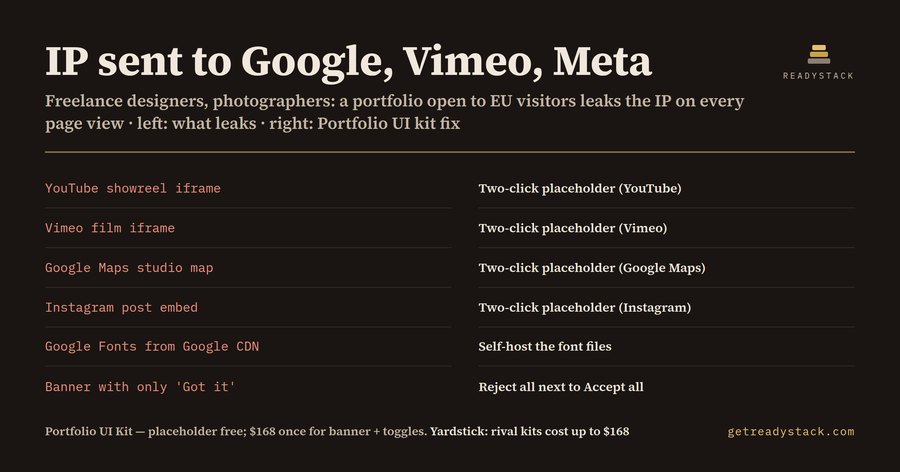
Your portfolio page probably loads things you never think about. A showreel from YouTube or Vimeo, a studio map from Google Maps, a strip of Instagram posts, and a typeface pulled from the Google Fonts CDN. Each of those is a request to another company's server, and each request carries the visitor's IP address. It happens the moment the page opens, before the visitor has clicked anything.
We built a small checker for exactly this and ran the most common portfolio setup through it: YouTube, Vimeo, Google Maps, Instagram and Google Fonts from the Google CDN. Result: 5 embeds, 3 companies (Google, Vimeo, Meta), all receiving the IP address before any click. Tick only Google Fonts and the answer changes: 1 embed, 1 company, and the fix is to self-host the font files, with no banner needed at all. Add Google Analytics and Calendly to a YouTube embed and you get 3 embeds, 2 companies and a banner with 3 category toggles.
Why this matters for a freelancer in particular: on 2022-01-20 the LG München I (3 O 17493/20) ruled on a site that loaded Google Fonts from Google's servers. The visitor's IP address went to Google without consent; the court awarded that visitor €100 and ordered the site to stop. A portfolio is a small site, but the fact pattern is the same one.
The second trap is the banner itself. Many portfolio templates show a banner with a single "Got it" or "Accept" button and hide refusing behind a settings link. The CNIL fined Google €150 million and Facebook €60 million in decisions dated 2021-12-31, because refusing cookies took more effort than accepting them. And the CJEU in Planet49 (C-673/17, 2019-10-01) held that a pre-ticked checkbox is not valid consent. GDPR Art. 7(3) adds that withdrawing consent must be as easy as giving it.
So a portfolio page that handles this well needs a few specific pieces. First, a placeholder in front of each embed: a card that says what will load and which company gets the IP address when the visitor clicks. Second, a consent banner where Reject all has the same weight as Accept all. Third, category toggles that start off, and a way to take consent back later. Fourth, any "always load YouTube" checkbox has to start unticked.
That is what the Portfolio UI Kit contains, drawn as Figma components with variants: Two-click embed placeholder (4 variants: YouTube, Vimeo, Google Maps, Instagram), Consent button (4), Consent banner (3: first visit, choice saved, consent withdrawn), Consent category toggle (3), Always-load checkbox (3), Contact form field (3), Project tag (4) and Portfolio nav tab (3). That is 8 components and 27 variants. It ships as a Figma plugin (TypeScript source you compile with tsc), 27 SVGs you paste as vectors, and a .sketch file Figma opens by drag and drop. The .sketch holds named, coloured shapes without text layers, so the labels come from the SVGs and the plugin.
The placeholder card is free, with all 4 variants, together with the checker. On its own it does the core job: nothing loads until the visitor clicks. What you notice after using it is the next gap: once a visitor has clicked, the site should remember that choice and let them take it back. That is the paid part.
Start with the checker. Tick what your page embeds and read which companies get your visitors' IP addresses today. This is a design kit, not legal advice; your developer still has to wire each iframe to load only after the click.