Unity assets: Korea gacha drop-rate disclosure (2024 law)

For Unity developers selling loot boxes or gacha pulls in South Korea. Change a weight and every rate below is recalculated.

ItemGradeWeightLegal display (Annex 3-2)Two-decimal displayTwo decimals allowed?
Full version: $10 once, not a subscription. Adds PityCounter, RateChangeNotice and DisclosureExporter for the guarantee condition, advance rate-change notice and a searchable website export. Full version, $10 once
Writing and testing these 4 scripts yourself: two 8-hour days at the BLS OEWS May 2025 median of $65.38 an hour for software developers = $1,046.08.

The rule

Game Industry Promotion Act Art. 33(2) (in force 22 March 2024): every probability item's kinds and per-kind rates must be shown in the game, on its website and in ads. Enforcement Decree Annex 3-2, 2.A.2: rates are percentages and may be rounded only at a decimal place four or more places below the first non-zero digit. A wrong or missing rate can bring a correction order (Art. 38(9)) with 7 days to comply (Art. 38(10)). Ignoring it carries up to 2 years' imprisonment or a fine of up to ₩20,000,000 (Art. 45 No. 11).

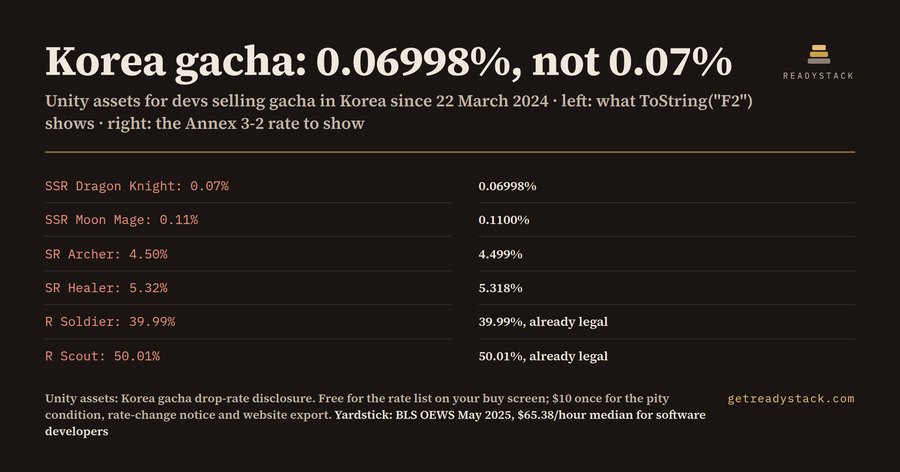
Why not ToString("F2") or chatbot code: two-decimal rounding shows 0.069979% as 0.07%, which rounds only one place below the first non-zero digit.

Free: DropRateTable.cs (complete, use it as-is)

Unity 2021.3 or newer. Scripts only, so it works in Built-in, URP and HDRP. Save as DropRateTable.cs (the class name must match the file name), add it to your banner object, fill entries, and drag your purchase-screen Text into disclosureText. Full pack install: Assets > Import Package > Custom Package (menu names can differ slightly by version and editor language), then pick the .unitypackage and press Import.

Show DropRateTable.cs
using System;
using System.Collections.Generic;
using UnityEngine;
using UnityEngine.UI;

// Weighted drop table that prints every item's exact drop rate on the purchase / view screen.
// Rates are shown as percentages and rounded no coarser than four places below the first
// non-zero digit (Korea, Enforcement Decree of the Game Industry Promotion Act, Annex 3-2, 2.A.2).
public class DropRateTable : MonoBehaviour
{
    [Serializable]
    public class Entry
    {
        [Tooltip("Name the player sees, e.g. 'SSR Dragon Knight'.")]
        public string itemName = "Item";

        [Tooltip("Grade or rarity label, e.g. 'SSR'. Used by PityCounter. Leave empty to hide it.")]
        public string grade = "";

        [Tooltip("Relative weight. Drop rate = this weight / sum of all weights.")]
        [Min(0)] public float weight = 1f;
    }

    [Tooltip("Every item this box, banner or upgrade can give. Weight 0 is listed as 0% and never drops.")]
    public List<Entry> entries = new List<Entry>();

    [Tooltip("Significant digits kept when rounding. 4 is the coarsest rounding Annex 3-2 allows; raise it for more precision.")]
    [Min(4)] public int significantDigits = 4;

    [Tooltip("Text on the purchase or view screen that receives the full rate list.")]
    public Text disclosureText;

    [Tooltip("First line of the list, in the language of your store page.")]
    public string header = "Drop rates (probability item)";

    [Tooltip("Show the grade in brackets after each item name.")]
    public bool showGrade = true;

    [Tooltip("Hard cap on listed entries so a bad import cannot freeze the UI. Raise it if the box really holds more.")]
    [Min(1)] public int maxEntries = 500;

    // Last text written, readable by the exporter and by tests.
    public string LastDisclosure { get; private set; }

    bool warnedMissingText;

    void OnEnable()
    {
        Refresh();
    }

    void OnValidate()
    {
        if (significantDigits < 4) significantDigits = 4;
        if (disclosureText != null) Refresh();
    }

    // Sum of all usable weights. NaN, infinity and negatives count as 0 so one bad value
    // cannot turn every rate into NaN.
    public double TotalWeight()
    {
        double total = 0;
        int n = Mathf.Min(entries.Count, maxEntries);
        for (int i = 0; i < n; i++) total += SafeWeight(entries[i]);
        return total;
    }

    static double SafeWeight(Entry e)
    {
        if (e == null) return 0;
        double w = e.weight;
        if (double.IsNaN(w) || double.IsInfinity(w) || w < 0) return 0;
        return w;
    }

    // Exact rate of entry i in percent (0..100).
    public double RatePercent(int i)
    {
        double total = TotalWeight();
        if (total <= 0 || i < 0 || i >= entries.Count || i >= maxEntries) return 0;
        return SafeWeight(entries[i]) / total * 100.0;
    }

    // Combined rate of every entry with this grade, in percent.
    public double GradePercent(string grade)
    {
        double sum = 0;
        int n = Mathf.Min(entries.Count, maxEntries);
        for (int i = 0; i < n; i++)
            if (entries[i] != null && entries[i].grade == grade) sum += RatePercent(i);
        return sum;
    }

    // Percent string rounded at the decimal place `significantDigits` below the first
    // non-zero digit. 0.069979 -> "0.06998%", 4.4987 -> "4.499%", 50.01 -> "50.01%".
    public static string FormatPercent(double pct, int significantDigits)
    {
        if (double.IsNaN(pct) || pct <= 0) return "0%";
        if (significantDigits < 4) significantDigits = 4;
        int firstDigit = (int)Math.Floor(Math.Log10(pct));
        int decimals = Mathf.Clamp(significantDigits - 1 - firstDigit, 0, 15);
        return pct.ToString("F" + decimals, System.Globalization.CultureInfo.InvariantCulture) + "%";
    }

    public string FormatRate(int i)
    {
        return FormatPercent(RatePercent(i), significantDigits);
    }

    public string BuildDisclosure()
    {
        var sb = new System.Text.StringBuilder();
        if (!string.IsNullOrEmpty(header)) sb.AppendLine(header);
        int n = Mathf.Min(entries.Count, maxEntries);
        for (int i = 0; i < n; i++)
        {
            Entry e = entries[i];
            if (e == null) continue;
            sb.Append(e.itemName);
            if (showGrade && !string.IsNullOrEmpty(e.grade)) sb.Append(" [").Append(e.grade).Append("]");
            sb.Append("  ").AppendLine(FormatRate(i));
        }
        if (entries.Count > maxEntries)
            sb.AppendLine("(" + (entries.Count - maxEntries) + " entries over maxEntries are not listed and never drop)");
        return sb.ToString();
    }

    // Rewrites the on-screen list. Call it after you change weights at runtime.
    public void Refresh()
    {
        LastDisclosure = BuildDisclosure();
        if (disclosureText == null)
        {
            if (!warnedMissingText && Application.isPlaying)
            {
                Debug.LogWarning(name + ": DropRateTable has no disclosureText, so the rates are not on screen.", this);
                warnedMissingText = true;
            }
            return;
        }
        disclosureText.text = LastDisclosure;
    }

    // Picks an index by weight, or -1 if nothing can drop.
    public int Roll()
    {
        return RollWhere(null);
    }

    // Picks an index by weight among entries of one grade (used for a guarantee), or -1.
    public int RollGrade(string grade)
    {
        return RollWhere(grade);
    }

    int RollWhere(string grade)
    {
        int n = Mathf.Min(entries.Count, maxEntries);
        double total = 0;
        int lastUsable = -1;
        for (int i = 0; i < n; i++)
        {
            if (entries[i] == null || (grade != null && entries[i].grade != grade)) continue;
            double w = SafeWeight(entries[i]);
            if (w <= 0) continue;
            total += w;
            lastUsable = i;
        }
        if (lastUsable < 0) return -1;
        // Random.value can return exactly 1.0; without the fallback below that roll would
        // fall off the end of the list.
        double r = UnityEngine.Random.value * total;
        double acc = 0;
        for (int i = 0; i < n; i++)
        {
            if (entries[i] == null || (grade != null && entries[i].grade != grade)) continue;
            double w = SafeWeight(entries[i]);
            if (w <= 0) continue;
            acc += w;
            if (r < acc) return i;
        }
        return lastUsable;
    }
}

This page shows the numbers your weights produce. It does not decide whether your game falls under Korean law and is not legal advice.

Get the complete version $10

This page is the working piece. The full pack has everything below.

Korea has required every gacha drop rate on the buy screen since 22 March 2024. Ignoring a correction order carries up to ₩20,000,000 (Game Industry Promotion Act Art. 45). DropRateTable pri

BLS OEWS May 2025: software developers' median wage is $65.38 an hour, so two 8-hour days of writing this yourself cost $1,046.08.

Buy the full version — $10
ENDEJAESPT

Find a tool

· ReadyStack

Worked example

Real numbers from this tool, line by line.
Unity assets: Korea gacha drop-rate disclosure (2024 law)

Korea has required every gacha drop rate in the game since 22 March 2024. The rule most Unity code gets wrong is not whether you show the rate. It is how you round it.

Game Industry Promotion Act Art. 33(2) says anyone who makes, distributes or provides a game must show the kinds of probability items and the supply rate of each kind in the game, on its website and in every advertisement. The Enforcement Decree fills in the detail in Annex 3-2. Its rule 2.A.2 says rates are shown as percentages and may be rounded only at a decimal place four or more places below the first non-zero digit.

Take a sample banner with six items and weights of 7, 11, 450, 532, 4,000 and 5,003, a total of 10,003. The top item's exact rate is 0.069979...%. Its first non-zero digit sits in the second decimal place, so the rule allows rounding from the sixth place on, which leaves 0.06998%. The line most of us write, rate.ToString("F2"), prints 0.07%. That is one place below the first non-zero digit, not four.

Run all six through the same test and four of them fail at two decimals: 0.06998% shows as 0.07%, 0.1100% as 0.11%, 4.499% as 4.50% and 5.318% as 5.32%. Only the two big rates, 39.99% and 50.01%, are fine, because their first digit is in the tens. The fix is not "more decimals everywhere". It is four significant digits for each rate, whatever its size.

Change the top weight from 7 to 700 and the answer moves. The top item becomes 6.545%, two decimals would print 6.54%, and it still fails, because a rate between 1% and 10% needs three decimals. A banner of 25%, 25% and 50% passes at two decimals, because every first digit is in the tens. So there is no single format string that is right. The decimals follow the size of each rate.

What happens if it is wrong? Art. 38(9) lets the Ministry of Culture, Sports and Tourism order a correction when rates are missing or false, and Art. 38(10) gives 7 days to complete it. Ignoring the order carries up to 2 years' imprisonment or a fine of up to ₩20,000,000 under Art. 45 No. 11.

The free DropRateTable script does this in Unity. You enter item name, grade and weight in the Inspector. It writes the list to the Text on your purchase screen with the Annex rounding, and Roll() draws from the same weights, so the number on screen and the number in the code cannot drift apart. A NaN or negative weight counts as zero, and a roll of exactly 1.0 from Random.value falls back to the last usable item instead of off the end of the list.

The annex asks for more than one list. Rule 1.F wants the condition for a guaranteed item, and 1.E wants the way rates change with progress. The full pack's PityCounter prints both: "SSR: 0.1799% per pull on pulls 1 to 89; guaranteed on pull 90", plus the player's own count. Rule 2.A.4 wants each change and its time posted in advance. RateChangeNotice lists every rate that will move and switches the weights only at the posted time. Rule 2.B.2 wants the website version searchable as text, so DisclosureExporter writes a CSV and an HTML table.

I compiled the four scripts with mono against Unity stubs and ran 19 behaviour checks. All passed, including the 90th pull guarantee and a refused change posted only 10 hours ahead against a 24-hour minimum.

Try your own weights in the browser checker first. It shows the legal display next to the two-decimal one and flags every rate that breaks the rule.

15 seconds — what it actually does

Questions people ask

What does this Unity asset pack do?

It shows every gacha or loot box drop rate on your purchase screen the way Korea's Annex 3-2 requires: as a percentage, rounded no coarser than 4 places below the first non-zero digit. Weight 7 of 10,003 shows 0.06998%, not 0.07%. The full pack adds the pity condition, the advance rate-change notice and a searchable website export: 4 C# scripts in total.

Who is it for?

Solo and small-team Unity developers whose game sells loot boxes, gacha pulls or random upgrades to players in South Korea. Korea's Game Industry Promotion Act Art. 33(2) has required each item's rate in the game, on the website and in ads since 22 March 2024. It works in Unity 2021.3 or newer, in Built-in, URP and HDRP.

Why not use ToString("F2") or chatbot code?

Two-decimal rounding turns 0.069979% into 0.07%. Annex 3-2 only lets you round 4 places below the first non-zero digit, so the legal display is 0.06998%. A wrong or missing rate can bring a correction order with 7 days to comply; ignoring it carries up to ₩20,000,000 or 2 years (Art. 45 No. 11).

What is free?

DropRateTable.cs is free and complete: your items and weights in the Inspector, every rate written to your purchase-screen Text with the Annex 3-2 rounding, and Roll() drawing from the same weights. The browser page checks your weights the same way before you download anything. The paid pack covers what comes next: the pity condition, rate-change notices and the website export.

What does it cost compared with writing it myself?

The full pack is $10, paid once, not a subscription. BLS OEWS May 2025 puts the median software developer wage at $65.38 an hour; two 8-hour days of writing and testing the same 4 scripts come to $1,046.08. You still check your own game against the law; the pack prints the numbers your weights produce.

Ask about this tool

One question, answered by the person who built it. Your email only if you want the answer sent.