· ReadyStack
Worked example
Real numbers from this tool, line by line.
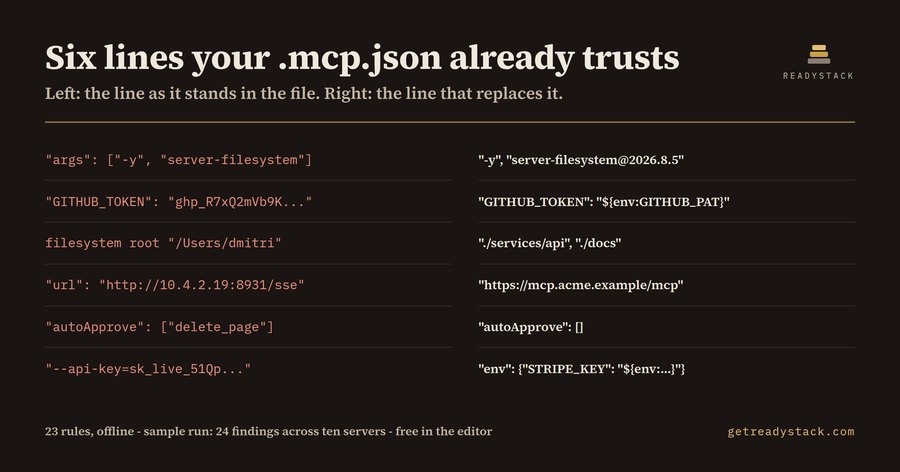
Six lines in one shared .mcp.json hand an AI agent more than anybody meant to give it - and if you are the platform engineer who set up Claude Code, Copilot or Cursor for a US or EU team repo, this is what that file says back:
L5   error  unpinned_npx     "filesystem" runs an unpinned npm package - the next publish runs on your machine.
L5   error  broad_fs_root    "filesystem" is given /Users/dmitri - the whole home directory, .ssh and .aws too.
L11  error  secret_literal   A live credential is written into this file (GITHUB_PERSONAL_ACCESS_TOKEN).
L21  error  plaintext_http   "internal-search" is reached over plain http:// - header and all, in clear text.
L31  error  auto_approve     "notion" runs tools without asking (create_page, delete_page) - no confirmation.
L35  error  secret_in_args   "stripe" gets a credential as a command-line argument - every process list sees it.
Six lines, and each one has a replacement that takes a few seconds: [email protected] instead of server-filesystem, ${env:GITHUB_PAT} instead of the token, ./services/api instead of the home directory. Those six are part of 24 findings - 17 errors and 7 warnings - that MCP Config Guard reports on the ten-server sample shipped with the extension. On the clean version of the same file it reports zero.
An MCP config is the least-reviewed file in the repository and the one with the widest blast radius. It tells Claude Code, Copilot, Cursor or Windsurf which servers to start, what to start them with, and which credentials to hand them. A little JSON decides what an agent may run on your machine. It is copied out of a README, it works on the first try, and nobody opens it again.
The line that changes under you. "command": "npx", "args": ["-y", "server-filesystem"] resolves the package again every single time the agent starts. The code you reviewed is not necessarily the code that runs tomorrow: the maintainer's next publish, a compromised account or a typosquat arrives with no action from you.
The line with the credential in it. The env block is the path of least resistance, so live tokens end up there - a GitHub PAT, an AWS secret, a database password - in a file that is committed, cloned, backed up and screen-shared. A key passed in args instead of env is visible to every process list on the machine.
The line that reaches too far. "/Users/dmitri" as a filesystem root is not a project directory. It is .ssh, .aws and every other repository on the disk, and it hard-codes one person's home directory, so it breaks for every teammate who clones the repo.
MCP Config Guard reads that file while you edit it and marks each of these lines. It covers 23 rules in four groups - how the code gets there, what it is handed, how far it reaches, how it is reached - and every finding gives the line number, one sentence on what goes wrong, and the line that replaces it.
Two things it deliberately does not do. It does not upload the file, and it does not connect to any server in it. A scanner that reads tool descriptions has to start the server first - that executes the code you are trying to judge. This one reads text, offline. That is also why pasting the config into a chatbot is not the free alternative it looks like: the credentials go with it.
Checking the file you have open is free, with all 23 rules, no key, no watermark and no limit. That is a finished job. The paid layer is a different axis: one sweep over every MCP config in the workspace and in the client config folders, a dated CSV, JSON or HTML report, and machine-readable output a CI step can fail on, so the pull request that adds an unpinned server stops before it merges. Upwork lists cybersecurity developers at a $60 median hourly rate; the sweep is the part somebody would otherwise repeat by hand every time a server is added. The extension is $29 once, one licence key per person or CI seat.
15 seconds — what it actually does
Questions people ask
What does MCP Config Guard actually do?
It reads an MCP client config - .mcp.json, .vscode/mcp.json, mcp.json or claude_desktop_config.json - and flags the lines that give an AI agent more reach than intended. It checks 23 rules across four groups: how the server code is fetched, which credentials it is handed, how far into the disk it reaches, and how it is reached over the network. Each finding names the line, the risk and the replacement.
Who is this for?
Engineers who added MCP servers to a shared repository so Claude Code, Copilot, Cursor or Windsurf agents can use them, and platform or security engineers who now own a config file that several people edit and nobody re-reads. It is also for reviewers who see .mcp.json in a pull request and have no checklist for it.
Why not just use a free MCP scanner or ask a chatbot?
The existing scanners connect to each server and read its tool descriptions, which means starting the code you are trying to judge, and they run as a separate command outside the editor. A chatbot needs the file pasted into it, credentials and all. This reads the text of the file you already have open, offline, and starts nothing.
What is free and what needs a licence key?
Checking the config file you have open is free, forever, with all 23 rules, no watermark and no limit on how many files you check one at a time. The licence key covers scale and hand-off: one sweep over every config in the workspace and the client config folders, a dated CSV, JSON or HTML report, and machine-readable output for CI.
What does the alternative cost?
Upwork lists cybersecurity developers at a $60 median hourly rate, $40 to $90 typical, as of September 2026. A person reading every MCP config in a monorepo and writing the findings down is an hour or two each time somebody adds a server. The extension is $29 once, one licence key per person or CI seat,.
Why not just ask ChatGPT or another AI chat?
A general AI chat answers from training data with a cutoff date, cannot read your repository and names no rule version. MCP Config Guard - agent config lint checks the file you open against 23 rules from a rule set dated 2026-09-20, and points at the exact line with the fix. For a filing, an audit or a client you need that dated result on your own files.
Ask about this tool
One question, answered by the person who built it. Your email only if you want the answer sent.