· ReadyStack
Worked example
Real numbers from this tool, line by line.
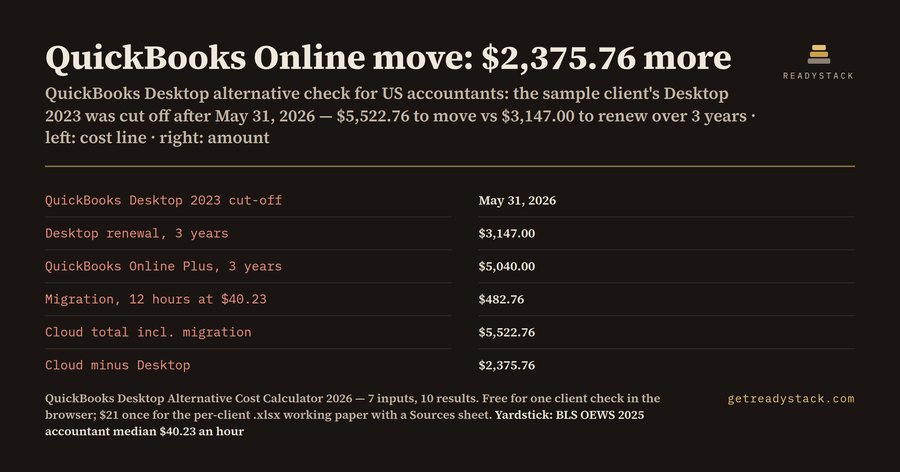
Your client still runs QuickBooks Desktop. The question you get every spring is the same: should we stay, or move?
Start with the date that already passed. Intuit's own help page, "QuickBooks Desktop 2023 service discontinuation policy" (updated 8/5/2026), says that after May 31, 2026, QuickBooks Desktop 2023 is discontinued. That covers Pro Plus, Premier Plus, Mac Plus and Enterprise Solutions 23.0. After that date Basic and Enhanced Payroll in Desktop 2023 won't calculate payroll taxes or provide payroll tax forms, Assisted Payroll won't file for the client, online bank feeds stop downloading, and the version gets no live support and no security updates.
So the first thing to check is not price. It is the version year on the client's Help > About screen. Intuit's pattern is a May 31 cut-off three years after the version year: Desktop 2023 ended on May 31, 2026. Plus subscribers receive the newer version at no extra cost as part of their annual plan, so a client on 2023 often just never installed the update. A lapsed subscription is a different conversation.
Then comes the money question, and here the free tools stop helping. Intuit's pricing page shows QuickBooks Online list prices, checked on 2026-10-01: $38 a month for Simple Start, $85 for Essentials, $140 for Plus and $340 for Advanced. It does not add your migration hours, and it does not set the client's own Desktop renewal next to it.
That is what this calculator does. You type 7 numbers: the Desktop version year, the client's renewal per year from the last Intuit invoice, the cloud plan price per month, your migration hours, your hourly rate, the years to compare and the year you are checking. It shows 10 results.
The sample client in the calculator: Desktop 2023, renewal $1,049.00 a year, moving to QuickBooks Online Plus at $140 a month, 12 migration hours at $40.23 an hour (the BLS OEWS 2025 median wage for accountants and auditors), compared over 3 years in 2026.
The cut-off year is 2026, so the flag shows 1: already cut off. Three years of Desktop cost $3,147.00. Three years of QuickBooks Online Plus cost $5,040.00, plus a $482.76 migration fee, so $5,522.76 in total. Moving costs $2,375.76 more, or $153.41 a month against $87.42.
Change one input and the answer turns. Put the same client on Simple Start at $38 a month with 8 migration hours, and the cloud total drops to $1,689.84, which is $1,457.16 less than renewing Desktop. Put the client on Desktop 2024 and Essentials at $85, and the cut-off year becomes 2027 with 1 supported year left, and the move costs $395.76 more over 3 years.
None of these is a recommendation. They are the numbers you need before you recommend anything. A client who runs payroll inside Desktop 2023 has a payroll problem today, whatever the price of the alternative.
The browser check is free and complete. Type the client's numbers and you see every result; nothing is uploaded. If you want a file per client, the workbook has the same 10 live formulas plus a Sources sheet citing the Intuit and BLS pages behind each default, so you can attach it to your engagement letter.
15 seconds — what it actually does
Full walk-through
Questions people ask
What does this QuickBooks Desktop alternative calculator do?
It reads the client's QuickBooks Desktop version year and shows the May 31 cut-off year, using Intuit's rule that version 2023 was discontinued after May 31, 2026. It then compares the client's Desktop renewal over the years you choose against a cloud plan price per month plus your migration hours, and shows the difference.
Who is it for?
US accountants, bookkeepers and ProAdvisors with small-business clients still on QuickBooks Desktop Pro Plus, Premier Plus or Enterprise. You need a cost answer for the client before the version is cut off, because after the cut-off Desktop stops calculating payroll taxes and downloading bank feeds.
Why not just use Intuit's pricing page?
Intuit's pricing page shows only its own monthly prices; it never adds your migration hours or tells you which Desktop version is already past its May 31 cut-off. This calculator puts the client's renewal, the cloud plan and your migration fee in one total.
What is free?
The full check in the browser, for as many clients as you like: you type 7 numbers and see all 10 results, including the cut-off year, the 3-year Desktop cost, the 3-year cloud cost with migration and the difference. Nothing is hidden. The paid workbook is the same maths as a file you keep per client.
How does the price compare?
The workbook is $21 once, not a subscription. For scale, BLS OEWS 2025 puts the median accountant wage at $40.23 an hour, so the file costs less than one hour of your own time, and you reuse it for every Desktop client.
Ask about this tool
One question, answered by the person who built it. Your email only if you want the answer sent.