· ReadyStack
Worked example
Real numbers from this tool, line by line.
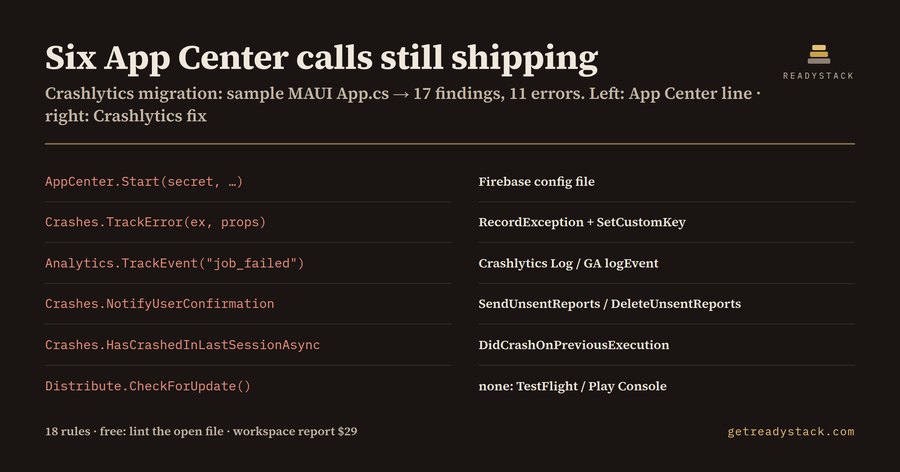
Six App Center calls were still shipping in the sample .NET MAUI App.cs we linted: 17 findings, 11 of them errors. This is the file of a Xamarin/.NET MAUI team whose crash dashboard went quiet and nobody noticed.
The dates come from Microsoft's own retirement page. Visual Studio App Center retired on 2025-03-31: no sign-in, and API calls fail. Microsoft extended Analytics & Diagnostics until 2026-06-30. That date has passed. The SDK is still in the NuGet, Gradle, CocoaPods and npm graphs of many apps, and it still compiles. Crashes.TrackError(ex) runs, returns and sends nothing anywhere. No build fails and no test goes red. You find out when a customer describes a crash you have no stack trace for.
The move to Firebase Crashlytics looks like a rename. For half the file it is:
- AppCenter.Start(secret, typeof(Analytics), typeof(Crashes)) is replaced by Firebase reading google-services.json or GoogleService-Info.plist.
- Crashes.TrackError(ex, props) becomes RecordException(ex), and the properties dictionary moves to SetCustomKey. Crashlytics keeps a maximum of 64 key-value pairs, each up to 1 kB.
- AppCenter.SetUserId becomes SetUserId.
- Crashes.HasCrashedInLastSessionAsync() becomes DidCrashOnPreviousExecution().
The other half has no one-to-one call, and that is where a find-and-replace or a chatbot pass goes wrong.
Consent. App Center has ShouldAwaitUserConfirmation and NotifyUserConfirmation(UserConfirmation.Send). If you delete them and add Crashlytics, reports are sent automatically, and your privacy prompt now controls nothing. The Crashlytics version is three calls: turn automatic collection off, then SendUnsentReports() when the user agrees or DeleteUnsentReports() when they refuse.
Events. Analytics.TrackEvent("job_failed") has no Crashlytics counterpart. For crash context, write it to the Crashlytics log (64kB per session). For product analytics, it belongs in Google Analytics logEvent().
Attachments. Crashes.GetErrorAttachments with ErrorAttachmentLog has no Crashlytics API at all. Short text goes to the log; state goes to custom keys.
Distribute. Distribute.CheckForUpdate() drove in-app updates. Crashlytics does not do that. Microsoft's page points to TestFlight and Google Play Console instead.
CodePush and pipelines. react-native-code-push pointed at the App Center service. Microsoft published a standalone CodePush server you host yourself. appcenter distribute release and other appcenter-cli steps in CI fail since 2025-03-31.
Crashlytics Migration Lint encodes this as 18 rules. It runs in VS Code on C#, Kotlin, Java, Swift, Objective-C, JS/TS, Gradle, JSON and YAML, and each hit comes with the line and the replacement call. On the sample MAUI App.cs it reports 17 findings: 11 errors, 5 warnings and 1 info. On the migrated version of the same file it reports 0.
The per-file lint is free, in the editor and on a web page where you paste a file. The paid part is the workspace migration report, a repo-wide checklist in Markdown or CSV for the migration pull request.
For scale: Firebase Crashlytics is no-cost, and Sentry's Team plan is $26/mo billed annually. Whichever you pick, the App Center code is the work.
15 seconds — what it actually does
Questions people ask
What does Crashlytics Migration Lint do?
It scans mobile source and build files for leftover Visual Studio App Center SDK code, such as AppCenter.Start, Crashes.TrackError, Analytics.TrackEvent, Distribute and CodePush, and names the Firebase Crashlytics call that replaces each one. It has 18 rules. Results show in the VS Code Problems panel with line numbers, or on a free web page where you paste a file.
Who is this App Center to Crashlytics lint for?
Xamarin and .NET MAUI teams, React Native teams, and native Android and iOS developers whose apps still ship the App Center SDK. App Center retired on 2025-03-31, and its Analytics & Diagnostics extension ended on 2026-06-30. Their crash reports and events now reach no dashboard, even though the app builds and runs normally.
Why not just ask a chatbot or use find-and-replace?
Find-and-replace catches Crashes.TrackError but misses the parts with no one-to-one Crashlytics call: the user-confirmation consent flow, error attachments, Distribute in-app updates, CodePush, and appcenter-cli steps in pipelines. A chatbot rewrites the snippet you paste and never sees the other files. The lint checks every line against 18 rules and names the fix for each hit.
What is free and what needs a licence key?
Free with no key: lint the open file in VS Code, or a pasted file on the web page, and see every App Center finding with its Crashlytics replacement. With a $29 one-time licence key: a workspace migration report that sweeps every project in the repo and exports a Markdown or CSV checklist for the pull request.
How does the cost compare with a paid crash-reporting service?
Firebase Crashlytics has no cost on Firebase pricing. Sentry's Team plan is $26 per month billed annually. Either way, the App Center calls in your code still have to be found and rewritten. The free lint lists them per file. The $29 one-time workspace report lists them for the whole repo.
Ask about this tool
One question, answered by the person who built it. Your email only if you want the answer sent.