UK Age assurance requirements — check your html free

Paste the HTML of a page that carries an age gate. Every line Ofcom would not count as highly effective age assurance (in force since 25 July 2025, fines up to £18,000,000 or 10% of qualifying worldwide revenue) is named with its line, clause and fix. It runs in this browser; nothing is sent.

Install free

Free for the file open in your editor - no key, no limit. The workspace sweep and the report ask for a key.

VS Code MarketplaceOpen VSX (Cursor, VSCodium)npmMCP server (npx)Docker Hub
ext install ReadyStack.age-gate-lint
npx @readystack/age-gate-lint <file>
npx @readystack/age-gate-lint --mcp

Team? One key for every ReadyStack linter, 5 seats, $149 once

Get the full rule table as a PDF
All 8 rules Age Gate Lint — UK Online Safety Act checks, each with its source and date, on printable pages you can hand to your team or auditor. We email it now, and once more only if a rule changes. No newsletter.

Get the full version $29

Sweeps every HTML file in the workspace in one pass and writes a dated evidence report you keep (scope + ownership axis) — $29 once per person or CI seat.

One payment, one licence key for this tool. The key is shown right after payment.

A freelance web developer bills about $60/hour; a manual review of one storefront's age gate plus a written note is roughly half a day (about $240).

Buy the full version — $29

· ReadyStack

Worked example

Real numbers from this tool, line by line.
Age Gate Lint — UK Online Safety Act

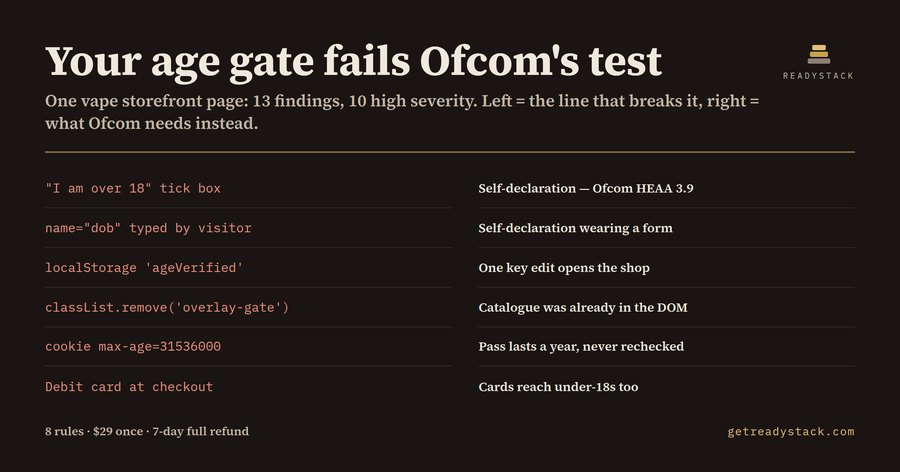
Thirteen weak points — ten of them high severity — in the age gate of one Manchester vape storefront's landing page, and the whole gate is four lines of JavaScript.

The page looked finished. An overlay asks "Are you over 18?", there is a tick box that says "I am over 18", a box to type a birth date, and a sentence underneath: "By entering this site you confirm you are 18 or older." Click through and the catalogue appears. That gate was written the way almost every small shop gate was written, and it has been out of step with the law since 25 July 2025, when Ofcom's guidance on highly effective age assurance began to apply under the Online Safety Act 2023.

Ofcom's guidance is unusually plain about what does not count. Self-declaration does not count. A birth date typed by the visitor does not count — it is self-declaration wearing a form. A general disclaimer does not count. A payment method that under-18s can also hold does not count. What does count is a listed method: photo-ID matching, facial age estimation, open banking, a mobile network operator check, a digital identity wallet. Ofcom enforces this, and the penalty ceiling is £18 million or 10% of qualifying worldwide revenue, whichever is greater.

The second half of the problem is not in the markup at all, it is in the script. On the test page the pass is written with localStorage.setItem('ageVerified', 'true'), the cookie is set with max-age=31536000, and the overlay is taken away with classList.remove(). Every one of those decisions happens in the browser. The catalogue markup was already delivered before anyone answered anything; the gate only covered it. One key edit in dev tools, or one look at view-source, and the gate is not there.

Age Gate Lint reads one HTML file — markup and inline script together — against eight rules: self-declared clicks, typed birth dates, browser-storage passes, year-long cookies, DOM-resident content uncovered by a class toggle, cards used as proof, disclaimer-only gates, and pages that gate on their own with no listed method anywhere in them. On the test page it returned 13 findings, 10 high and 3 medium, each with a line number and the clause it fails.

The same engine was then run on a rewritten version of that page, where the server renders the catalogue only after a pass comes back from a listed provider and the result is held in a signed session cookie with max-age=1800. That page returned zero findings. The difference between the two files is not politeness or wording; it is where the decision is made.

That is the practical test for any gate you maintain: if a visitor can reach the restricted markup by editing something they own — a key, a cookie, a class — the gate is decorative. If the answer comes back from a listed method and the server holds it, the gate is a gate.

What this cannot do is see your server. A page that gates properly on the back end ships no restricted markup and reads as clean, which is the correct answer. It is a lint over the surface you actually control in the editor, not legal advice.

The free command reads the file you have open and finishes that job: all eight rules, every finding, every line. The engine is the same file that runs the free web page, so the answer is the same in either place. Costed the other way, a freelance web developer bills about $60 an hour and a manual pass over one storefront's gate plus the written note is roughly half a day — near $240, and again after the next redesign.
15 seconds — what it actually does

Questions people ask

What does Age Gate Lint actually do?

Age Gate Lint reads one HTML page that carries an age gate and names every line Ofcom would not count as highly effective age assurance: self-declared 18+ tick boxes, typed dates of birth, disclaimers, card-as-proof wording, passes kept in localStorage, year-long cookies and gates removed by a class toggle. Each finding gives the line, the Ofcom clause and the fix.

Who is Age Gate Lint for?

It is for the developer or owner of a UK-facing shop or site that must keep under-18s out: online vape and e-liquid shops, alcohol and knife retailers, gambling affiliates and adult-content sites. It fits freelancers who inherited an old age-gate snippet and agencies that maintain several client storefronts and need to show what changed after 25 July 2025.

Why not just ask a chatbot or use a free checker?

A chatbot answers about the snippet you paste, not about the storage key, the cookie lifetime and the hidden markup spread across the same page, and it does not cite the Ofcom clause each line fails. Free browser age-gate testers check whether a gate appears, not whether the decision is made somewhere a visitor cannot edit.

What is free and what does the paid version add?

Free: the file you have open is checked against all 8 rules, with every finding, line number, clause and fix shown, no limit and no key. Paid, $29 once per person or CI seat: one pass over every HTML file in the workspace plus a dated evidence report file listing each page, its findings, the rule set and the run date.

How does the cost compare with paying someone?

A freelance web developer bills about $60 an hour, and a manual pass over one storefront's age gate with a written note takes roughly half a day, so about $240 per site. The penalty side is larger: Ofcom can fine up to £18 million or 10% of qualifying worldwide revenue, whichever is greater.

Why not just ask ChatGPT or another AI chat?

A general AI chat answers from training data with a cutoff date, cannot read your repository and names no rule version. Age Gate Lint — UK Online Safety Act checks the file you open against 8 rules, each naming its legal or official basis, from a rule set dated 2026-09-20, and points at the exact line with the fix. For a filing, an audit or a client you need that dated result on your own files.

Ask about this tool

One question, answered by the person who built it. Your email only if you want the answer sent.

ENDEJAESPT

Find a tool

Embed this tool on your site (free)

Paste this code into your page. It runs in your visitor’s browser and stays up to date. Nothing your visitors type is stored.

 All embeddable tools

For businesses: your name and logo instead of ours, and each visitor’s result + e-mail in your inbox (only when they tick consent) — Pro from $19/month. See Pro →