· ReadyStack
Worked example
Real numbers from this tool, line by line.
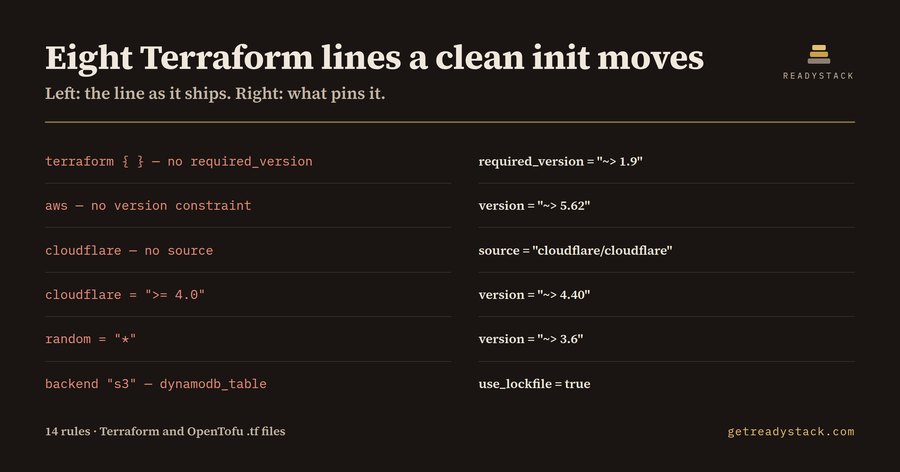
Eight lines in one 41-line Terraform root module were free to move under the platform engineer who owned it, and the eu-west-1 stack those lines describe is production.
Nothing was broken. It parsed, it planned. The problem is the next clean run.
A CI runner starts empty. No .terraform directory carries over from yesterday's job, so terraform init resolves every provider and every module again, from scratch, against whatever the constraint in the file allows. That is the whole mechanism: >= 4.0 allows 4.1, allows 5.0, allows whatever ships next quarter. An entry with no version allows the newest release published this morning. A git module source with no ?ref= follows the default branch wherever it moved. A committed .terraform.lock.hcl holds providers still — but the constraint is what that lockfile gets refreshed against.
Here they are.
The terraform block had no required_version, so whichever CLI the runner image installed would run the module — including a major that upgrades the state file and leaves older CLIs unable to read it. The aws entry had a source but no version; cloudflare had no source at all, which makes Terraform assume the hashicorp/ namespace rather than the real publisher, plus a >= 4.0 with no ceiling; random was pinned to *. The s3 backend still locked through dynamodb_table; Terraform 1.10 added native S3 state locking via use_lockfile and marks the DynamoDB path deprecated. A provider "datadog" block was configured but never declared, so Terraform quietly assumes registry.terraform.io/hashicorp/datadog. And module "vpc" pulled a registry source with no version.
Six of those are high severity, two medium. All eight are readable from the text of the file, before any provider is downloaded. In AI-generated Terraform the same failure shows up bigger: a provider block and no required_providers at all, which parses and resolves to the hashicorp/ namespace at the newest release.
So why does the toolchain stay quiet? terraform fmt rewrites whitespace; version ranges are not whitespace. terraform validate checks syntax and internal consistency against providers terraform init has already installed — it runs after the choice was made. Neither is designed to say "this constraint was free to pick something new." That question belongs to a reader, and readers are expensive: by hand it means opening the registry page for each provider and module. Contract platform and DevOps engineers list $75-150/hour on public freelance marketplaces.
Terraform Provider Pin Lint reads a .tf file as text and applies 14 rules to exactly these parts: provider sources and versions, unbounded and wildcard and 0.x constraints, undeclared providers, required_version, registry modules with no version, git modules with no ?ref= or a branch ?ref=, plain http:// sources, and the deprecated DynamoDB backend lock. Each finding carries a line number and the pinned form. Run the same 14 rules against the pinned version of that root module and they report nothing — which is how you know the rules describe the file rather than complain about Terraform.
The file you have open is free to lint, permanently: no watermark, no trial counter, nothing held back. The licence key opens a different axis — scope and ownership. It scans every .tf file in the workspace in one pass and writes a dated Markdown report you keep, for the CI gate and the change ticket.
The same engine also runs as a single page in the browser. Paste a root module, nothing uploaded, same 14 rules.
15 seconds — what it actually does
Questions people ask
What does Terraform Provider Pin Lint actually do?
It reads a .tf file as text and applies 14 rules to the version constraints and source addresses: required_providers entries with no source or no version, constraints with no upper bound, wildcards, 0.x tracking, registry modules with no version, git modules with no ?ref= or a branch ref, and an s3 backend still locking through dynamodb_table.
Who is it for?
Platform and DevOps engineers whose pipelines run terraform init on a fresh runner every job, so nothing carries over between builds. Also for anyone reviewing Terraform that an AI assistant generated, where required_providers is often absent entirely and the provider address is silently assumed to be the hashicorp namespace.
Why is terraform validate or fmt not enough?
terraform fmt only rewrites whitespace and alignment. terraform validate checks syntax and internal consistency against providers that terraform init has already installed, so by the time it runs the choice has been made. Neither one tells you that the constraint allowed that choice to change.
What is free and what needs a licence key?
Linting the file you have open is free forever, with no watermark, no trial counter and no held-back findings: open a .tf file, run the command, get every finding and its pinned form. The licence key adds the other axis, scanning every .tf file in the workspace at once and writing a dated Markdown report you keep.
What would the same review cost otherwise?
Reading one root module by hand means opening the registry page for each provider and module to see which majors the constraint admits. Contract platform and DevOps engineers list $75-150/hour on public freelance marketplaces, so a single review of a single environment folder already costs more than the licence.
Why not just ask ChatGPT or another AI chat?
A general AI chat answers from training data with a cutoff date, cannot read your repository and names no rule version. Terraform Provider Pin Lint checks the file you open against 14 rules from a rule set dated 2026-09-20, and points at the exact line with the fix. For a filing, an audit or a client you need that dated result on your own files.
Ask about this tool
One question, answered by the person who built it. Your email only if you want the answer sent.