· ReadyStack
Worked example
Real numbers from this tool, line by line.
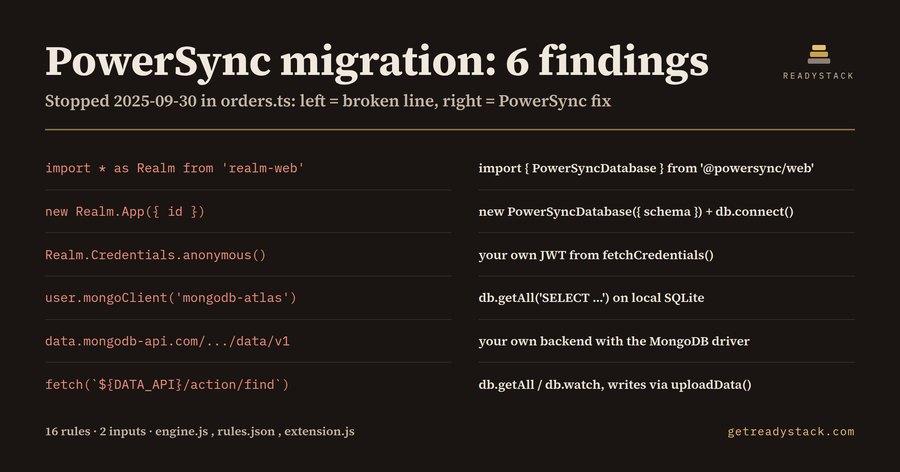
PowerSync migration: 6 findings in one 22-line orders.ts, which is what a React Native, web, Swift, Kotlin or Flutter developer still on MongoDB Realm Sync gets from the free check before writing a line of PowerSync code.
What MongoDB changed, and when
In September 2024 MongoDB deprecated Atlas Device Sync, the sync side of the Atlas Device SDKs (Realm), the Atlas Data API and custom HTTPS Endpoints. All of them reached end-of-life on 2025-09-30. Since that day a client that logs in through Realm.App, opens a Flexible Sync session or posts to data.mongodb-api.com gets no sync. PowerSync's MongoDB module reached general availability in March 2025 and is the path MongoDB pointed Device Sync users to.
The local database is a different story. The Realm SDKs stayed open source, and a local-only Realm still opens and queries. That is why the first job of a migration is a list: which lines are dead, and which ones are fine.
The sample file
The sample is a small offline order list written for Device Sync:
import * as Realm from 'realm-web';
const app = new Realm.App({ id: 'orders-abcde' });
const user = await app.logIn(Realm.Credentials.anonymous());
const mongo = user.mongoClient('mongodb-atlas');
const DATA_API = 'https://data.mongodb-api.com/app/orders-abcde/endpoint/data/v1';
const res = await fetch(`${DATA_API}/action/find`, { ... });
The check returns 6 findings, one per line above:
- RS01 realm-web import: replace with @powersync/web (or @powersync/react-native).
- RS02 new Realm.App: replace with new PowerSyncDatabase({ schema, database: { dbFilename } }) and db.connect(connector).
- RS10 Realm.Credentials.anonymous(): keep your own auth provider and return its JWT from fetchCredentials().
- RS11 user.mongoClient('mongodb-atlas'): query the local SQLite copy with db.getAll('SELECT ...').
- RS06 the Data API base URL: call your own backend with the MongoDB driver.
- RS09 /action/find: reads become db.getAll or db.watch, writes become db.execute, uploaded by connector.uploadData().
Each message ends with the clock. With the date set to 2026-09-29 it reads "Stopped 2025-09-30 (364 days before 2026-09-29)". With a date before the end-of-life the same finding is a warning with the days left.
Why not grep for realm
A grep for realm flags every schema class and every local query you can keep. The 16 rules fire only on the paths that stopped: realm-web and the native sync SDKs used with sync, Realm.App, Realm.Credentials, mongoClient, Flexible Sync configuration, subscriptions, partitionValue, syncSession, user.functions, @realm/react AppProvider and UserProvider, the Data API base URL, Data API actions, the api-key header, custom HTTPS Endpoints and the App Services client API URL. Comment lines are skipped, and a clean PowerSync version of the same file returns 0 findings.
What the PowerSync side looks like
The replacement for the sample is one PowerSyncDatabase with a Schema of Tables, a connector with fetchCredentials() returning your endpoint and JWT, and uploadData() sending each CRUD transaction to your own API. Which rows each user receives moves from client subscriptions into Sync Rules on the server.
Try it
The check has 2 inputs: the file text and a date. Paste a file into the web version or open it in VS Code; all 16 rules run on it with no key. The full version scans a whole workspace and writes one Markdown migration report for the team.
15 seconds — what it actually does
Questions people ask
What does PowerSync Migration Check do?
It scans JavaScript, TypeScript, Swift, Kotlin and Dart files for MongoDB Atlas Device Sync (Realm Sync), Atlas Data API and HTTPS Endpoint calls, which reached end-of-life on 2025-09-30. It has 16 rules. Each finding gives the line, the dead call and the PowerSync replacement, such as PowerSyncDatabase, fetchCredentials, uploadData or Sync Rules. On the sample orders.ts it reports 6 findings.
Who is it for?
It is for mobile and web developers whose offline-first app was built on MongoDB Realm Sync or the Atlas Data API and now has to move to PowerSync. That includes React Native, web (realm-web), Swift, Kotlin and Flutter/Dart teams. It also suits a tech lead who needs a list of every call to replace before estimating the migration.
Why not just grep for realm or ask a chatbot?
Local-only Realm databases still work, because the SDKs stayed open source. A grep for realm therefore flags every schema and query you can keep. These 16 rules only fire on the sync, Data API, HTTPS Endpoint and App Services login paths that stopped on 2025-09-30. Each finding names the PowerSync call that replaces it, taken from the PowerSync client API.
What is free and what does the full version add?
The free check takes 2 inputs: the source text and a date. It runs all 16 rules on the open file in VS Code or in the web version, with no key and no limit. The full version scans the whole workspace and saves one Markdown migration report listing each file, line, dead call and PowerSync replacement for your team. It is one payment of $29 per licence key.
What does the alternative cost?
The alternative is a developer reading every file by hand for Realm.App, Credentials, mongoClient, flexible sync, subscriptions, syncSession, partitionValue and data.mongodb-api.com URLs, then looking up each PowerSync equivalent. The free check does the file you have open in seconds. The workspace report is one $29 payment instead of a subscription, and the free result on your own file comes first.
Ask about this tool
One question, answered by the person who built it. Your email only if you want the answer sent.