| '+h[i].line+' | '+ String(h[i].msg).replace(/&/g,'&').replace(/'} o.innerHTML=s+' |
Install free
Free for the file open in your editor - no key, no limit. The workspace sweep and the report ask for a key.
npmMCP server (npx)Docker Hubnpx @readystack/outlook-email-html-lint <file> npx @readystack/outlook-email-html-lint --mcp docker run --rm -v "$PWD:/w" getreadystack/outlook-email-html-lint /w
Team? One key for every ReadyStack linter, 5 seats, $149 once
Get the full version $29
Scan the whole template library in one pass, export a client-ready CSV/JSON/HTML report, and emit CI output that can stop a broken template.
One payment, one licence key for this tool. The key is shown right after payment.
Email on Acid Basics is $99/month and Litmus Core starts at $500/month (checked 2026-09-07).
Buy the full version — $29Need more than this one? ReadyStack Pass opens all 593 files and 515 full versions — $29/month or $199/year. See the Pass →
Find a tool
· ReadyStack
Worked example
Real numbers from this tool, line by line.
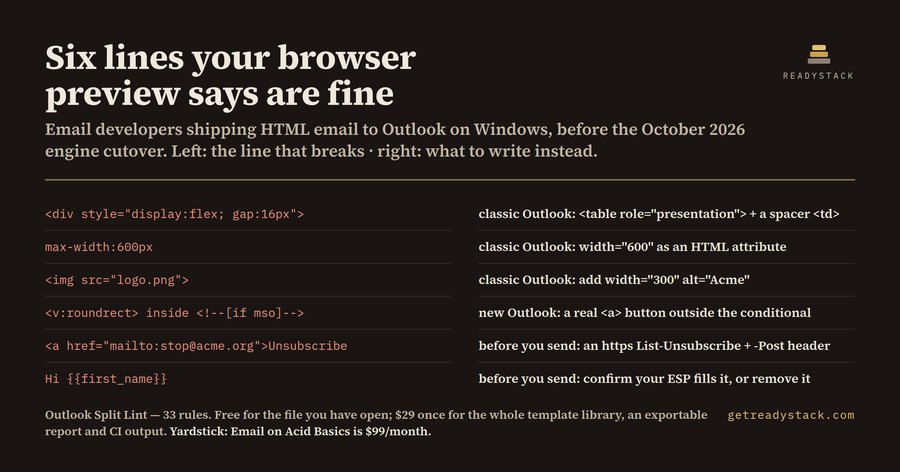
There are two Outlooks now, and they disagree
 12  classic Outlook: display:flex is ignored by the Word engine - the row collapses
 12  classic Outlook: max-width is ignored - the element renders at full width
 13  classic Outlook: an <img> with no width attribute is scaled unpredictably
 14  before you send: an unresolved merge tag would be sent literally to the whole list
 31  new Outlook: VML is NOT rendered by WebView2 - this button disappears there
 38  before you send: a mailto-only unsubscribe fails the Gmail and Yahoo one-click rule
That is one campaign template, checked in the editor before it went out: six findings — three from classic Outlook, one from the new Outlook, and two that would have gone out to the whole list. Every one of them renders clean in a browser preview.
Here is the block those first findings point at:
<div style="display:flex; gap:16px; max-width:600px">
  <img src="https://cdn.acme.org/logo.png">
  <p style="border-radius:8px">Hi {{first_name}}</p>
</div>
VS Code's Live Preview, your browser, and every free HTML validator render that with one modern engine, and it looks right. Classic Outlook for Windows does not use a modern engine. It renders your email with Microsoft Word, which has no flexbox, no grid, no gap, no max-width, and which throws away padding you put on a <div>. So it arrives as a full-width stack of blocks, with square corners, an image scaled to something you did not choose — and, if your ESP did not fill it, the literal text {{first_name}} in front of everyone on the list.
The half nobody lints
Here is the part that is new in 2026. The *new* Outlook for Windows does not use the Word engine either. It uses Edge WebView2, so modern CSS mostly works. Good news — except that everything you added to survive classic Outlook now becomes the bug.
VML is not rendered by WebView2. The <v:roundrect> you used to get a rounded button in classic Outlook is simply not drawn in the new Outlook. If your real button lives only inside <!--[if mso]>...<![endif]-->, new-Outlook readers see a gap where your call to action used to be. No error, no warning. Just a missing button. That is line 31 above.
Microsoft ends support for the Word-engine Outlook in October 2026. But classic remains the enterprise default into 2027 — which means for this stretch you are not migrating from one engine to the other, you are shipping to both at the same time.
That is the awkward window, and it is exactly where an AI assistant will steer you wrong. Ask one whether Outlook supports flexbox and you will get a confident answer that is either two years stale ("use tables, Outlook uses Word") or two years early ("new Outlook uses WebView2, modern CSS is fine"). Today, both answers ship a broken email — and an email is the one artifact you cannot recall after you press send.
What this does
Outlook Split Lint reads the file you have open and marks every line, saying which engine breaks on it and what to do instead. 33 rules in three groups: classic Outlook (Word engine), new Outlook (WebView2), and before-you-send checks — a dead href="#" opt-out, a mailto-only unsubscribe that fails the Gmail and Yahoo one-click requirement under RFC 8058, unresolved merge tags, http:// assets, staging URLs.
Opening a file and checking it is free, with no key and no limit — every rule, every finding, every suggested fix. That job finishes on its own.
What it does not do for free is the *next* job: you have a whole template library, not one file, and a client who wants the sign-off in writing. The licence scans the whole library in a pass, exports the report as CSV, JSON or HTML, and gives CI machine-readable output so a broken template never reaches the send window. That is $29, once. Email on Acid Basics is $99/month and Litmus Core starts at $500/month (checked 2026-09-07).
15 seconds — what it actually does
Questions people ask
What does Outlook Split Lint actually do?
It reads an HTML email file and marks every line that breaks in Outlook, saying which of the two Outlooks breaks on it. Classic Outlook for Windows renders with the Microsoft Word engine; the new Outlook renders with Edge WebView2. Thirty-three rules cover both engines plus before-you-send checks, each with a suggested fix.
Who is this for?
Email developers and agencies who hand-write or hand-fix HTML email and must support Outlook on Windows. It is most useful to anyone maintaining a template library through the 2026 to 2027 changeover, when classic Outlook and the new Outlook are both in the field and disagree with each other about the same markup.
Why can't I just use a browser preview or a free HTML validator?
A browser preview and a free validator both render with one modern engine, so a table-less flexbox layout passes cleanly. Classic Outlook uses the Word engine and will destroy that exact file. Nothing that renders in a browser can show you the Word engine, and none of them know that VML is invisible in the new Outlook.
What is free and what needs a licence?
Opening a file and checking it is free with no key and no limit: every rule, every finding, every suggested fix, plus checking a selection and reopening the report. The licence covers a different job, not a bigger one: scanning the whole template library at once, exporting a report as CSV, JSON or HTML, and machine-readable output for CI.
How much does this cost compared with the alternatives?
The licence is twenty-nine dollars, paid once,. Hosted email rendering services are priced per month instead: Email on Acid Basics is ninety-nine dollars a month and Litmus Core starts at five hundred dollars a month, both checked on the seventh of September 2026. Those render screenshots; this reads your source.
Ask about this tool
One question, answered by the person who built it. Your email only if you want the answer sent.