· ReadyStack
Worked example
Real numbers from this tool, line by line.
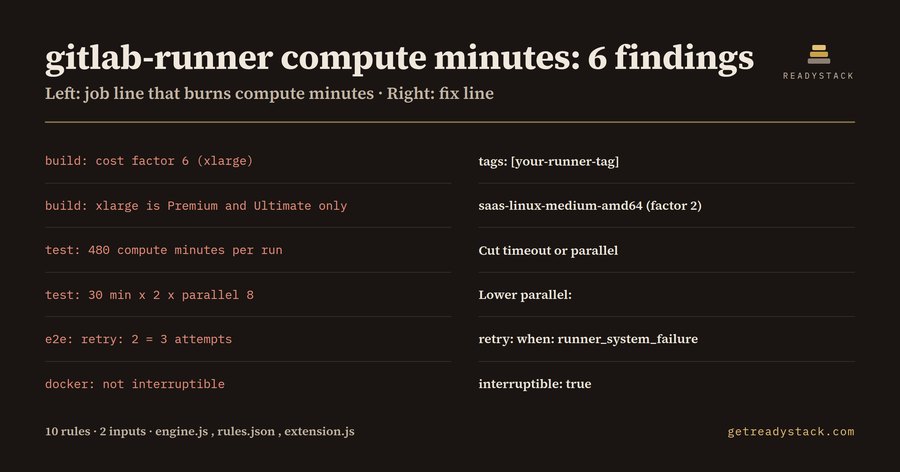
gitlab-runner compute minutes: 6 findings in one five-job .gitlab-ci.yml, and a single test job that can use 480 compute minutes per run. That is written for DevOps engineers and small teams on GitLab.com Free in the US, the UK and the EU, where a namespace gets 400 compute minutes a month and usage resets to 0 on the first day of each month.
What GitLab counts
GitLab's documentation (docs.gitlab.com/ci/pipelines/compute_minutes/, read 2026-09-30) gives the formula: Job duration / 60 * Cost factor. The cost factor comes from the runner tag: saas-linux-small-amd64 is 1, medium 2, large 3, xlarge 6, 2xlarge 12, the GPU runner 7, macOS M1 6 and macOS M2 Pro 12 (the macOS and Windows factors are marked Beta). Untagged jobs run on the small Linux runner. Free gets 400 minutes, Premium 10,000 and Ultimate 50,000 a month. Extra minutes are sold at $10 per 1,000 as a one-time pack.
Jobs on a runner you registered yourself with gitlab-runner are not instance runners, and compute minutes measure instance runners. That is the migration path: move the expensive jobs, keep the cheap ones.
The sample file
The sample pipeline has five jobs: build on saas-linux-xlarge-amd64 with timeout 15m, test on medium with parallel: 8 and timeout 30m, e2e on medium with retry: 2 and timeout 20m, docker on medium with timeout 10m, and deploy on a self-hosted runner tagged deploy-box.
The audit resolves default: and extends: for every job and takes the worst case for one run: timeout (or the 60-minute default) x cost factor x parallel x (1 + retry). It reports 6 findings from 10 rules:
- build: cost factor 6 (xlarge), 15 min x 6 = 90 compute minutes. Fix: tags: [your-runner-tag].
- build: xlarge is Premium and Ultimate only. Fix: saas-linux-medium-amd64 (factor 2).
- test: 480 compute minutes per run, more than the whole Free month. Fix: cut timeout or parallel.
- test: 30 min x 2 x parallel 8. Fix: lower parallel:.
- e2e: retry: 2 = 3 attempts, 120 compute minutes. Fix: retry: when: runner_system_failure.
- docker: not interruptible, so a newer pipeline cannot cancel it. Fix: interruptible: true.
deploy produces nothing: it already runs on deploy-box, a self-hosted gitlab-runner, so it costs 0 compute minutes.
Moving a job
Register a runner with gitlab-runner register, give it a tag such as build-box, and swap the hosted tag:
build: tags:
- build-box # was saas-linux-xlarge-amd64 (cost factor 6)
timeout: 15m interruptible: true
Run the check again and the build findings disappear. A file where every job runs on your own runners gives 0 findings.
Why the usage page is not enough
GitLab's usage page shows minutes after a pipeline has spent them. A chatbot does not see your tags:, parallel: and retry: lines, and often quotes an older cost factor table. The check reads the file you are editing and names the line before the next push.
Free and full version
The free extension and the free web page check one .gitlab-ci.yml with no limit on runs, and nothing leaves your machine. A licence key adds a scan of every .gitlab-ci.yml in the workspace and one dated compute-minutes report per repository, jobs ranked by worst-case minutes, for the runner budget decision.
15 seconds — what it actually does
Questions people ask
What does gitlab-runner Compute Minutes Audit do?
It reads a .gitlab-ci.yml, resolves default: and extends:, and maps every job on a GitLab.com hosted runner to its cost factor and worst-case compute minutes per run (timeout x cost factor x parallel x attempts). It applies 10 rules; on the bundled sample file it reports 6 findings, each with the file line and the tags: line that moves the job to your own gitlab-runner.
Who is it for?
DevOps engineers, platform teams and solo maintainers on GitLab.com Free, which gives 400 compute minutes a month and 5 users per top-level group, and Premium teams watching a 10,000-minute quota. It helps anyone deciding which CI jobs to move from hosted runners such as saas-linux-xlarge-amd64 to a self-hosted gitlab-runner before the quota runs out.
Why not just use GitLab's usage page or a chatbot?
GitLab's compute usage page shows minutes after a pipeline has spent them. A chatbot does not see your tags:, parallel: and retry: lines and often quotes an old cost factor table. This extension reads the actual file, applies the published factors such as 6 for xlarge and 12 for macOS M2 Pro, and names the exact line to change before the next run.
What is free and what needs a licence key?
Free: the open .gitlab-ci.yml, every hosted-runner job with its cost factor, worst-case minutes and fix line, with no limit on runs. The licence key adds a workspace scan of every .gitlab-ci.yml and one dated compute-minutes report per repository, jobs ranked by worst-case minutes, for the runner budget decision. One payment, one key per person or team seat.
What does running out of compute minutes cost?
GitLab sells extra compute minutes at $10 per 1,000 minutes as a one-time pack, and Premium costs $29 per user per month for 10,000 minutes. In the sample file one parallel: 8 test job on a medium runner can use 480 minutes in one run, more than the 400 minutes a Free namespace gets each month.
Ask about this tool
One question, answered by the person who built it. Your email only if you want the answer sent.