· ReadyStack
Worked example
Real numbers from this tool, line by line.
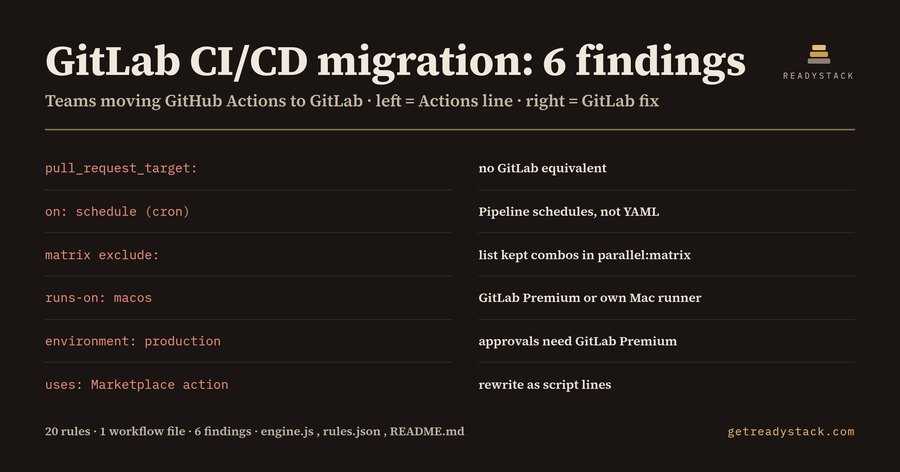
Migrate from GitHub Actions to GitLab CI/CD: the 6 lines a conversion silently drops
GitLab CI/CD migration: 6 findings in one 35-line GitHub Actions release workflow, measured before a single job ran on GitLab, and 2 of them decide whether a DevOps team moving to GitLab can stay on the Free tier.
The workflow: a Node test matrix, an iOS build on a macOS runner, a deploy job to a production environment, a weekly cron, and a pull_request_target trigger.
What GitLab does differently
Most GitHub Actions steps translate one to one into .gitlab-ci.yml. The trouble is the handful of features with no counterpart, that live outside the YAML on GitLab, or that sit behind a paid tier. A chatbot conversion parses; it does not say which lines stopped doing anything.
The 6 findings
- pull_request_target (line 3, no GitLab equivalent). GitHub runs the base branch's workflow with repository secrets for fork pull requests. GitLab has no trigger with that behaviour: fork merge request pipelines run in the fork, and a maintainer can choose to run one in the parent project.
- on: schedule (line 5, GitLab Free). GitLab does not read cron lines from .gitlab-ci.yml. Schedules are created under Build > Pipeline schedules or through the API, and jobs are gated with rules: - if: $CI_PIPELINE_SOURCE == "schedule". A conversion that keeps the cron block produces a pipeline that simply never runs on Monday.
- strategy.matrix.exclude (line 14, no GitLab equivalent). parallel:matrix accepts a list of variable hashes but has no exclude key. The fix is to write out only the combinations you keep.
- runs-on: macos-14 (line 21, GitLab Premium). GitLab-hosted macOS runners are offered on Premium and Ultimate only. The alternative is registering your own Mac as a runner and targeting it with tags.
- environment: production (line 28, GitLab Premium). Environments themselves work on Free. If the GitHub environment had required reviewers, the GitLab version of that gate, deployment approvals on a protected environment, is Premium and Ultimate only.
- uses: aws-actions/configure-aws-credentials@v4 (line 31, no GitLab equivalent). GitLab runners do not execute Marketplace actions. The step becomes script lines, or a GitLab CI/CD Catalog component pulled in with include: - component:.
Why the tier tag matters
GitLab Premium lists at 29 US dollars per user per month, billed annually. For a 10-seat team that is 3,480 dollars a year, and it is decided by lines like finding 4 and finding 5. Seen before cutover, the team can move the iOS build to its own Mac runner and swap the reviewer gate for a when: manual job.
Two more workflows, two different answers
A package publish workflow using actions/setup-node, actions/cache with a hashFiles() key and secrets.NPM_TOKEN gives 4 findings, all on GitLab Free: image: node:20, cache: key: files:, and a masked CI/CD variable. A deploy workflow with workflow_dispatch, concurrency, permissions, a reusable workflow, a self-hosted runner, ${{ github.sha }} and $GITHUB_OUTPUT gives 7 findings, one of them (permissions) with no GitLab equivalent.
Try it on your own file
The web version runs the same 20 rules in the browser and uploads nothing. Paste one workflow, read the findings, fix them. A licence key only adds whole-workspace scans and an exported migration report; checking a single file stays free.
15 seconds — what it actually does
Questions people ask
What does GitLab CI/CD Migration Check do?
It reads a GitHub Actions workflow file and lists every line GitLab CI/CD cannot run as-is: Marketplace actions, pull_request_target, matrix exclude, schedules, GITHUB_OUTPUT writes and 15 more patterns, 20 rules in all. Each finding names the GitLab keyword to use instead and tags the tier it needs: GitLab Free, GitLab Premium, or no GitLab equivalent.
Who is this migration check for?
DevOps and platform engineers moving a company's GitHub Actions workflows to GitLab CI/CD, and the engineering lead who must decide whether the team can stay on GitLab Free. It fits teams with release, iOS or deploy workflows, because macOS runners and deployment approvals are the lines that push a GitLab project onto Premium.
Why not just ask a chatbot to convert the workflow?
A chatbot produces a .gitlab-ci.yml that parses, but it does not flag what silently disappears. On GitLab an on: schedule cron is not read from YAML, parallel:matrix has no exclude key, and pull_request_target has no counterpart. In our sample release workflow the check found 6 findings, 2 of them Premium-only, that a plain conversion would carry over unnoticed.
What is free and what needs a licence key?
Checking one workflow file is free and complete: every finding, its line number, the GitLab fix and the tier tag, in the editor or on the web page. A licence key adds a whole-workspace scan of every workflow in one pass and exports one migration report per repository with the Premium-only lines totalled for the plan decision.
What does getting the plan decision wrong cost?
GitLab Premium lists at 29 US dollars per user per month, billed annually, so a 10-seat team pays 3,480 dollars a year. One macOS runner or approval-gated deploy left in a workflow decides that line. The check shows those lines before cutover, so the team can keep Premium features only where they are worth it.
Ask about this tool
One question, answered by the person who built it. Your email only if you want the answer sent.