· ReadyStack
Worked example
Real numbers from this tool, line by line.
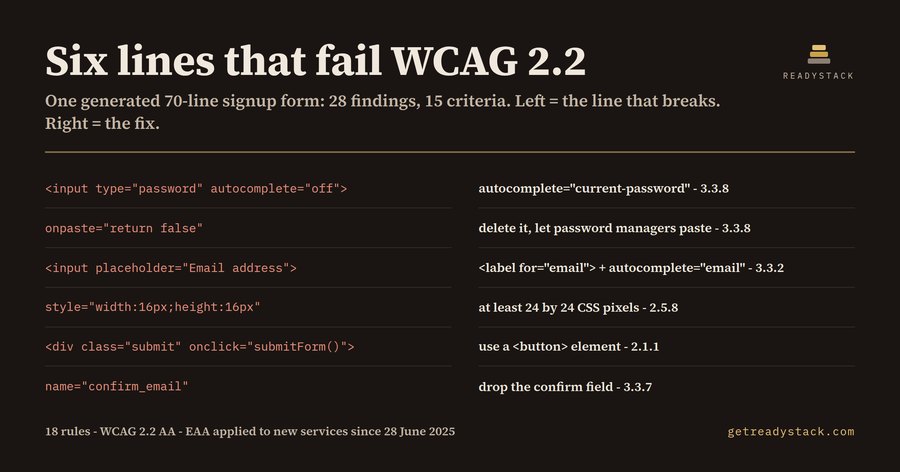
A 70-line signup form, generated in a single prompt, fails 28 WCAG 2.2 Level AA checks across 15 success criteria - and the frontend developer shipping it into Germany or Ireland usually learns this from a market surveillance letter rather than from the editor.
I kept that form as a test fixture so the number is reproducible: 24 errors, 4 warnings, 28 findings. The repaired version of the same page returns 0.
The interesting part is not the total. It is which criteria the generated markup breaks. Six of the 28 findings sit under the four success criteria that WCAG 2.2 added: 2.5.7 Dragging Movements, 2.5.8 Target Size (Minimum), 3.3.7 Redundant Entry and 3.3.8 Accessible Authentication. Models learned forms from a decade of WCAG 2.1-era code, so they reproduce the habits 2.2 turned into failures.
Four lines from that form, each a house style you will recognise:
<input type="password" autocomplete="off" onpaste="return false">
Two failures of 3.3.8 on one line. A password field that refuses paste and hides itself from password managers forces the user to retype a 20-character secret by hand. The fix is to delete the handler and write autocomplete="current-password".
<input type="email" name="confirm_email" placeholder="Confirm email address">
Three findings. The placeholder is doing the job of a label (3.3.2), there is no autocomplete token (1.3.5), and the field asks for something the user already typed (3.3.7).
<div class="submit" onclick="submitForm()">Create account</div>
2.1.1. It looks like a button and the keyboard cannot reach it.
<button class="icon-btn" style="width:20px;height:20px">
Two more: a 20px target where 2.5.8 asks for 24 by 24 CSS pixels, and an icon with no accessible name (4.1.2).
None of this is exotic. All of it is machine-checkable from the template text, before the page is rendered, the point: browser audit panels score a page you already deployed, and most of them still test WCAG 2.1. On the four criteria that matter most for generated forms, they stay quiet.
Why now: the European Accessibility Act, Directive (EU) 2019/882, has applied to new consumer-facing e-commerce, banking, ticketing and e-book services since 28 June 2025. Enforcement runs through national market surveillance bodies, against the live service, and the technical yardstick they point at is EN 301 549, which carries the WCAG criteria. The remedy is not a fine; it is an order to fix or withdraw, with a deadline attached.
The linter is 18 rules over the template text. Each finding names the line, the success criterion, and the one-line fix. It runs in VS Code on the file you have open, and the same engine file runs in the browser on a free page, so you can paste a template without installing anything. That tier is complete on its own: every rule, every line, no key, no limit, no watermark.
The licensed tier does a different job rather than more of the same one. It scans every template in the workspace in a single pass and writes a dated evidence file you keep - one row per finding, per file, mapped to its criterion. That artefact is what an accessibility statement rests on, and what a client asks for.
One honest limit: this reads markup, not a rendered page. It cannot judge colour contrast or visual reading order, and it will never tell you that you conform. It finds the part a machine can find, which happens to be the part generated code gets wrong.
For comparison, a WCAG audit from an accessibility vendor starts around $2,500 for a single signup flow and answers for the day it was run.
15 seconds — what it actually does
Questions people ask
What does EAA Form Lint actually check?
It reads an HTML, Vue or Svelte template as text and applies 18 rules drawn from WCAG 2.2 Level AA. Each finding names the line, the success criterion and the fix: a password field hidden from password managers, a placeholder standing in for a label, a 16px tap target, a click handler no keyboard can reach.
Who is this for?
Frontend and full-stack developers shipping consumer-facing web services into the EU: e-commerce, banking, ticketing, e-books. Also the freelancer who inherits a generated codebase and has to answer a client asking whether the signup flow meets the European Accessibility Act, which has applied to new services since 28 June 2025.
Why is a free browser audit not enough?
Browser audit panels score a rendered page you already deployed, and most still test WCAG 2.1. Six of the 28 findings in the sample form sit under criteria added in WCAG 2.2 - dragging, target size, redundant entry, accessible authentication. This runs on the template in your editor, before the page exists.
What is free and what needs a key?
Checking the file you have open is free and complete: all 18 rules, every line, the criterion and the fix, no key and no limit. The licence key adds a different job - scanning every template in the workspace in one pass and writing a dated evidence file you keep and hand to a client.
What would this cost otherwise?
A WCAG audit from an accessibility vendor starts around $2,500 for a single signup flow, and its answer is true for the day it was run. A specialist re-reviewing each pull request costs more. This extension is $29 once, and it answers again every time you save a template.
Why not just ask ChatGPT or another AI chat?
A general AI chat answers from training data with a cutoff date, cannot read your repository and names no rule version. HTML Form Accessibility Lint - WCAG 2.2 AA (EAA) checks the file you open against 18 rules from a rule set dated 2026-09-20, and points at the exact line with the fix. For a filing, an audit or a client you need that dated result on your own files.
Ask about this tool
One question, answered by the person who built it. Your email only if you want the answer sent.