· ReadyStack
Worked example
Real numbers from this tool, line by line.
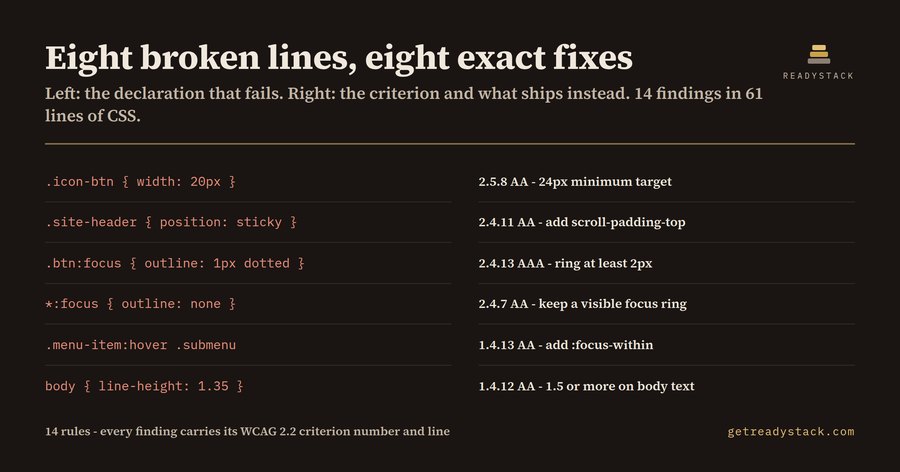
Eight broken lines, eight exact fixes - frontend developers shipping to customers in the EU.
L12 1.4.12 AA line-height is 1.35 on body text "body" L17 2.4.11 AA ".site-header" is sticky and can cover the element the keyboard just moved to L24 2.4.7 AA outline is removed on "*:focus" and nothing in this file draws a focus ring L28 2.4.13 AAA focus ring on ".btn:focus" is 1px thick L33 2.5.8 AA control ".icon-btn" is width: 20px, under the 24px minimum L35 1.4.13 AA ".menu-item:hover .submenu" reveals content that no :focus-within rule reveals L47 1.3.1 A ".sr-only" uses display: none, so screen readers lose it too L55 2.2.2 A animation on ".spinner" never stops
Those eight lines came out of one 61-line stylesheet - a pricing card, a sticky header, a spinner, an .sr-only class. The full run returned 14 findings across 11 success criteria, each printed with its criterion number, its conformance level and its line. The eight above are the ones a design system ships most often.
Three of the fourteen name criteria that do not exist in WCAG 2.1 at all: 2.5.8 Target Size (Minimum), 2.4.11 Focus Not Obscured (Minimum) and 2.4.13 Focus Appearance. WCAG 2.2 became a W3C Recommendation on 5 October 2023, and those three are decided almost entirely in CSS. A lint config written against 2.1 - or a code assistant trained mostly on 2.1-era stylesheets - returns nothing for them. The rules pass review, and the criteria fail.
Here is what the file said, and what the criterion says back.
.icon-btn { width: 20px; height: 20px; } - 2.5.8 AA. A pointer target has to be at least 24 by 24 CSS px unless it has 24px of clear space around it. Twenty is the number an icon font wants; twenty-four is the number the criterion wants.
.site-header { position: sticky; top: 0; height: 64px; } - 2.4.11 AA. Tab down the page and the browser scrolls the focused element to the top of the viewport, which is exactly where the sticky bar is. The element has focus and nobody can see it. The fix is one declaration - scroll-padding-top - somewhere in the file, and the file did not have it.
*:focus { outline: none; } - 2.4.7 AA, still the most common line in this list. It is only safe when :focus-visible draws a ring back, and this file had .btn:focus { outline: 1px dotted } instead, which is itself 2.4.13: a focus ring has to be at least 2px.
The rest of the run is older criteria that CSS keeps breaking anyway: line-height 1.35 on body text and letter-spacing locked with !important (1.4.12 Text Spacing), min-width 1024px on the body (1.4.10 Reflow), text-size-adjust: none and a root font-size pinned to 14px (1.4.4 Resize Text), .sr-only implemented with display: none, which hides it from the screen reader it was written for (1.3.1), a spinner set to infinite with no way to stop it (2.2.2), and a file that animates without ever answering prefers-reduced-motion (2.3.3).
Why not just run axe or Lighthouse? Because they inspect a rendered page. They need a route that renders, they report a DOM node rather than the declaration that caused it, and a rule sitting in a file that no current route renders is never reached at all. A stylesheet lint runs on the source, in the editor, before the route exists.
Why now: the European Accessibility Act has applied since 28 June 2025, and enforcement is national. The cost of finding this at the end rather than in the editor is an accessibility consultant's $150-$250 hour, or a third-party audit quoted in the thousands.
The extension is 14 rules. Linting the file you have open is free and complete - no watermark, no counter, no cap on runs. The licence key covers a different job: sweeping every stylesheet in the workspace at once and exporting a dated criterion-by-criterion table, the paper record that sits behind an accessibility statement. $29 once, one key per person or team seat.
15 seconds — what it actually does
Questions people ask
What does WCAG 2.2 CSS Lint actually do?
It parses a CSS or SCSS file and reports the declarations that break a WCAG 2.2 success criterion: targets under 24 px, removed focus outlines, sticky bars with no scroll-padding, line-height under 1.5, locked text spacing, hover-only reveals, infinite animation, and .sr-only built with display:none. Each finding carries the criterion number, its level and the line.
Who is it for?
Frontend developers and design-system maintainers whose product is sold into the EU, where the European Accessibility Act has applied since 28 June 2025, and agencies who must hand a client an accessibility statement. It is for the person who owns the stylesheet, not the person who runs the audit at the end.
Why is a free browser checker not enough?
axe, Lighthouse and WAVE inspect a rendered page. They need a running route and a browser, they report a DOM node rather than the CSS line that caused it, and a rule living in a file no route renders is never reached at all. This runs on the source file while you are editing it.
What is free and what needs a licence key?
Linting the file you have open is free and complete: all 14 rules, every criterion number, no watermark and no usage counter. The licence key adds a different job - scanning every stylesheet in the workspace at once and exporting a dated evidence table you keep as the paper record behind your accessibility statement.
What would this cost otherwise?
An accessibility consultant reading one stylesheet by hand bills a $150-$250 hour, and a third-party WCAG audit of a whole site is quoted in the thousands. The licence is $29 once, per person or team seat,. It does not replace an audit; it removes the findings an audit would bill you for.
Why not just ask ChatGPT or another AI chat?
A general AI chat answers from training data with a cutoff date, cannot read your repository and names no rule version. WCAG 2.2 CSS Lint - Focus & Target Size checks the file you open against 14 rules from a rule set dated 2026-09-20, and points at the exact line with the fix. For a filing, an audit or a client you need that dated result on your own files.
Ask about this tool
One question, answered by the person who built it. Your email only if you want the answer sent.