Claude Code skills · updated 2026-10-03
Docker Desktop to Podman skill for Claude Code — sockets, hostnames
Lists every line in your repo that stops working when Docker Desktop is gone
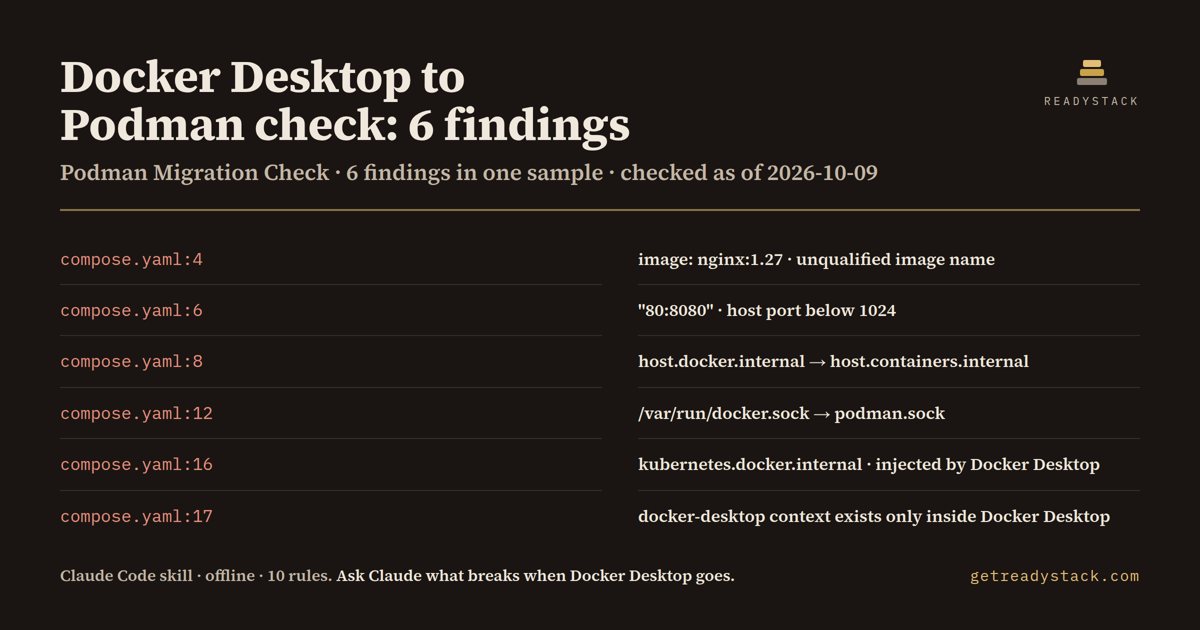
On one 17-line compose.yaml it printed 6 findings (3 errors, 3 warnings) from 10 rules, each with file:line and the Podman fix.
Get it on Whop - $12 onceGet it on Gumroad
Who it's for
For developers and platform teams replacing Docker Desktop with Podman or rootless Podman on their laptops, CI runners and dev containers.
What breaks, and when
The day Docker Desktop is uninstalled, /var/run/docker.sock, docker-credential-desktop, the docker.internal names and the docker-desktop context are gone; the stack fails.
What it printed on the bundled example
== Podman Migration Check — 6 findings (3 errors, 3 warnings) in 1 file · 10 rules
  WARN  compose.yaml:4  [short-image-name]
        Unqualified image name. Podman resolves short names through registries.conf (short-name-mode enforcing) and can prompt or fail in CI; write the full name, e.g. docker.io/library/nginx:1.27.
  WARN  compose.yaml:6  [privileged-host-port]
        Host port below 1024. Rootless Podman cannot bind it unless net.ipv4.ip_unprivileged_port_start is lowered on the host (or the Podman machine); map to 8080/8443 instead.
  WARN  compose.yaml:8  [host-docker-internal]
        host.docker.internal is Docker Desktop's name for the host. Podman's own name is host.containers.internal; older Podman releases do not add the Docker alias, so use the Podman name.
  ERROR compose.yaml:12  [docker-sock-host-path]
        Host path /var/run/docker.sock only exists while Docker Desktop (or dockerd) runs. Rootless Podman serves $XDG_RUNTIME_DIR/podman/podman.sock after `systemctl --user enable --now podman.socket`; mount that path instead.
What you get
- A scanner Claude runs over every compose file, Dockerfile, devcontainer.json and script - not a guess from memory
- 10 rules: docker.sock, docker.internal names, credsStore desktop, Desktop contexts, scout, bake
- Each finding names the Podman fix: podman.sock, host.containers.internal, podman login
- Claude proposes the edits and applies them only after you say yes; exit 1 in CI on any error
Install
Unzip into ~/.claude/skills/ (all projects) or your-repo/.claude/skills/ (one repo), then ask Claude Code: "We're uninstalling Docker Desktop and moving the team to rootless Podman next sprint. Can you go through our compose files, Dockerfiles and scripts and tell me what will stop working? Don't edit anything yet.". Needs Node 16+.
unzip docker-desktop-to-podman-check.zip -d ~/.claude/skills/
Ask Claude
“We're uninstalling Docker Desktop and moving the team to rootless Podman next sprint. Can you go through our compose files, Dockerfiles and scripts and tell me what will stop working? Don't edit anything yet.”
What it does not do
Reads text files only; it does not start Podman or check Kubernetes manifests.
FAQ
What is a Claude Code skill?
A folder with a SKILL.md and scripts that Claude Code loads when your request matches it. You ask in plain words and Claude runs the scanner the skill carries.
How is this different from asking Claude without the skill?
The skill carries a dated rule table and a scanner that reads every file, so Claude quotes the exact date and line instead of answering from memory.
Does it send my code anywhere?
Reads text files only; it does not start Podman or check Kubernetes manifests.
How do I install it?
Unzip into ~/.claude/skills/ (all projects) or your-repo/.claude/skills/ (one repo), then ask Claude Code: "We're uninstalling Docker Desktop and moving the team to rootless Podman next sprint. Can you go through our compose files, Dockerfiles and scripts and tell me what will stop working? Don't edit anything yet.". Needs Node 16+.
What do I get when I buy?
The zip. On Whop it is in your library as a download lesson with the zip attached; on Gumroad it is the product file.