Claude Code skills · updated 2026-10-03
Android targetSdk 36 skill for Claude Code — Play deadline, Android 16 breaks
13 findings in one Android app, each with the line and the fix for targetSdk 36
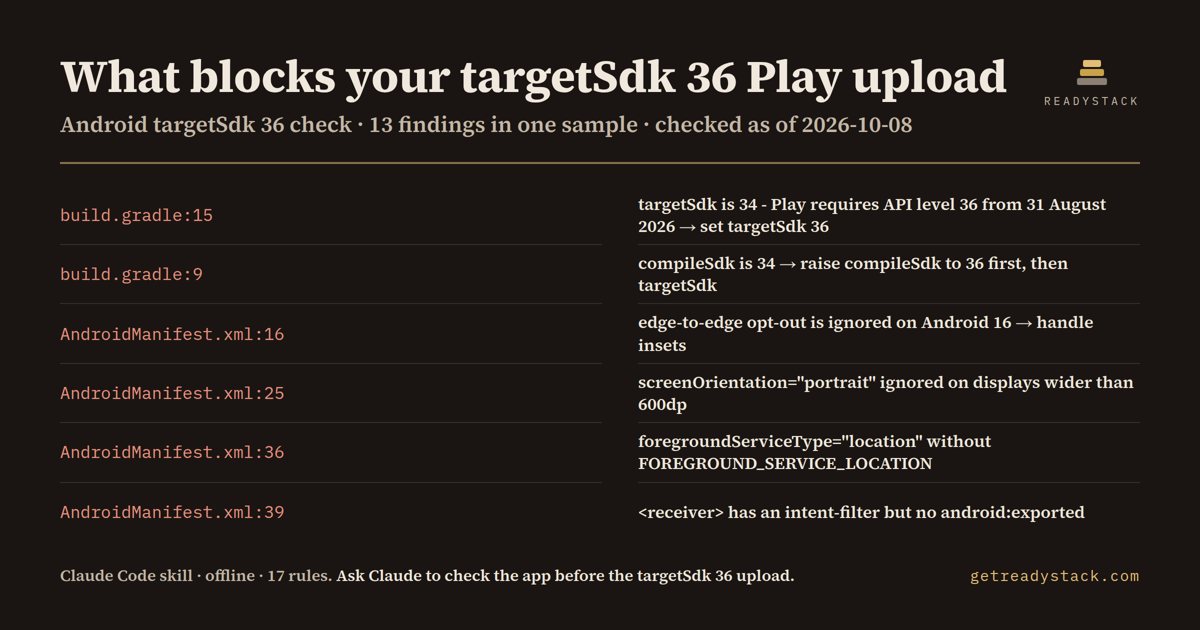
On the bundled sample: 13 findings (7 errors, 6 warnings) in 2 files from 17 rules, including targetSdk is 34, compileSdk is 34 and the edge-to-edge opt-out.
Get it on Whop - $12 onceGet it on Gumroad
Who it's for
Android developers and mobile leads whose Play Console update is blocked by the target API level.
What breaks, and when
Google Play requires API level 36 for new apps and for updates to existing apps from 31 August 2026; the extension ends 1 November 2026. Below that, Play will not accept the upload.
What it printed on the bundled example
== targetSdk 36 Deadline Gate (Google Play) — 13 findings (7 errors, 6 warnings) in 2 files · 17 rules
  ERROR app/build.gradle:9  [compile-sdk-below-36]
        compileSdk is 34. You cannot set targetSdk 36 while compiling against 34 — the Android 16 APIs the new behaviour needs are not on the classpath. → Raise compileSdk to 36 first, fix the deprecation errors, then raise targetSdk.
  WARN  app/build.gradle:10  [ndk-16kb-page-size]
        ndkVersion is r25. 16 KB page size support arrived in NDK r27, and Play requires 16 KB compatible native code for apps targeting Android 15 and above. → Move to NDK r27 or newer and rebuild every prebuilt .so you ship, including the ones inside third-party AARs.
  ERROR app/build.gradle:15  [target-sdk-below-36]
        targetSdk is 34. Google Play requires API level 36 for new apps and for updates to existing apps from 31 August 2026 (that was 38 days ago — uploads are already being refused). Below that, Play will not accept the upload. → Set targetSdk 36 in defaultConfig, then work through the Android 16 behaviour changes flagged below. An extension can be requested in Play Console until 1 November 2026.
  WARN  app/build.gradle:22  [legacy-jni-packaging]
        useLegacyPackaging is true, so native libraries ship compressed and unaligned. That is the opposite of what 16 KB page size devices need. → Set useLegacyPackaging false and confirm your native libs load on a 16 KB emulator image.
What you get
- SKILL.md, an offline Node scanner and the 17-rule table
- file:line, severity and the Android 16 or Play effect
- The fix for each finding, applied only after you agree
- CI: node scripts/scan.js . exits 1 on any error
Install
Unzip into ~/.claude/skills/ (all projects) or your-repo/.claude/skills/ (one repo), then ask Claude Code: "Play Console says our next update has to target API level 36. What do we need to change in this Android project? Don't edit anything yet.". Needs Node 16+.
unzip android-target-sdk-36-check.zip -d ~/.claude/skills/
Ask Claude
“Play Console says our next update has to target API level 36. What do we need to change in this Android project? Don't edit anything yet.”
What it does not do
It does not run Gradle or read the merged manifest or version catalogs. No network calls, no edits without your OK.
FAQ
What is a Claude Code skill?
A folder with a SKILL.md and scripts that Claude Code loads when your request matches it. You ask in plain words and Claude runs the scanner the skill carries.
How is this different from asking Claude without the skill?
The skill carries a dated rule table and a scanner that reads every file, so Claude quotes the exact date and line instead of answering from memory.
Does it send my code anywhere?
It does not run Gradle or read the merged manifest or version catalogs. No network calls, no edits without your OK.
How do I install it?
Unzip into ~/.claude/skills/ (all projects) or your-repo/.claude/skills/ (one repo), then ask Claude Code: "Play Console says our next update has to target API level 36. What do we need to change in this Android project? Don't edit anything yet.". Needs Node 16+.
What do I get when I buy?
The zip. On Whop it is in your library as a download lesson with the zip attached; on Gumroad it is the product file.