· ReadyStack
Worked example
Real numbers from this tool, line by line.
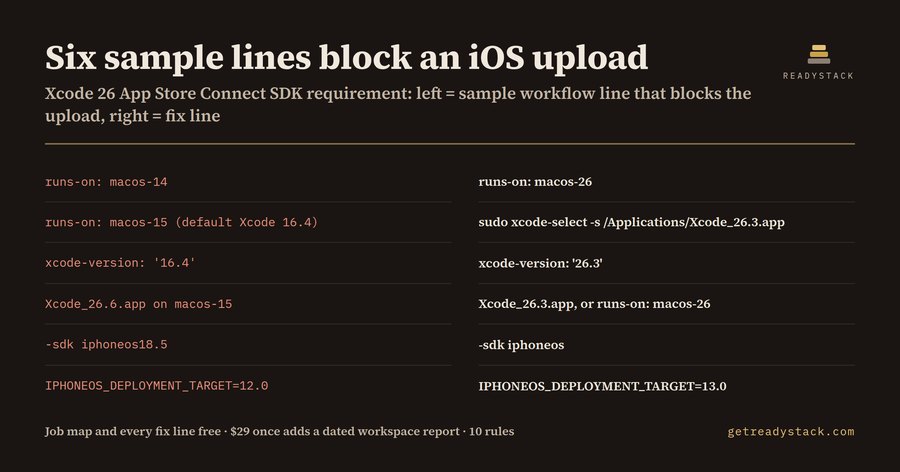
Six lines in the sample workflow block an iOS upload, for iOS teams shipping from GitHub Actions: a runner label, an Xcode pin, an SDK flag, a deployment target.
Since 28 April 2026, Apple's Upcoming Requirements page says apps uploaded to App Store Connect must be built with Xcode 26 or later using an SDK for iOS 26, iPadOS 26, tvOS 26, visionOS 26 or watchOS 26. Since 9 September 2026, iOS and iPadOS apps must also target iOS 13 or later. The app code does not decide any of this. The CI workflow does, because the runner label and the Xcode selection step decide which Xcode compiles the archive.
Here is the part that catches teams. The GitHub-hosted macos-15 image, arm64 and Intel, has Xcode 26.0.1, 26.1.1, 26.2 and 26.3 installed, but its default is still Xcode 16.4. A job that says runs-on: macos-15 and then calls fastlane or xcodebuild without selecting an Xcode builds with 16.4, and the upload is rejected. The macos-14 image is worse: it ships Xcode 15.0.1 up to 16.2 with 15.4 as default, so no pin can reach Xcode 26 there. GitHub also deprecates that image: brownouts start on 5 October 2026 and it is unsupported from 2 November 2026.
Xcode 26 SDK Gate for GitHub Actions reads the workflow you have open and does two things. First it draws a map: for every job that archives or uploads an Apple build, it prints the runner, the Xcode that runner resolves to (an explicit setup-xcode pin, an xcode-select path, DEVELOPER_DIR, or the image default) and whether that meets the upload minimum. Second it marks every line that breaks, with the replacement line next to it.
The bundled sample workflow has six shipping jobs. The gate reports seven errors, one warning and one info line besides the six map lines:
- runs-on: macos-14 in the archive job. Fix: runs-on: macos-26.
- runs-on: macos-15 in the TestFlight job with no Xcode selection, so it builds with 16.4. Fix: sudo xcode-select -s /Applications/Xcode_26.3.app.
- xcode-version: '16.4' in the App Store job. Fix: xcode-version: '26.3'.
- Xcode_26.6.app on macos-15-xlarge. That image does not ship 26.6, so the select step fails before the build. Fix: Xcode_26.3.app, or runs-on: macos-26.
- -sdk iphoneos18.5. Fix: -sdk iphoneos.
- IPHONEOS_DEPLOYMENT_TARGET=12.0. Fix: IPHONEOS_DEPLOYMENT_TARGET=13.0.
It also flags a macos-13 leg in a matrix (that label is gone from the runner list), a self-hosted Mac job that never selects an Xcode, and macos-latest, which points to macOS 26 with Xcode 26.6 today but moves when GitHub migrates the label.
In total there are 10 rules, and the runner table behind them comes straight from the actions/runner-images Readmes for macos-14, macos-15 and macos-26. The clean sample, with a macos-26 archive job and a macos-15 job that selects Xcode 26.3, produces only its two map lines.
Why not ask a chatbot? Because the answer depends on which Xcode each image ships this month, and on your file. The Readmes list versions per image, but they do not read your workflow or point at the job line.
Everything above is free for the open file, in VS Code and on the web page, with no key. The full version sweeps every workflow in the repository at once and writes a dated SDK-compliance report in Markdown and JSON. For scale: an hour of a US software developer costs $65.38 at the BLS OEWS 2025 median, and finding the runner, the default Xcode and every pin by hand takes a search through each workflow.
Open .github/workflows, look at the map, and replace the lines it marks before the next release tag.
15 seconds — what it actually does
Questions people ask
What does Xcode 26 SDK Gate for GitHub Actions do?
It reads a GitHub Actions workflow and shows, for every job that archives or uploads an iOS build, which Xcode that job really builds with: the explicit pin or the runner image default. It marks each line that App Store Connect rejects since 28 April 2026, when uploads must use Xcode 26 and an iOS 26 SDK, and prints the exact fix line. It has 10 rules.
Who is this Xcode 26 CI check for?
iOS, iPadOS, tvOS, visionOS and watchOS teams that archive and upload from GitHub Actions: release engineers, mobile leads and solo developers using fastlane, xcodebuild or flutter build ipa on macos-14, macos-15, macos-26, macos-latest or a self-hosted Mac. It helps when a TestFlight upload starts failing and nobody changed the app.
Why not just ask a chatbot or read the GitHub runner docs?
A chatbot does not know which Xcode each runner image ships this month: macos-15 still defaults to Xcode 16.4 even though Xcode 26.0.1, 26.1.1, 26.2 and 26.3 are installed, and macos-14 tops out at 16.2. The runner Readmes list versions per image but do not read your workflow or tell you which job line breaks.
What is free and what does the full version add?
Free: the check, the per-job Xcode map and every fix line for the workflow you have open, in VS Code or on the web page, with no key. The full version is $29 once, one licence key per person or team seat: it sweeps every workflow in the repository at once and writes a dated SDK-compliance report in Markdown and JSON for release sign-off.
What does fixing this by hand cost?
An engineer has to open each workflow, find the runner label, look up that image's default Xcode in the actions/runner-images Readme, check every setup-xcode pin and xcode-select path, then rerun the build. At the BLS OEWS 2025 median wage for US software developers, $65.38 per hour, every hour of that search is the yardstick.
Ask about this tool
One question, answered by the person who built it. Your email only if you want the answer sent.