· ReadyStack
Worked example
Real numbers from this tool, line by line.
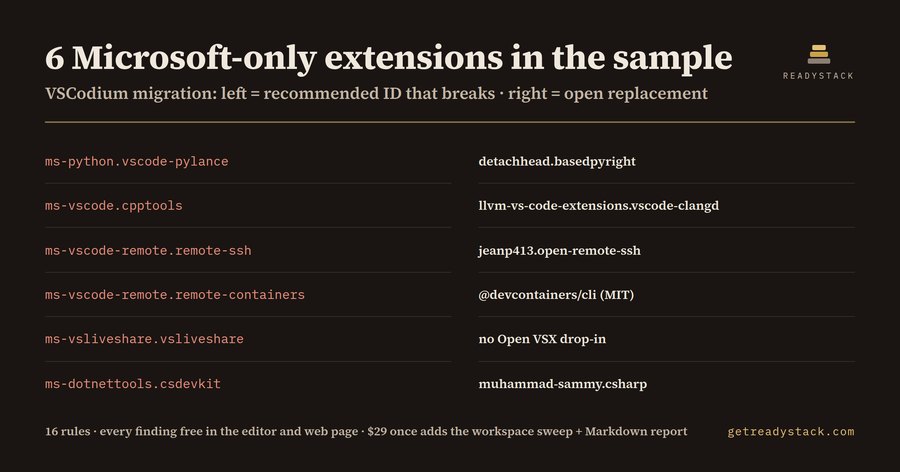
Migrate from Microsoft VS Code to VSCodium: 6 extension IDs that stop working
6 of the 9 recommended extensions in a sample .vscode/extensions.json stop working when a Python and C++ platform team moves from Microsoft VS Code to VSCodium. It is written in Microsoft's own licence files, checked on 2026-09-29: Pylance and C/C++ may be used "only with Microsoft Visual Studio, Visual Studio for Mac, Visual Studio Code, Azure DevOps, Team Foundation Server, and successor Microsoft products and services", and the Remote Development licence says "You may not use the software if you do not have a license for Microsoft Visual Studio Code."
The second half of the problem is the registry. VSCodium installs extensions from Open VSX, and none of the 15 Microsoft and GitHub extension IDs covered here are on Open VSX. A shared recommendation for one of them simply does nothing in VSCodium. The extension panel does not tell them why, and it does not suggest what to use instead.
The sample
The sample lists: ms-python.python, ms-python.vscode-pylance, ms-toolsai.jupyter, ms-vscode.cpptools, ms-vscode-remote.remote-ssh, ms-vscode-remote.remote-containers, ms-vsliveshare.vsliveshare, ms-dotnettools.csdevkit and ms-vscode.cmake-tools. Three of them are fine: ms-python.python is MIT-licensed and on Open VSX, and so are Jupyter and CMake Tools. The other six are flagged:
- ms-python.vscode-pylance: replace with detachhead.basedpyright
- ms-vscode.cpptools: replace with llvm-vs-code-extensions.vscode-clangd
- ms-vscode-remote.remote-ssh: replace with jeanp413.open-remote-ssh
- ms-vscode-remote.remote-containers: use the MIT devcontainer CLI from a terminal
- ms-vsliveshare.vsliveshare: no Open VSX drop-in; its licence says "solely with Microsoft Visual Studio family of products"
- ms-dotnettools.csdevkit: replace with muhammad-sammy.csharp; its licence says "only with Microsoft Visual Studio Code, vscode.dev, GitHub Codespaces"
Why the MIT Python extension misleads
ms-python.python is MIT, so it is natural to assume the Python stack is open. It is not: the language server most teams rely on, Pylance, is a separate extension with a Microsoft licence. The same split exists for C#: the ms-dotnettools.csharp extension bundles a debugger whose licence says it may be used "only ... with Visual Studio Code, Visual Studio or Xamarin Studio software". A settings.json that pins "python.languageServer": "Pylance" keeps pointing at the restricted server even after the extension list is cleaned, so the lint flags that setting too.
What the lint does
Open an extensions.json, devcontainer.json, settings.json or .gitpod.yml. Each problem line shows up in the Problems panel with the extension ID, the clause quoted from the licence file, and the open replacement ID. Entries under unwantedRecommendations and commented-out lines are ignored, so a cleaned list stays quiet. There are 16 rules: 15 extension IDs and the Pylance setting. Four of them are warnings rather than errors: Remote - Tunnels server, Remote Explorer, GitHub Copilot and GitHub Copilot Chat are not on Open VSX, but the lint does not claim anything about their licences.
The same engine runs on the free web page: paste a list, press Check, read the findings.
It is not legal advice: it reads licence text as published, and it installs nothing. Test basedpyright or clangd on your codebase before the team switches.
Try it
Paste your extensions.json into the free web page, or install the extension and open the file. On the sample, the result is six findings and six swaps.
15 seconds — what it actually does
Questions people ask
What does VSCodium Migration Lint do?
It reads .vscode/extensions.json, devcontainer.json or settings.json and flags every recommended extension that VSCodium cannot use: Microsoft extensions whose licence limits them to Microsoft products, and IDs that Open VSX does not carry. Each finding shows the line, the licence clause quoted from Microsoft's own licence file, and an open replacement ID such as detachhead.basedpyright for Pylance.
Who is it for?
Platform engineers, tech leads and open-source maintainers moving a team or a repository from Microsoft VS Code to VSCodium who keep a shared extensions.json or devcontainer.json. It suits Python, C and C++, .NET and remote-SSH teams, because those rely most on Pylance, C/C++, C# Dev Kit and the Remote Development extensions.
Why not just try installing the extensions in VSCodium?
Open VSX, the registry VSCodium installs from, carries none of the 15 Microsoft and GitHub extension IDs this lint knows (checked 2026-09-29), so the panel just does not list them and gives no reason or replacement. The Pylance and C/C++ licences allow use 'only with' Microsoft products; Remote Development needs a licence for Microsoft Visual Studio Code.
What is free and what does the full version add?
Free, with no key, in the editor and on the web page: every flagged extension in the open file, the licence clause behind it and the open replacement ID. The full version, $29 once with one licence key per person or team seat, scans every extension list in the workspace at once and exports one Markdown migration report.
What would a person charge for this review?
DOJ's Fitzpatrick Matrix rates a 15-year litigator at $851/hour for billing year 2026. Reading the Pylance, C/C++, Remote Development, Live Share, C# and C# Dev Kit licence files and checking 15 IDs against Open VSX takes most of an hour, and the result goes stale the next time someone adds a recommendation.
Ask about this tool
One question, answered by the person who built it. Your email only if you want the answer sent.