SaaS UI Kit — AI disclosure check for your AI feature

For SaaS teams shipping a chatbot or an image, voice or text generator in the EU or California. EU AI Act Article 50 applies since 2 August 2026. Pick your feature: the labels it needs and the fine that applies appear below.

Full version — $168 once · get the whole kit

Check your own feature above for free first, and take the free label + tooltip (7 variants, Figma plugin, .sketch, SVG): download the free part. The full kit adds the screens around the label: chatbot notice, visible-label export toggle, publisher confirmation, output cards, EU/California tabs and actions — 8 components, 27 variants. One payment, no subscription. Rival SaaS UI kits cost up to $168 and draw no AI disclosure states.

How to get the kit into Figma

  1. In Figma, drag the .sketch file onto the file browser — Figma imports .sketch. Sketch users open the same file.
  2. Copy an .svg and paste it into Figma: it lands as an editable vector.
  3. For real variant sets, import the plugin from manifest.json and run it. Menu names differ by Figma version and UI language; part of the component structure in the .sketch is simplified.

Sources: Regulation (EU) 2024/1689 Art. 50, 99(4), 99(6), 113; California SB 942 (AI Transparency Act). This page is a design aid, not legal advice.

Get the complete version $168

This page is the working piece. The full pack has everything below.

SaaS UI kit for AI features: EU AI Act Article 50 applies since 2 August 2026, with fines up to €15,000,000 or 3% of turnover. 8 components, 27 variants: AI labels, chatbot notice, export to

EU AI Act (Regulation (EU) 2024/1689): Article 50 applies from 2 August 2026 (Art. 113); Art. 99(4) sets fines of up to €15,000,000 or 3% of total worldwide annual turnover, whichever is higher (for SMEs, whichever is lower, Art.

Buy the full version — $168
Want the full version?
Enter your email and we send the download link.
ENDEJAESPT

Find a tool

· ReadyStack

Worked example

Real numbers from this tool, line by line.
SaaS UI Kit — AI Disclosure Labels for EU AI Act Art. 50 & California SB 942 (Figma + Sketch)

If your SaaS product ships an AI chat assistant, an image generator or a voice feature, the EU AI Act changed your screens on 2 August 2026. That is the date Article 50 started to apply (Article 113 of Regulation (EU) 2024/1689).

What Article 50 asks the screen to show

Article 50(1): people must be informed that they are interacting with an AI system, unless that is obvious to a reasonably well-informed person. In a SaaS app, that is a chatbot notice at the start of the conversation. Article 50(5) adds the timing: clear and distinguishable, at the latest at the first interaction or exposure. A notice buried in the terms of service does not meet that.

Article 50(2): providers of systems that generate synthetic audio, image, video or text must mark the output in a machine-readable format. That part lives in the file metadata, but the screen still needs a state that says the latent marking stays in place when a user turns the visible label off.

Article 50(3): deployers of emotion recognition or biometric categorisation must inform the people exposed to it.

Article 50(4): deepfakes must be disclosed as artificially generated or manipulated. AI text published to inform the public on matters of public interest must be disclosed too, unless it went through human review or editorial control and a person or company holds editorial responsibility. That exception is a checkbox and a named editor on your publishing screen.

What getting it wrong costs

Article 99(4) sets fines of up to €15,000,000 or 3% of total worldwide annual turnover, whichever is higher. For SMEs and start-ups, Article 99(6) flips it: whichever is lower.

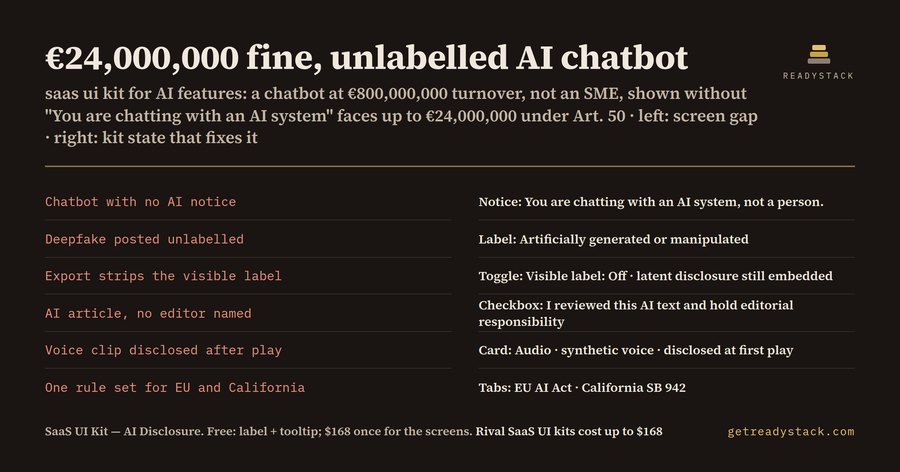
We ran three cases through the free checker on the product page:

California is a different rule

California SB 942, the AI Transparency Act, covers GenAI providers with over 1,000,000 monthly users. It asks them to offer users a visible (manifest) disclosure on image, video and audio content and to embed a latent one. It does not cover chat text. The penalty is $5,000 per violation, and each day counts as a separate violation: an image generator that ran 30 days without the option comes to $150,000 in the checker. At 900,000 monthly users, the same feature has no SB 942 duty.

So one product needs two rule sets: a chatbot needs the EU notice but nothing under SB 942, and an image generator needs the export toggle for California and the machine-readable marking for the EU.

What the kit draws

The SaaS UI kit holds 8 Figma components with 27 variants. There is an AI content label with 4 variants, a label explainer tooltip with 3, and an AI interaction notice with 4 (including emotion recognition and a missing-label error). The visible-label export toggle has 3 variants and the publisher confirmation checkbox has 3. There are 3 AI output cards, 3 EU and California market tabs, and 4 disclosure actions. It ships as a Figma plugin, a .sketch file that Figma imports by drag and drop, and one SVG per variant. You swap the 6 color tokens for your brand.

The label and the tooltip are free: 7 variants, enough to label AI output on any page. The rest covers the screens around the label.

It is a design file, not legal advice: it puts the Article 50 and SB 942 states into your design review before the feature ships.

15 seconds — what it actually does

Questions people ask

What does this SaaS UI kit do?

It gives you 8 Figma components with 27 variants for the AI features of a SaaS product: AI content labels, an explainer tooltip, the chatbot interaction notice, a visible-label export toggle, the publisher confirmation for AI text, output cards, EU and California market tabs and disclosure actions. It ships as a Figma plugin, a .sketch file and SVGs, so you lay out a disclosed AI screen without drawing a state.

Who is this AI disclosure kit for?

Product designers and front-end teams at SaaS companies that ship a chat assistant or an image, voice or text generator to users in the EU or California. If your screen must tell people they are talking to an AI system, label a deepfake, or offer a visible AI label on export, the states are already drawn. Sketch users open the same .sketch file.

Why not use a free SaaS UI kit?

A generic SaaS kit has buttons, cards and alerts, but no AI disclosure states: no chatbot notice, no deepfake label, no export toggle that keeps the latent disclosure, no editorial-review confirmation. You would draw each one by hand, and a chatbot cannot hand you Figma components with variants. EU AI Act Article 99(4) fines reach €15,000,000 or 3% of worldwide turnover.

What is free, and what does the full kit add?

Free: the AI content label with 4 variants and its explainer tooltip with 3 variants, as plugin, .sketch and SVG, plus the browser checker that tells you which disclosure a feature needs and the fine that applies. That labels AI output on any page. The full kit adds the screens around the label: chatbot notice, export toggle, publisher confirmation, output cards, market tabs and actions.

What does it cost compared with the alternatives?

The full kit is $168 once, no subscription; rival SaaS UI kits cost up to $168 and draw no AI disclosure states. The stake is the fine: under EU AI Act Article 99(4) up to €15,000,000 or 3% of worldwide annual turnover, and under California SB 942 $5,000 per violation, with each day counted as a separate violation.

Ask about this tool

One question, answered by the person who built it. Your email only if you want the answer sent.