· ReadyStack
Worked example
Real numbers from this tool, line by line.
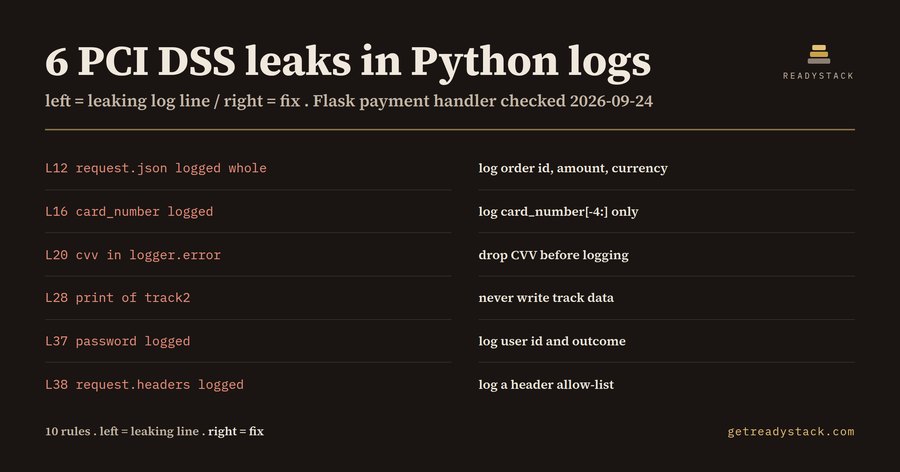
6 PCI DSS leaks in Python logs: that is what one Flask payment handler produced when I checked it on 2026-09-24. If you are a Python backend developer at a card-accepting merchant, payment provider or fintech, and a PCI DSS v4.0.1 assessment is coming, this is the file to look at first.
The file
The handler is short: a /pay route that reads a JSON body and calls Stripe, a /terminal route that receives a card swipe, and a /login route. Here are the 6 findings, with line numbers:
- L12 request-dump-in-log:
logger.info("incoming payment payload: %s", request.json)logs the whole body. On a payment route it carries the PAN and CVV. Req 3.3.1. - L16 pan-in-log:
logger.debug("charging card %s", card_number)writes the full PAN. Req 3.5.1 says a PAN must be unreadable anywhere it is stored, and logs count. - L20 cvv-in-log:
logger.error(f"card declined, cvv={cvv}: {e}")puts the card verification code into an error log. Req 3.3.1.2 says it must not be retained after authorization. - L28 track-in-log:
print("swipe received", track2)writes track 2 data to stdout. Req 3.3.1.1. - L37 password-in-log: a failed login logs the password it was given. Req 8.3.2.
- L38 auth-header-in-log:
logger.debug("auth headers: %s", request.headers)logs the Authorization header. Req 8.3.2.
The fixed version of the same file logs the order id, the amount and card_number[-4:]. It gives 0 findings.
What you lose, and when
A leaked line does not go away when you fix the code. Req 10.5.1 asks you to keep audit log history for at least 12 months. A line written on 2026-09-24 is still stored on 2027-09-24. Every log store that holds it is in scope for the assessment.
Why the free options stop short
General Python linters check style, and some flag hard-coded passwords. None of them tells you that cvv inside an f-string in logger.error is a Req 3.3.1.2 problem. A chat assistant can explain the requirement, but it gives no line numbers in your file.
How the check reads code
Plain message text is ignored. logger.info("password reset for %s", user) is not a finding, because the password is not in the values. Only the arguments, the f-string {expressions} and concatenations count. A call that wraps over several lines is joined first. There are 10 rules: PAN, CVV, track data, PIN, password, auth headers, whole request bodies, locals() dumps, Luhn-valid numbers inside log text, and send_default_pii=True in Sentry.
The date matters. Check a point-of-sale handler on 2026-12-01 that logs track_data and pin_block, dumps locals() and prints a test card number, and you get 4 findings, each stored until 2027-12-01 under the 12-month retention. A refund module with Sentry's send_default_pii=True, a raise ValueError that includes card.pan, and a logged STRIPE_API_KEY gives 3.
Yardstick
Semgrep Teams, a general code-scanning service, lists $35 per contributor per month once a team is past its free 10-contributor tier. This lint does one narrow job and cites the requirement per line.
Free and full
The free version checks the open .py file against all 10 rules and lists every leaking line with its requirement and fix, in VS Code or in the browser. For one file, that finishes the job. The full version checks every .py file in the repository in one run and exports a Markdown evidence table for the assessment.
It does not prove compliance and does not follow data across files. Paste your payment handler in and see what it writes to your logs.
15 seconds — what it actually does
Questions people ask
What does Python Log Leak Lint do?
It checks every logger, logging, print and raise statement in a Python file against 10 rules. For each line that writes card data or credentials, it names the PCI DSS v4.0.1 requirement and gives a fix. A Flask payment handler gave 6 findings: request.json logged whole, card_number, cvv in an f-string, print of track2, password and request.headers. The fixed file gave 0.
Who is Python Log Leak Lint for?
It is for Python backend developers at card-accepting merchants, payment service providers and fintechs who use Flask, Django, FastAPI or Celery and are preparing for a PCI DSS v4.0.1 assessment. It also suits reviewers checking a payment handler that an AI coding assistant wrote, before that code writes a CVV or card number into production logs.
Why not use a free Python linter or a chatbot?
General Python linters check style, and some check for hard-coded passwords. They do not map a CVV, track data, a PIN block or a Luhn-valid card number inside a log call to PCI DSS Req 3.3.1 or 3.5.1. A chatbot can explain the rule, but it gives no line numbers in your own file.
What is free, and what does the full version add?
The free version checks the open Python file against all 10 rules and lists every leaking line with its line number, PCI DSS requirement and fix. For one file, that is the whole job. The full version is $29 once for a licence key. It checks every .py file in the repository in one run and exports a Markdown evidence table for the assessment.
What does the alternative cost?
Semgrep Teams, a general code-scanning service, lists $35 per contributor per month once a team is past its free 10-contributor tier. That service covers far more than logging. This lint does one narrow job: it finds the log, print and raise lines that write card data or credentials, and cites the PCI DSS v4.0.1 requirement for each one.
Ask about this tool
One question, answered by the person who built it. Your email only if you want the answer sent.