· ReadyStack
Worked example
Real numbers from this tool, line by line.
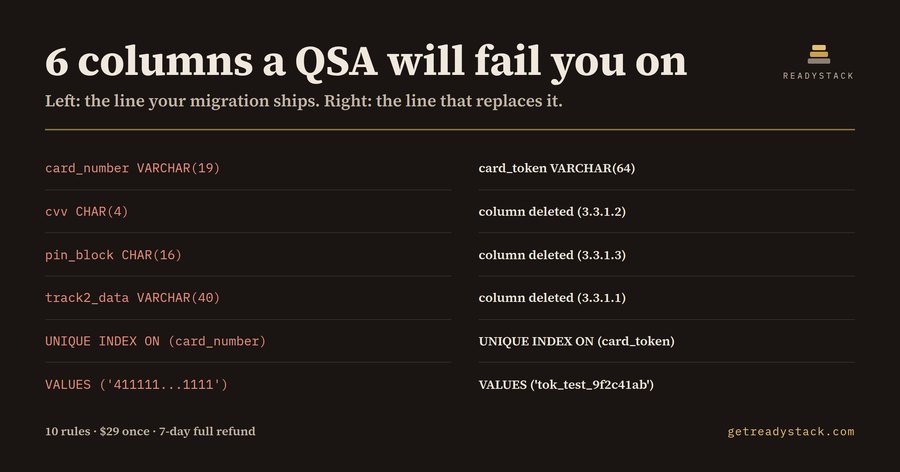
6 columns a QSA will fail you on sit in this 35-line migration — for backend engineers on a Rails, Django, Laravel, .NET or Node payments repository, anywhere PCI DSS applies. Here is the whole result on the sample migration shipped with the tool, _fixtures/dirty.sql:
_fixtures/dirty.sql — 13 findings, 10 rules, 9 errors, 4 warnings, 2 tables
L5 warn no-retention-column 3.2.1 customer_cards has no purge column L8 error pan-plaintext-column 3.5.1 card_number VARCHAR(19) L9 error sad-cvv-stored 3.3.1.2 cvv CHAR(4) L10 error sad-pin-stored 3.3.1.3 pin_block CHAR(16) L11 error sad-track-stored 3.3.1.1 track2_data VARCHAR(40) L17 error pan-searchable-key 3.5.1 UNIQUE INDEX ON (card_number) L19 warn no-retention-column 3.2.1 payment_audit_log has no purge column L22 error pan-plaintext-column 3.5.1 card_number VARCHAR(19) L22 error pan-in-log-table 3.3.1 card data written into a log table L23 warn auth-response-blob 3.3.2 gateway_response JSONB L28 warn pan-view-unmasked 3.4.1 view selects card_number unmasked L32 error sad-cvv-stored 3.3.1.2 cvv in the seed row column list L33 error live-pan-literal 6.5.5 Luhn-valid literal 411111...1111
The migration itself is unremarkable. The prompt was "add card storage for saved payment methods"; what came back was clean, well indented, and named card_number, cvv, pin_block and track2_data in customer_cards.
That is exactly the problem. Three of those columns — cvv at L9, pin_block at L10, track2_data at L11 — are sensitive authentication data, which PCI DSS Requirement 3.3.1 says may not be retained after authorisation at all: not hashed, not encrypted, not "temporarily". card_number VARCHAR(19) is the account number in a readable column, which Requirement 3.5.1 does not allow.
The file keeps going. The index at L17 keeps the account number readable inside the index pages. payment_audit_log copies the same column into a log store and parks the whole gateway response in a JSONB column, where the verification code arrives whether you wanted it or not. The seed row at L33 puts a Luhn-valid card number into version control.
Here are the 6 lines from that result and what replaces each of them:
card_number VARCHAR(19) -> card_token VARCHAR(64) cvv CHAR(4) -> column deleted (3.3.1.2) pin_block CHAR(16) -> column deleted (3.3.1.3) track2_data VARCHAR(40) -> column deleted (3.3.1.1) UNIQUE INDEX ON (card_number) -> UNIQUE INDEX ON (card_token) VALUES ('411111...1111') -> VALUES ('tok_test_9f2c41ab')
Rewrite the schema around card_token, card_last4 and a purge_after date and the linter returns zero findings: a compliant schema is quiet.
Why the linter you already run misses this: sqlfluff, sqlint and your database's own checks read syntax and style, and have no view on what a column means. A chat assistant answers well about the snippet you paste, but it does not read the other migrations in the repository and does not answer the same way twice. This runs offline on the file in your editor.
The PCI DSS v4 requirements that were future-dated became mandatory on 31 March 2025, so Requirement 3 is assessed in full at your next annual assessment — against the schema you deployed, not the intent described in the pull request. A QSA-led gap analysis of your data stores is commonly quoted as a five-figure engagement.
The free web page and the free editor command check the file in front of you against all 10 rules, with the rule id and a replacement for every finding, and card numbers are always reported masked. The full version sweeps every migration in the workspace at once and writes a dated report you keep, for a change ticket or an assessor.
15 seconds — what it actually does
Questions people ask
What does SQL Card Data Lint actually do?
It reads a .sql migration and reports every column, index, view and seed row that stores cardholder data or sensitive authentication data. Each of the 10 rules carries a PCI DSS Requirement 3 id and a replacement line. The 35-line sample migration returns 13 findings from 10 rules, with card numbers always masked.
Who is it for?
Backend and platform engineers on a payments repository in Rails, Django, Laravel, .NET or Node, whose company sits inside a PCI DSS assessment scope, and the person who must answer where card data is stored on the SAQ. It is for teams merging migrations written with an assistant.
Why will a normal SQL linter not catch this?
sqlfluff, sqlint and database checks read syntax and style. None of them know that cvv CHAR(4) is sensitive authentication data that may never be stored after authorisation, or that a unique index on card_number keeps the account number readable inside the index pages. This tool checks meaning, not formatting.
What is free and what needs a licence key?
Free and keyless: the .sql file open in your editor, all 10 rules, rule ids and suggested replacements, forever. The full version sweeps every migration in the workspace at once and writes a dated findings report you keep for an assessor or a change ticket, and covers team and commercial use.
What would this cost done by a person?
A QSA-led gap analysis of your data stores is commonly quoted as a five-figure engagement, and it happens once a year. The PCI DSS v4 requirements that were future-dated became mandatory on 31 March 2025, so Requirement 3 is assessed in full at your next annual assessment. This is $29 once.
Why not just ask ChatGPT or another AI chat?
A general AI chat answers from training data with a cutoff date, cannot read your repository and names no rule version. SQL Card Data Lint (PCI DSS Req 3) checks the file you open against 10 rules from a rule set dated 2026-09-20, and points at the exact line with the fix. For a filing, an audit or a client you need that dated result on your own files.
Ask about this tool
One question, answered by the person who built it. Your email only if you want the answer sent.