· ReadyStack
Worked example
Real numbers from this tool, line by line.
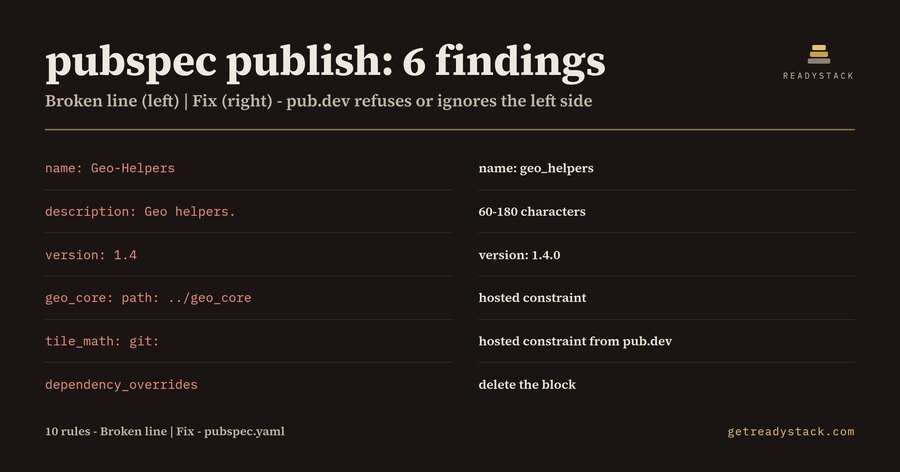
pubspec publish: 6 findings in one 24-line pubspec.yaml - that is what a Dart or Flutter package author gets from the example file before running dart pub publish, and every one of the six is a line that works on the author's own machine.
The reason this matters is written on dart.dev: "a published package lasts forever", and the pub.dev policy "disallows unpublishing packages except for very few cases". A version can be retracted only within 7 days of publication, and a retracted version is still visible with a RETRACTED badge. So the useful moment to read a pubspec.yaml is before the upload, not after.
Here is the example file, a small geo package developed next to two sibling packages:
name: Geo-Helpers description: Geo helpers. version: 1.4 dependencies: geo_core: path: ../geo_core tile_math: git: url: https://github.com/example/tile_math.git dependency_overrides: collection: 1.17.2
pubspec Publish Gate reads it as text and reports six findings, each with its line and the replacement line:
- name: Geo-Helpers - dart.dev says package names are lowercase [a-z0-9_] and do not start with a digit. Fix: name: geo_helpers.
- description: Geo helpers. - 12 characters. dart.dev asks for 60 to 180 characters of plain text. Fix: one sentence saying what the package does.
- version: 1.4 - a version is three numbers separated by dots. Fix: version: 1.4.0.
- geo_core with path: ../geo_core - "you cannot upload a package to the pub.dev site if it has any path dependencies in its pubspec." Fix: publish geo_core first and depend on a hosted constraint.
- tile_math with git: - "Git dependencies are not allowed as dependencies for packages uploaded to pub.dev." Fix: a hosted constraint from pub.dev.
- dependency_overrides with collection: 1.17.2 - this one is the quiet one. It is legal, the resolver accepts it and your tests pass with it. But dart.dev: "your package's dependency overrides are ignored by all users of your package." Whatever the override was fixing, it is not fixed for anyone who adds your package. Fix: delete the block and widen the real constraint under dependencies.
The full rule set is 10 rules, all from the dart.dev pubspec, dependencies and publishing pages: path-dependency, git-dependency, dependency-overrides, publish-to-none, name-invalid, version-format, description-length, sdk-constraint-missing, repository-missing and topics-invalid (at most 5 topics, 2-32 characters).
Three runs of the same engine show that the answer follows the file. The example gives 6 findings. A tile_math package with seven topics and no environment block gives 2: topics-invalid and sdk-constraint-missing. The clean geo_helpers pubspec with a folded description, hosted dependencies and sdk: ^3.4.0 gives 0.
Why not just run dart pub publish and read what comes back? You should, as the last step. But that check happens at the moment of upload, and dependency_overrides are not an upload problem - they are a problem for the people who install the package later.
The extension checks every pubspec.yaml in the workspace on open and on save. The same engine runs on a free web page where you paste a pubspec.yaml and read the same findings; nothing is uploaded. Every finding and fix is free with no key. The full version adds a dated pre-publish report for every pubspec.yaml in a workspace and a CI exit-code gate for release jobs.
15 seconds — what it actually does
Questions people ask
What does pubspec Publish Gate check in a pubspec.yaml?
It checks every pubspec.yaml against 10 rules from the dart.dev pubspec, dependencies and publishing pages: path dependencies, git dependencies, dependency_overrides, publish_to: none, package name, version format, description length, the environment sdk constraint, homepage or repository, and topics. On the example file it reports 6 findings, each with its line number and the exact replacement line.
Who is pubspec Publish Gate for?
Dart and Flutter package authors who are about to run dart pub publish, especially maintainers who develop several packages side by side with path or git dependencies and dependency_overrides. Those lines work on their own machine, but pub.dev refuses the first two at upload and ignores the overrides for every user who adds the package.
Why not just run dart pub publish and see what fails?
A version uploaded to pub.dev is permanent; dart.dev says it can be retracted only within 7 days and stays visible with a RETRACTED badge. dart pub publish checks at the moment of upload, while this extension flags the lines while you edit, including dependency_overrides, which are legal locally but ignored by all users of the published package.
What is free and what does the full version add?
Free, with no key: every finding with its line and replacement, in VS Code and on the web page, for the 10 rules; the example shows 6 findings: name, description, version, path dependency, git dependency and dependency_overrides. The full version adds a dated pre-publish report for every pubspec.yaml in a workspace and a CI exit-code gate for release jobs.
What does a wrong pub.dev release cost compared with checking first?
The cost is a version you cannot delete. pub.dev policy disallows unpublishing except in very few cases, and retraction only works within 7 days of publication, so users can already depend on the broken version. Checking the pubspec.yaml before upload takes seconds, runs locally, and uploads nothing.
Ask about this tool
One question, answered by the person who built it. Your email only if you want the answer sent.