· ReadyStack
Worked example
Real numbers from this tool, line by line.
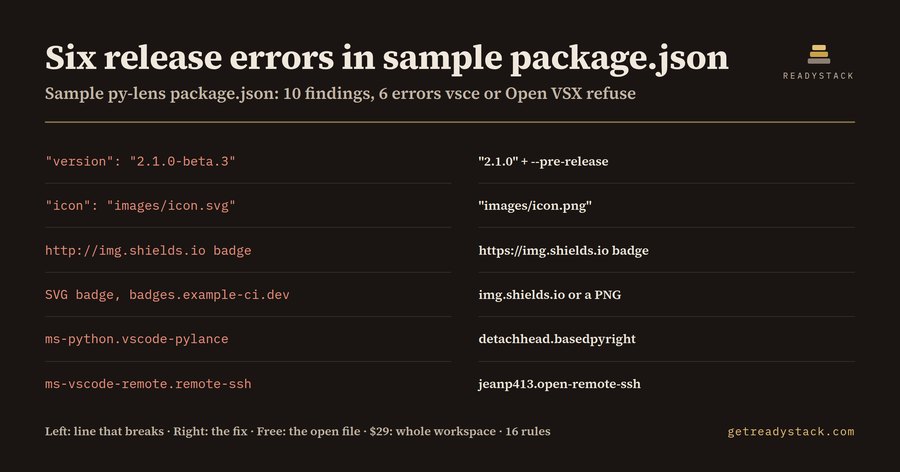
Six release errors in one sample package.json: that is what Open VSX Publish Gate reports for a VS Code extension author who publishes to the Visual Studio Marketplace and wants the same build on Open VSX, where VSCodium, Cursor, Windsurf and Gitpod users install from.
Migrate from Marketplace-only publishing to Open VSX: the date first
The official vsce publishing page now carries this line: "On December 1, 2026, global Personal Access Tokens (PATs) in Azure DevOps are retired." The same page still tells you to create the publishing PAT with Organization set to All accessible organizations. That is a global PAT. If your release job runs vsce publish -p $VSCE_PAT, it stops working on December 1, 2026. The replacement is vsce publish --azure-credential, which signs in with Microsoft Entra ID.
Many teams use that deadline to move the release job anyway, and add Open VSX in the same pull request. That is where the second set of problems shows up.
What the sample package.json contained
The sample is an extension called py-lens. The gate reads the file once and reports 10 findings: 6 errors, 3 warnings and 1 info.
The 6 errors:
- "version": "2.1.0-beta.3" - vsce refuses semver pre-release tags. Use "2.1.0" and publish with --pre-release.
- "icon": "images/icon.svg" - vsce stops with "SVGs can't be used as icons". Use a PNG.
- a badge on http://img.shields.io - vsce wants HTTPS badge URLs.
- an SVG badge from badges.example-ci.dev - that host is not on the vsce trusted list of 32 hosts.
- ms-python.vscode-pylance in extensionDependencies - it returns 404 on open-vsx.org, so VSCodium users cannot install py-lens. The gate suggests detachhead.basedpyright.
- ms-vscode-remote.remote-ssh in extensionPack - also 404 on open-vsx.org. The gate suggests jeanp413.open-remote-ssh.
The 3 warnings: the publish script passes $VSCE_PAT, nothing runs ovsx publish, and there is no repository field. The info finding is the missing license field.
Why vsce alone does not show this
vsce package throws on the first error it meets. Six errors means six rounds of fix, re-run, read the next error. And vsce never checks Open VSX at all: a Pylance dependency packages without a word, then breaks installs in VSCodium. The gate prints every finding with its line and the replacement line in one pass, from 16 rules.
The four-line move to Open VSX
- Sign the Eclipse Publisher Agreement on open-vsx.org and create an access token. Store it as OVSX_PAT.
- Run npx ovsx create-namespace <publisher> -p $OVSX_PAT. Your publisher field is the namespace.
- Add "publish:ovsx": "ovsx publish -p $OVSX_PAT" to scripts.
- In GitHub Actions, HaaLeo/publish-vscode-extension publishes to Open VSX by default. Set registryUrl: https://marketplace.visualstudio.com only on the Marketplace step.
The gate also reads the workflow file. If it sees vsce publish or a Marketplace registryUrl with a VSCE_PAT secret, it flags the PAT. If nothing reaches open-vsx.org, it prints the ovsx step to add.
Free, and what comes next
The free check covers the file you have open, in full, in VS Code or in the web version. Nothing is hidden. The full version adds the whole workspace: every extension manifest and workflow in the repo, a dated migration report, and a CI gate that fails a build adding a new blocker.
Sources: the vsce publishing page on code.visualstudio.com, the Open VSX publishing wiki, the vsce source (package.js), and open-vsx.org/api lookups made on 2026-09-30.
15 seconds — what it actually does
Questions people ask
What does Open VSX Publish Gate check?
It reads a VS Code extension's package.json or its GitHub publish workflow and lists every line that stops vsce or ovsx: an SVG icon, http or untrusted SVG badges, a semver pre-release version, a missing publisher or engines field, Microsoft-only dependencies that return 404 on open-vsx.org, and a VSCE_PAT that global PAT retirement on December 1, 2026 will break. Each finding carries the replacement line.
Who is this for?
VS Code extension authors and small tool teams who publish to the Visual Studio Marketplace and want the same release on Open VSX, where VSCodium, Cursor, Windsurf and Gitpod users install from. It also fits maintainers whose release job still runs vsce publish with a Personal Access Token and who have to switch to Microsoft Entra ID before December 1, 2026.
Why not just run vsce package and see what fails?
vsce throws on the first error it meets, so a manifest with 6 errors takes 6 rounds of fix and re-run. It never checks Open VSX: an extension that lists ms-python.vscode-pylance in extensionDependencies packages fine, yet VSCodium users cannot install it because that ID returns 404 on open-vsx.org. The gate lists all 16 rule hits in one pass.
What is free and what needs a key?
Free, with no key: the open package.json or workflow file is checked in full and every finding shows its line and the fix; the web version does the same for a pasted file. The $29 key adds the whole workspace: every extension manifest and publish workflow in the repo, a dated migration report you can file, and a CI gate that fails a build adding a new blocker.
What does it cost compared with doing it by hand?
The free tier costs nothing and ends the job for one file. The full version is $29 once, one licence key per person or team seat, no subscription. The yardstick: a US software developer's median wage is $65.38 an hour (BLS OEWS 2025), and doing this by hand means reading the vsce trusted-host list and querying open-vsx.org per dependency ID.
Ask about this tool
One question, answered by the person who built it. Your email only if you want the answer sent.