· ReadyStack
Worked example
Real numbers from this tool, line by line.
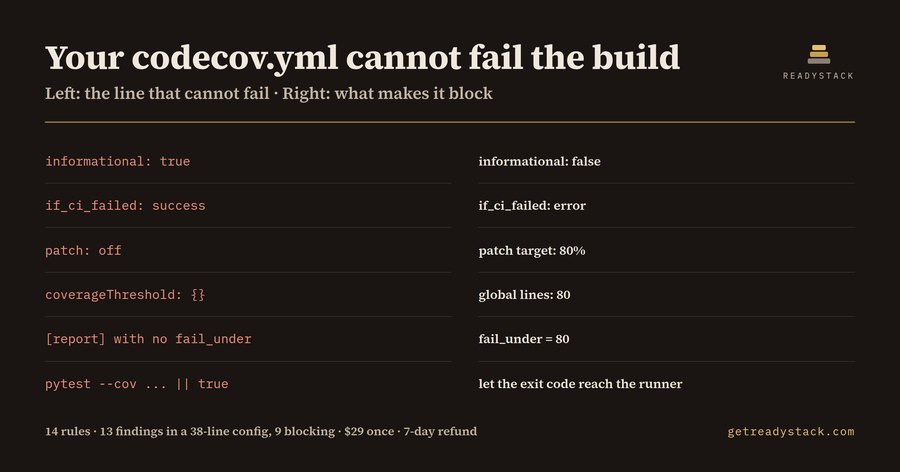
13 findings in a 38-line codecov.yml, 9 of them severe enough that the coverage gate cannot fail a build: that is what Coverage Gate Lint returns on the fixture that ships with it, and it is a list every platform engineer holding an EU CRA or NIS2 evidence file should read before the next review.
Here is the shape of the problem. Your CI prints a coverage percentage. Your branch protection rule requires the coverage check to pass. Both statements are true, and neither one can stop a pull request, because the gate itself is configured to always succeed.
That is not an exotic failure. It is what generated configuration looks like. A snippet written to make a pipeline go green will reach for exactly the settings that guarantee green:
coverage: status: project: default: target: auto informational: true if_ci_failed: success patch: off
Every line there is valid. Codecov accepts it without a warning, because each option is legitimate and someone, somewhere, genuinely wants it. informational: true says post the number, never fail. if_ci_failed: success says pass the coverage check even when the test job died. patch: off says do not gate the lines this pull request actually changed. The badge stays green forever, and the required status check stays green with it.
The Python half of a repo has its own version:
[tool.coverage.report] precision = 2 show_missing = true
No fail_under. coverage report prints a percentage and exits 0 at any coverage, including none. The JavaScript half has coverageThreshold: {}, which Jest and Vitest accept and enforce nothing from. And the CI step has the oldest one of all: pytest --cov=app || true, where the exit code of the only command that could have failed is thrown away before the runner sees it.
None of this is caught by the tools already in the pipeline. A YAML linter checks syntax, and all of it is syntactically perfect. Codecov and coverage.py accept these settings deliberately. A chatbot will explain a snippet you paste into it, but it cannot tell you which of the config files in your monorepo are the disarmed ones.
Coverage Gate Lint reads the configuration file you have open and names the lines where the gate stops being a gate. It carries 14 rules, grouped by where the damage happens: Codecov statuses, coverage.py report sections, Jest and Vitest thresholds, and the CI step itself.
Two fixtures ship with the extension so the claim is checkable before you trust it. clean.yml is a gate that can genuinely fail — explicit targets, a tight threshold, if_ci_failed set to error — and it returns 0 findings. dirty.yml is 38 lines of the configuration described above and returns 13 findings, 9 of them at error severity. Run them yourself; the same engine runs in the browser with nothing to install.
The free tier finishes one job completely: open a coverage config, run the check, and all 14 rules run against it with line numbers and the fix for each finding. Nothing is withheld, nothing is watermarked, there is no usage counter.
What the free tier does not do is scope. The paid tier sweeps every coverage config and CI workflow in the workspace in one pass and writes a dated report of which gates block and which do not — a file you keep. When a CRA or NIS2 review asks for evidence that testing gates were enforced rather than merely present, that report is the artifact. A contract CI engineer bills about $150 an hour to assemble the same thing by reading the files.
15 seconds — what it actually does
Questions people ask
What does Coverage Gate Lint actually do?
It reads a coverage configuration file — codecov.yml, .coveragerc, setup.cfg, pyproject.toml, a Jest or Vitest config, or a CI workflow — and reports every line that makes the coverage gate incapable of failing a build. Fourteen rules cover informational statuses, missing fail_under, empty thresholds, whole-tree omits and discarded exit codes.
Who is it for?
Platform and CI engineers who own a monorepo's test pipeline, and the teams preparing EU Cyber Resilience Act or NIS2 evidence this quarter. If someone asks you to show that your coverage gate blocks merges, and your answer depends on a config file you did not write, this is aimed at you.
Why will a normal linter or a chatbot not catch this?
YAML linters check syntax, and every one of these settings is valid syntax. Codecov and coverage.py accept them without warning, because each is a legitimate option someone deliberately wants. A chatbot can explain one snippet you paste, but it will not tell you which of the config files in your repo are the disarmed ones.
What is free and what is paid?
Free with no licence key: the file you have open is checked against all fourteen rules, with line numbers and the fix for each. Nothing is withheld or watermarked. The paid tier changes scope instead: it sweeps every coverage config and workflow in the workspace and exports a dated report of which gates block.
What would this cost me otherwise?
A contract CI or DevOps engineer bills about $150 per hour, and opening every coverage config and workflow in a mid-sized monorepo to judge whether each gate can fail is most of an afternoon. The extension is $29 once, one licence key per person or CI seat,.
Why not just ask ChatGPT or another AI chat?
A general AI chat answers from training data with a cutoff date, cannot read your repository and names no rule version. Code Coverage Gate - enforce thresholds in CI (lcov, cobertu checks the file you open against 14 rules from a rule set dated 2026-09-20, and points at the exact line with the fix. For a filing, an audit or a client you need that dated result on your own files.
Ask about this tool
One question, answered by the person who built it. Your email only if you want the answer sent.