· ReadyStack
Worked example
Real numbers from this tool, line by line.
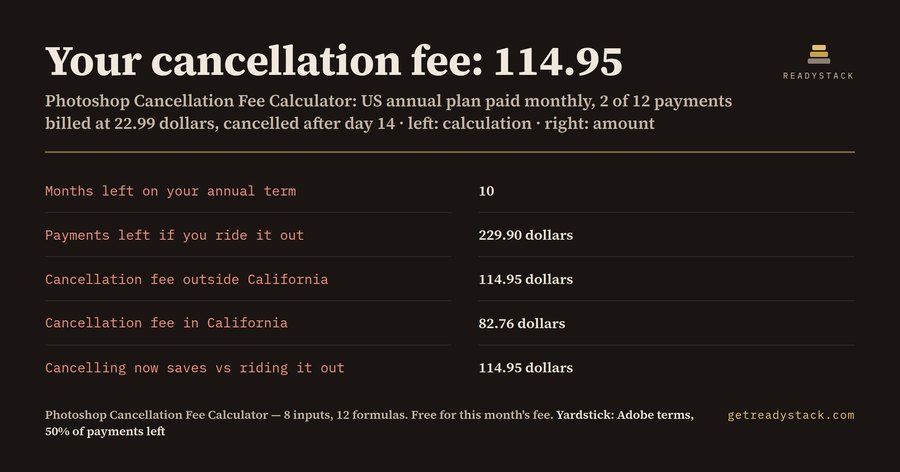
On the Photoshop annual plan paid monthly, a US subscriber with 10 months left at 22.99 a month pays a cancellation fee of 114.95 outside California and 82.76 in California.
| Your plan | Figure |
|---|---|
| Monthly payments already billed | 2 of 12 |
| Months left on your annual term | 10 |
| Payments left if you ride it out | 229.90 |
| Cancellation fee outside California (50%) | 114.95 |
| Cancellation fee in California (30% of the year) | 82.76 |
| Your fee in months of your plan | 5.0 |
The rule Adobe applies
Adobe's Subscription Terms (Effective Date August 1st. After 14 days you are charged a lump sum of 50% of your remaining contract obligation, and the service continues until the end of that month's billing period. For customers in California the lump sum is 30% of the annual commitment instead.
Those two sentences produce two very different curves. Outside California the fee shrinks every month you pay: 50% of what is left. In California the fee is fixed for the whole year: 30% of 12 payments, which on the Photoshop plan is 30% of 275.88, or 82.76, whether you have 11 months left or 1.
The California catch
30% of the year equals 3.6 monthly payments. So once 3 or fewer payments are left, paying the term out costs less than cancelling. Example: 10 payments billed, 2 left. Riding it out costs 2 x 22.99 = 45.98. Cancelling costs 82.76. Cancelling there costs 36.78 more than doing nothing.
Outside California the opposite holds: cancelling always costs half of what is left, so with 2 months left the fee is 22.99.
Three situations, three answers
- Two payments billed, outside California: fee 114.95, payments left 229.90, cancelling now saves 114.95.
- Two payments billed, California: fee 82.76, cancelling now saves 147.14 against riding the term out.
- Ten payments billed, California: fee 82.76, payments left 45.98, riding it out is cheaper by 36.78.
What the cancellation screen does not show you
Adobe's own screen shows the figure only after you start cancelling. It does not show what the fee would be next month, or that a California address changes the formula. The free calculator shows all of that first, with your own monthly price, because promotional prices and older plans differ from the 22.99 list price.
The renewal decision
The fee is only half the question. The other half comes at renewal. Next year on the Photoshop plan, annual paid monthly, is 12 x 22.99 = 275.88. Adobe's plans page lists the Photography plan at 19.99 a month, and it includes Photoshop, so switching at renewal saves 36.00 a year. Prepaying the Photoshop year at 263.88 saves 12.00 against paying monthly. The paid workbook keeps your plan and computes those figures, plus the fee if you wait one more month and the month from which a California customer should ride the term out.
How to use it
Type the monthly payments already billed and the monthly price on your Adobe invoice. Pick whether your billing address is in California. The fee, the fee in months of your plan and the cancel-or-ride-out saving appear at once. Compare the figure with Adobe's cancellation screen before you confirm.
Sources: adobe.com/legal/subscription-terms.html (Effective Date August 1st, 2026) and adobe.com/products/photoshop/plans.html, both checked 2026-10-26. This is arithmetic on Adobe's published terms, not legal advice.
15 seconds — what it actually does
Questions people ask
What does this Photoshop cancellation fee calculator work out?
It takes the monthly payments already billed on your annual plan and your monthly price, counts the months left, and applies Adobe's August 2026 subscription terms: 50% of the remaining payments, or 30% of the annual commitment for California customers. It then shows the fee in months of your plan and whether cancelling now beats paying out the term.
Who is it for?
Anyone in the US on the Photoshop or Creative Cloud annual plan paid monthly who wants to stop before the year ends: freelance illustrators between clients, photographers who switched editors, students and hobby artists. Monthly and prepaid plans carry no early termination charge, so they do not need it.
Why not just read Adobe's help page?
Adobe states the rule in words, and its cancellation screen shows the number only after you start cancelling. Most guides and chatbots quote only the 50% rule. They miss the California clause, 30% of the whole annual commitment, which in the last 3 months of a term is more than the payments left.
What is free and what do I pay for?
The web calculator is free and complete for the question in front of you: months left, payments left, your fee in and outside California, the fee in months and the cancel-or-ride-out saving. The paid Excel workbook adds the renewal planner: fee one month later, the California break-even, next year's cost, the Photography plan switch and the prepaid saving. One payment, no subscription.
How much is at stake?
On the Photoshop plan at 22.99 a month, cancelling with 10 months left costs 114.95 outside California and 82.76 in California, against 229.90 if you pay the term out. Picking the wrong month or plan at renewal repeats that every year: the Photography plan at 19.99 includes Photoshop and costs 36.00 less a year.
Ask about this tool
One question, answered by the person who built it. Your email only if you want the answer sent.