· ReadyStack
Worked example
Real numbers from this tool, line by line.
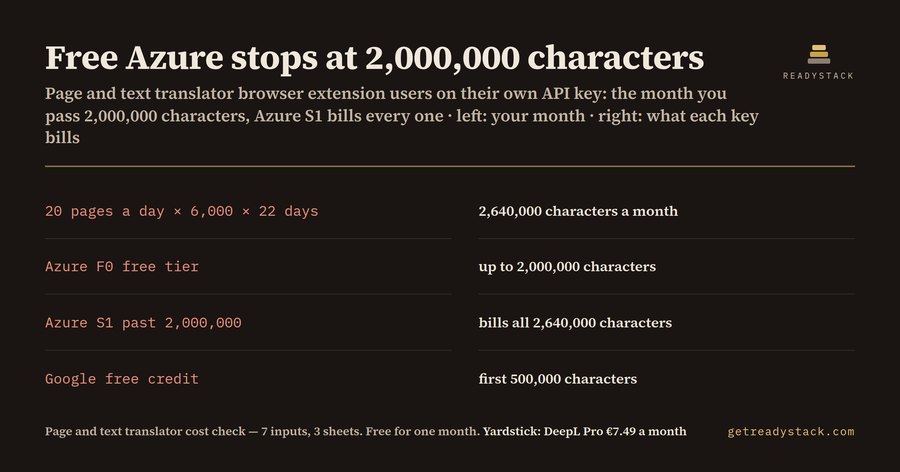
For Firefox and Edge users of a page and text translator browser extension, free Azure stops at 2,000,000 characters a month, and at 20 pages a day you read 2,640,000. On your own Azure key that month costs $26.40, on your own Google key $42.80, against a $7.49 subscription. Here is the result the free check gives for 20 pages a day of 6,000 characters over 22 reading days:
| Line | Result |
|---|---|
| Visible characters per month | 2,640,000 |
| Characters over Google's 500,000 free | 2,140,000 |
| Google Cloud Translation key, per month | $42.80 |
| Azure Translator key, per month | $26.40 |
| Own key beats the $7.49 subscription | No |
| Yearly gap | $226.92 |
| Pages a day that stay free on Azure | 15 |
Why the free-tier line misleads
Both providers advertise free characters, but they mean different things. Google Cloud Translation takes the first 500,000 characters a month off your bill as a $10 credit, then charges $20.00 per million.
Azure Translator does not work that way. Its 2,000,000 free characters exist only on the F0 tier. The S1 pay-as-you-go tier costs $10.00 per million and bills from the first character. So there is a cliff: 15 pages a day is 1,980,000 characters and costs $0 on F0; 20 pages a day is 2,640,000 characters and costs $26.40 on S1, because S1 bills all of them, not only the 640,000 above the line.
The markup you also pay for
Google states that every character you send is billed, including whitespace and HTML tags. Its own example counts a paragraph tag around five Japanese characters as 12 characters. A full-page translator that sends the page's markup pays for the tags too. The check has a markup field for that: at 25% on top of the same 20 pages a day, billed characters become 3,300,000, the Azure key $33.00 and the Google key $56.00.
Three readers, three answers
At 5 pages a day (660,000 characters) the Azure key costs $0 and the Google key $3.20, so your own key beats a $7.49 subscription by $89.88 a year. At 10 pages a day (1,320,000 characters) Azure is still $0, Google $16.40. At 20 pages a day the subscription wins: the cheaper key is $26.40 a month, $226.92 a year more than $7.49 a month.
The answer flips at a line most people never see: about 15 pages a day of 6,000 characters on Azure, and only 3 pages a day on Google before the credit runs out.
How to use the free check
Type your pages a day, page length (a 1,000-word article is about 6,000 characters) and reading days, plus your markup estimate and subscription price. The rates are pre-filled from the providers' pages and editable.
You get 10 results on screen: visible characters, billed characters, characters over Google's free 500,000, the cost on each key, the cheaper key, whether it beats your subscription, the yearly gap, and the pages a day that fit each free tier. Nothing is uploaded; it runs in your browser.
What the file adds
The free check covers one month. The .xlsx keeps a year: a 12-month log where you type each month's real billed characters from Google Cloud Billing or Azure Cost Management, every month priced on both keys, months over Azure's 2,000,000 line flagged, and the year's key cost set against 12 months of your subscription. It is the same spreadsheet formulas you see on the page, in your own file.
Sources: cloud.google.com/translate/pricing (NMT text translation) and the Azure retail prices API for Translator Text, both read 2026-10-29.
15 seconds — what it actually does
Questions people ask
What does this page and text translator browser extension cost check tell me?
It turns your reading habit into billed characters per month and prices them on your own Google Cloud Translation key and your own Azure Translator key, at the rates both providers publish. At 20 pages a day of 6,000 characters over 22 days that is 2,640,000 characters: $42.80 on Google, $26.40 on Azure S1, so a $7.49 subscription is cheaper.
Who is this for?
Firefox and Edge users who translate web pages or selected text every day and are deciding between paying a translator extension subscription and pasting their own API key into an extension that accepts one. It also fits anyone who got a first Azure or Google Cloud bill after their reading grew.
Why not just read the provider's free-tier line?
Because the two free tiers work differently. Google takes 500,000 characters off every month as a $10 credit. Azure's 2,000,000 free characters exist only on the F0 tier; on S1 every character is billed. At 15 pages a day Azure costs $0, at 20 pages a day $26.40. The free-tier headline does not show that cliff.
What is free on this page?
The whole check for one month of your reading: visible characters, billed characters with your markup estimate, the Google cost, the Azure cost, the cheaper key, whether it beats your subscription, the yearly gap, and how many pages a day fit each free tier. Nothing is hidden or locked on screen.
What does the paid file add?
The .xlsx keeps twelve months. You type each month's real billed characters from your Google Cloud or Azure billing page, and every month is priced on both keys, months over Azure's 2,000,000 line are flagged, and the year's total is set against twelve months of your subscription. The browser check covers one month; the file is your own record for the year.
Ask about this tool
One question, answered by the person who built it. Your email only if you want the answer sent.