· ReadyStack
Worked example
Real numbers from this tool, line by line.
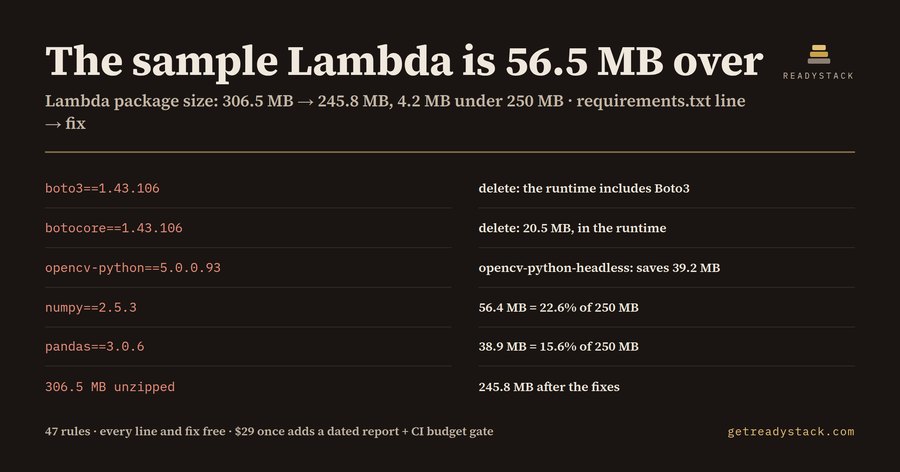
The sample invoice-OCR Lambda in this tool unzips to 306.5 MB, 56.5 MB over the 250 MB AWS Lambda limit, and it is the kind of requirements.txt a Python developer shipping .zip functions writes in an afternoon: boto3, botocore, numpy, pandas, opencv-python and requests.
The limit is written on the AWS Lambda quotas page. A .zip deployment package may be 50 MB zipped when you upload it through the Lambda API, SDKs or console; larger archives go through Amazon S3. The contents, unzipped, may not pass 250 MB, and that figure includes layers and custom runtimes. Container images get 10 GB uncompressed. So a layer does not buy space: moving numpy into a layer moves the same 56.4 MB to a different line of the same bill.
Here is what the tool reports for the sample, line by line, using sizes measured on 2026-09-30 from the PyPI cp312 manylinux x86_64 wheel of each package (the sum of the file sizes inside the wheel) and from the npm registry's unpackedSize:
- opencv-python 5.0.0.93: 189.5 MB, 75.8% of the limit on its own.
- numpy 2.5.3: 56.4 MB, 22.6%.
- pandas 3.0.6: 38.9 MB, 15.6%.
- botocore 1.43.106: 20.5 MB, 8.2%.
- boto3 1.43.106: 1.0 MB.
- requests 2.34.2: 0.2 MB.
Total: 306.5 MB. Three of those lines have a fix that does not change your code.
First, boto3 and botocore. The Lambda Python runtime already includes the SDK for Python (Boto3); AWS says so on the Python runtime page. Bundling your own copy is only worth it when you need a newer version than the runtime ships. Deleting the two lines saves 21.5 MB.
Second, opencv-python. Its own README describes opencv-python-headless as the package for server (headless) environments, with no GUI functionality. A Lambda has no screen. Swapping the line to opencv-python-headless==5.0.0.93 takes the package from 189.5 MB to 150.3 MB, which saves 39.2 MB.
After those three lines the sample measures 245.8 MB: 4.2 MB under the limit. The tool prints that number in the same finding, so you know before the build whether the fixes are enough or whether the function belongs in a container image.
The zipped side matters too. The same wheels download at 114.8 MB zipped, above the 50 MB direct-upload limit, so the tool also tells you to upload the archive through S3.
Node projects get the same treatment from package.json. The Node.js runtimes include the AWS SDK for JavaScript v3, so @aws-sdk/client-* lines are flagged the same way as boto3. The old aws-sdk v2 package measures 98.2 MB unpacked and is not the SDK the runtime ships. Build tools listed under dependencies instead of devDependencies are a quieter leak: aws-cdk-lib alone is 137.1 MB, and npm install --omit=dev would leave it out.
Some packages cannot be saved. The torch 2.14.1 wheel is 1144.2 MB unzipped and tensorflow 2.21.0 is 1873.3 MB; either one is over 250 MB by itself. For those the tool says it plainly: set PackageType: Image and deploy a container image.
What it does not do: it counts the lines you list. A hand-written requirements.txt leaves out transitive dependencies, so run it on pip freeze output when you want the full picture. Packages outside the 47-rule size table are named in the finding and not counted, instead of being guessed.
The free part is complete: the ranking, the total, the zipped check and the fix for every line, in VS Code or on the web page, with no key. The paid licence covers the next job, which is keeping the budget in a pull request: a dated size-budget report, a CI gate with your own MB budget and team keys.
15 seconds — what it actually does
Questions people ask
What does Lambda Package Size Budget actually do?
It reads requirements.txt or package.json, looks up the measured unzipped size of each listed dependency, and compares the total with the 250 MB AWS Lambda limit for .zip functions, layers included. Each line gets a fix: delete boto3 because the runtime ships it, swap opencv-python for opencv-python-headless, move build tools to devDependencies, or deploy torch as a container image.
Who is this for?
Python and Node.js developers who deploy AWS Lambda functions as .zip archives with SAM, Serverless Framework, CDK or plain zip, and who have hit, or are close to, the 250 MB unzipped limit. It suits a team lead who wants the size budget checked in every pull request before a deploy fails in the pipeline.
Why not ask a chatbot or just run du on the build folder?
A chatbot guesses package sizes from memory and often forgets that layers count toward the same 250 MB. du only works after a full Linux build and does not say which line to change. This tool uses sizes measured on 2026-09-30 from PyPI cp312 x86_64 wheels and npm, and names the line and the fix.
What is free and what does the paid version add?
Free, with no key: every listed dependency ranked by MB, the total against 250 MB, the 50 MB zipped upload check, and the fix for each line, in the editor and on the web page. The $29 one-time licence adds a dated size-budget report for the pull request, a CI gate with your own MB budget, and team licence keys.
What does it cost compared with doing it by hand?
The licence is $29 once. A developer hour at the BLS 2025 median wage for software developers is $65.38. Working out package sizes by hand means building on Linux, unzipping, running du per folder and mapping folders back to requirement lines. In the bundled sample the tool finds 60.7 MB of savings across three lines.
Ask about this tool
One question, answered by the person who built it. Your email only if you want the answer sent.