· ReadyStack
Worked example
Real numbers from this tool, line by line.
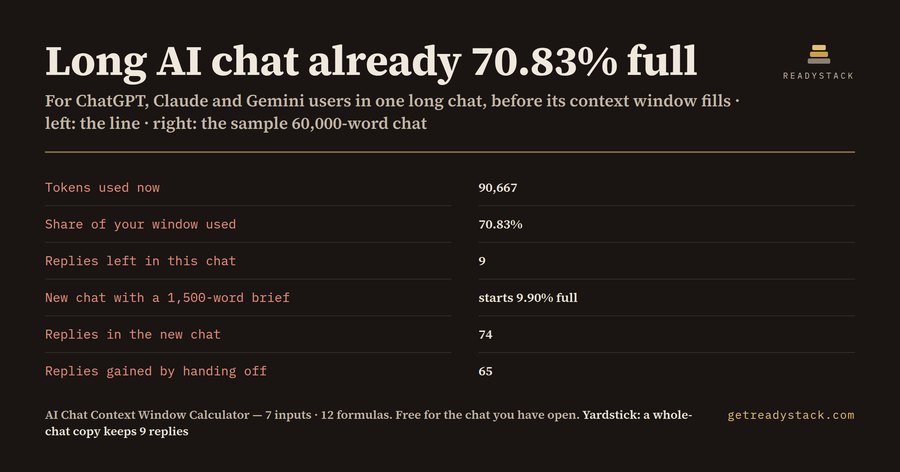
If you keep one long working chat with ChatGPT, Claude or Gemini, a 60,000-word conversation with 8,000 words of files is already 70.83% of a 128k Gemini AI Plus window. That is 80,000 + 10,667 = 90,667 tokens. At 900 words per exchange and a hand-off point at 80% of the window, 9 replies are left.
| Line | Result |
|---|---|
| Tokens used now | 90,667 |
| Share of the window used | 70.83% |
| Replies left in this chat | 9 |
| New chat with a 1,500-word brief starts | 9.90% full |
| Replies in the new chat | 74 |
| Replies gained by handing off | 65 |
Where the tokens come from
OpenAI's help center gives the rule of thumb for English: 1 token is about 4 characters, and 100 tokens are about 75 words. So the calculator divides your word count by 0.75. 60,000 words become 80,000 tokens. The files and custom instructions the chat carries count too: 8,000 words become 10,667 tokens. Other languages use more tokens per word, so the words-per-token cell is yours to lower.
What the window is on your plan
Google publishes the Gemini windows: 32k tokens without an AI plan, 128k on AI Plus, 1 million on AI Pro and AI Ultra. Anthropic publishes the Claude paid-plan windows: 1M or 500K for the models it lists, 200K for the rest. For ChatGPT, type the window OpenAI shows for your plan and model. These were read on 26 October 2026 and sit in the workbook with their sources.
What happens past the window
Google says replies past the window may not take into account all the content provided, or may miss connections across it. Claude paid plans with code execution summarise earlier messages to make room. Either way, your early instructions and decisions are what go first. The hand-off point is the share of the window where you choose to stop; the example uses 80%, and you can set your own.
Why copying the whole chat does not help
A common fix is to carry the whole conversation into a new chat. Every token comes along. In the example the new chat would start at the same 90,667 tokens, with the same 9 replies before the hand-off point.
A 1,500-word brief with the same files is different. The new chat starts at 12,667 tokens, 9.90% of the window. With 900 words per exchange it gives 74 replies before the hand-off point: 65 more than staying.
Three chats, three answers
A client codebase review on Claude with a 200K window, 95,000 words and 30,000 words of files: 83.33% used, past the hand-off point, no replies left. A new chat with the same files and a 1,500-word brief gives 63 replies.
Tax questions on Gemini without a plan, 21,000 words and 1,500 words of files: 93.75% of 32k. A 600-word brief gives 28 replies.
Try it on your own chat
The free calculator runs in your browser. Paste the conversation text to count its words, pick your plan's window, and read your replies left. Nothing is uploaded and no account is needed.
The workbook keeps the same 12 formulas. It adds a 40-row chat log that marks each running chat Keep going, Write the brief or Hand off now. It also has a hand-off brief template with a word budget for each of its 6 sections, and the plan table with sources. You already pay for the window: Claude Pro is $20 a month billed monthly, Google AI Pro $19.99 a month.
15 seconds — what it actually does
Questions people ask
What does this AI chat context window calculator work out?
You type the words in your long ChatGPT, Claude or Gemini chat, the files and instructions it carries, and your words per exchange. It turns them into tokens with OpenAI's rule of 100 tokens per 75 words, shows how full your plan's window is, how many replies are left before your hand-off point, and how many a fresh chat started with a short brief gives back.
Who is this hand-off calculator for?
People who keep one long working chat with ChatGPT, Claude or Gemini for a project, a book, a codebase or a client file, and notice it forgetting early instructions. It is for the moment you ask whether to keep going or hand off to a new chat, and how much of the old chat to carry over.
Why not just use a free token counter or paste the whole chat into a new one?
A token counter tells you a count, not how many replies remain at your plan's window. Pasting the whole chat into a new one carries all the tokens with it: in the worked example the new chat starts 70.8% full with 9 replies left, while a 1,500-word brief starts it at 9.9% with 74 replies.
What is free on the page?
The whole answer for one chat, in your browser, with no account: tokens used, percent of the window, replies left before your hand-off point, the start size of a new chat with your brief, and replies gained. Nothing is sent to us. The page keeps working for every chat you check.
What does the paid workbook add, and what does it cost against the plans?
The $21 one-time .xlsx keeps the same live formulas, a 40-chat log that flags which running chats to hand off now, a hand-off brief template with a word budget per section, and the published window of each Claude and Gemini plan with its source. Claude Pro is $20 a month billed monthly; Gemini AI Pro is $19.99 a month.
Ask about this tool
One question, answered by the person who built it. Your email only if you want the answer sent.