Claude Code skills · updated 2026-10-03
pyproject.toml release skill for Claude Code — PEP 639 license, Python EOL
Every pyproject.toml line PEP 639 or setuptools will reject, before you publish
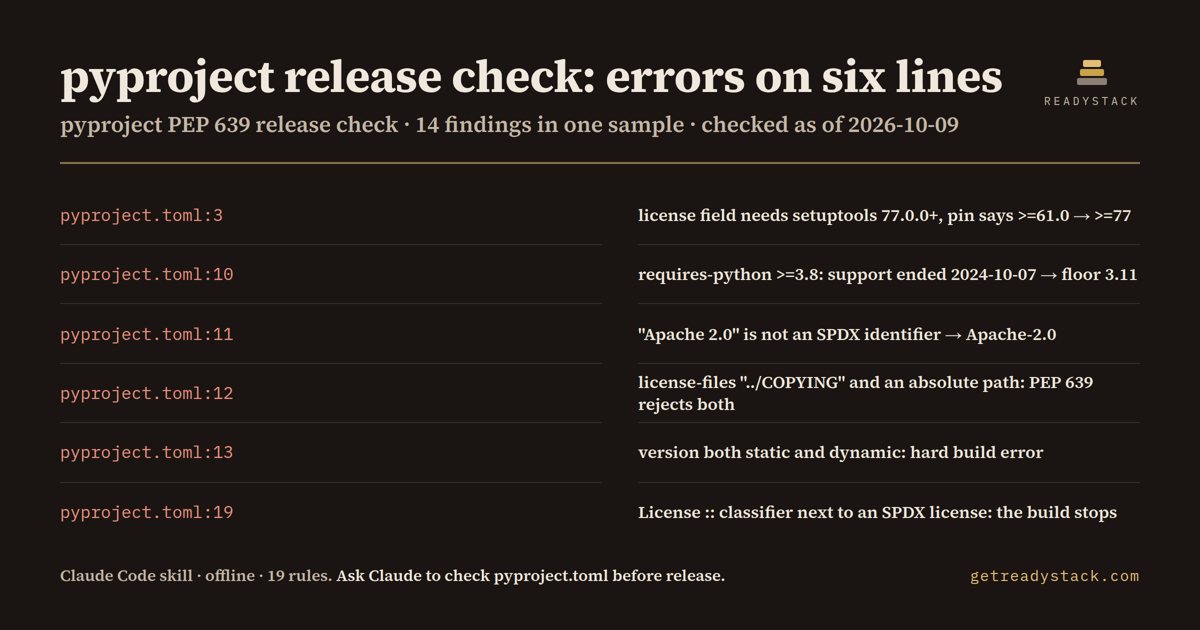
On the bundled sample: 14 findings (8 errors, 5 warnings, 1 info) in 1 file from 19 rules, including "Apache 2.0" for Apache-2.0 and a setuptools>=61.0 pin.
Get it on Whop - $12 onceGet it on Gumroad
Who it's for
For Python library maintainers and teams who publish to PyPI and are moving license metadata to PEP 639.
What breaks, and when
Under PEP 639 setuptools refuses an SPDX license next to a License :: classifier and the build stops; Python 3.8 support ended 2024-10-07 and Python 3.10 reaches end of life on 2026-10-31.
What it printed on the bundled example
== pyproject.toml Release Gate (PEP 639) — 14 findings (8 errors, 5 warnings, 1 info) in 1 file · 19 rules
  ERROR pyproject.toml:3  [setuptools_too_old_for_spdx]
        license = "Apache 2.0" needs setuptools 77.0.0+, but [build-system] requires says "setuptools>=61.0". A fresh build box can resolve an older setuptools that drops the field. → Raise the build requirement to setuptools>=77.
  WARN  pyproject.toml:6  [readme_missing]
        No readme, so the project page on PyPI opens with an empty description. → Point readme at your README file so the PyPI page is not blank.
  INFO  pyproject.toml:6  [urls_missing]
        No [project.urls], so the PyPI sidebar has no Source, Issues or Changelog link. → Add Homepage / Source / Issues so the PyPI sidebar has links.
  WARN  pyproject.toml:7  [project_name_not_normalized]
        name = "Invoice_Toolkit" normalises to "invoice-toolkit" on PyPI, so the page, the install command and your docs can all disagree. → Lower-case it and use hyphens so the name you publish is the name people type.
What you get
- SKILL.md, an offline Node scanner and the 19-rule table
- file:line, the PEP behind it and the exact fix line
- SPDX and Python floor fixes, applied after you agree
- CI: node scripts/scan.js . exits 1 on any error
Install
Unzip into ~/.claude/skills/ (all projects) or your-repo/.claude/skills/ (one repo), then ask Claude Code: "I'm about to publish a new release of our Python library to PyPI. Can you check our pyproject.toml packaging metadata for anything the build or PyPI will reject, especially the license fields? Don't edit anything yet.". Needs Node 16+.
unzip pyproject-pep-639-release-check.zip -d ~/.claude/skills/
Ask Claude
“I'm about to publish a new release of our Python library to PyPI. Can you check our pyproject.toml packaging metadata for anything the build or PyPI will reject, especially the license fields? Don't edit anything yet.”
What it does not do
Does not build your package, run pip or call PyPI; not license advice. No network, no edits without your OK.
FAQ
What is a Claude Code skill?
A folder with a SKILL.md and scripts that Claude Code loads when your request matches it. You ask in plain words and Claude runs the scanner the skill carries.
How is this different from asking Claude without the skill?
The skill carries a dated rule table and a scanner that reads every file, so Claude quotes the exact date and line instead of answering from memory.
Does it send my code anywhere?
Does not build your package, run pip or call PyPI; not license advice. No network, no edits without your OK.
How do I install it?
Unzip into ~/.claude/skills/ (all projects) or your-repo/.claude/skills/ (one repo), then ask Claude Code: "I'm about to publish a new release of our Python library to PyPI. Can you check our pyproject.toml packaging metadata for anything the build or PyPI will reject, especially the license fields? Don't edit anything yet.". Needs Node 16+.
What do I get when I buy?
The zip. On Whop it is in your library as a download lesson with the zip attached; on Gumroad it is the product file.