Claude Code skills · updated 2026-10-03
Conda licence skill for Claude Code — defaults channel and pkgs/main lines
6 lines in one environment.yml pulling from Anaconda's licensed repo, with fixes
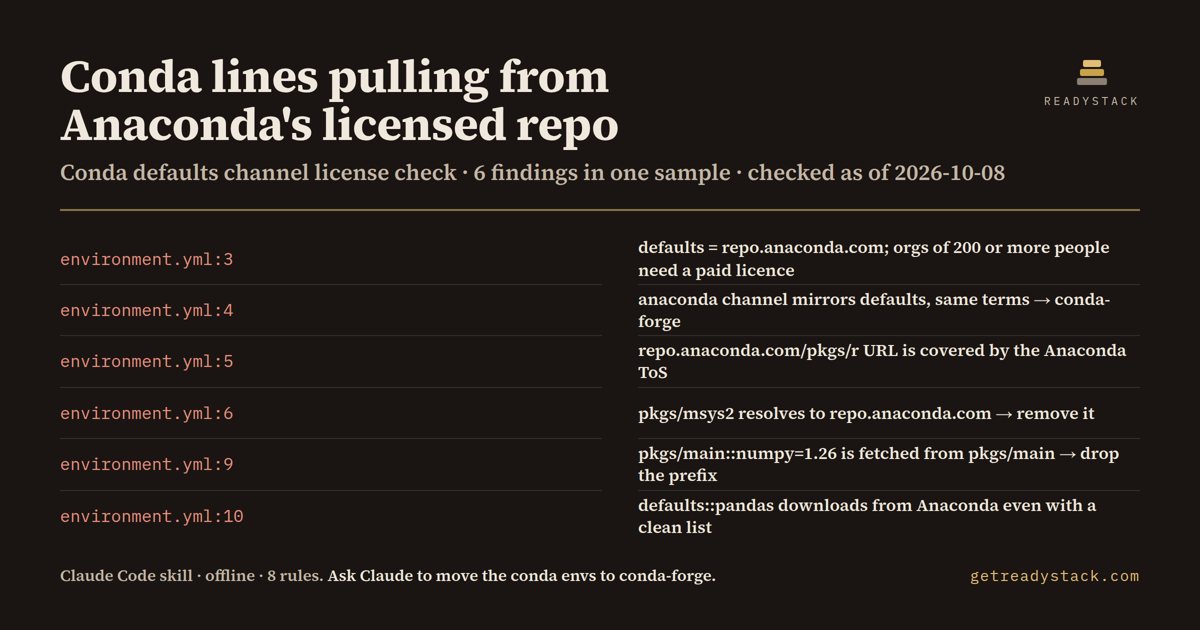
On the bundled sample environment.yml: 6 findings (6 errors, 0 warnings) from 8 rules - defaults, anaconda, a repo.anaconda.com/pkgs/r URL, pkgs/msys2, pkgs/main::numpy=1.26 and defaults::pandas. Checked as of 2026-10-08.
Get it on Whop - $12 onceGet it on Gumroad
Who it's for
For teams in organisations with 200 or more people who build Python or R environments with conda.
What breaks, and when
Organisations with 200 or more people need a paid Anaconda licence to use defaults. A conda-forge switch fails if one defaults:: or pkgs/main:: prefix stays.
What it printed on the bundled example
== Conda License Lint: Anaconda defaults channel — 6 findings (6 errors, 0 warnings) in 1 file · 8 rules
  ERROR environment.yml:3  [defaults-channel]
        defaults channel: "defaults" in channels — defaults is short-hand for repo.anaconda.com/pkgs/main and pkgs/r (plus pkgs/msys2 on Windows); organisations with 200 or more people need a paid Anaconda licence to use it. Fix: replace with - conda-forge and add - nodefaults.
  ERROR environment.yml:4  [anaconda-channel]
        anaconda channel (anaconda.org mirror): "anaconda" in channels — the anaconda channel on anaconda.org is a mirror of defaults and is subject to the same terms. Fix: replace with - conda-forge.
  ERROR environment.yml:5  [repo-anaconda-url]
        repo.anaconda.com URL: "https://repo.anaconda.com/pkgs/r" in channels — repo.anaconda.com/pkgs/main, pkgs/r and pkgs/msys2 are the defaults channels covered by the Anaconda Terms of Service. Fix: replace with conda-forge (or the repository URL your Anaconda licence gives you).
  ERROR environment.yml:6  [pkgs-channel-name]
        pkgs/main, pkgs/r or pkgs/msys2 short name: "pkgs/msys2" in channels — pkgs/main, pkgs/r and pkgs/msys2 resolve to repo.anaconda.com, the licensed defaults repository. Fix: remove it and use - conda-forge.
What you get
- SKILL.md, an offline Node scanner (scripts/scan.js) and the 8-rule table
- file:line, the reason and the conda-forge replacement for every Anaconda source
- channel:: prefixes, .condarc default_channels and missing nodefaults
- CI: node scripts/scan.js . exits 1 on any error
Install
Unzip into ~/.claude/skills/ (all projects) or your-repo/.claude/skills/ (one repo), then ask Claude Code: "Are our conda environments still pulling anything from the Anaconda defaults channel? Don't edit anything yet.". Needs Node 16+.
unzip conda-defaults-channel-license-check.zip -d ~/.claude/skills/
Ask Claude
“Are our conda environments still pulling anything from the Anaconda defaults channel? Don't edit anything yet.”
What it does not do
It does not run conda or decide whether your organisation needs a licence; it reads text files only. No network calls, no edits without your OK.
FAQ
What is a Claude Code skill?
A folder with a SKILL.md and scripts that Claude Code loads when your request matches it. You ask in plain words and Claude runs the scanner the skill carries.
How is this different from asking Claude without the skill?
The skill carries a dated rule table and a scanner that reads every file, so Claude quotes the exact date and line instead of answering from memory.
Does it send my code anywhere?
It does not run conda or decide whether your organisation needs a licence; it reads text files only. No network calls, no edits without your OK.
How do I install it?
Unzip into ~/.claude/skills/ (all projects) or your-repo/.claude/skills/ (one repo), then ask Claude Code: "Are our conda environments still pulling anything from the Anaconda defaults channel? Don't edit anything yet.". Needs Node 16+.
What do I get when I buy?
The zip. On Whop it is in your library as a download lesson with the zip attached; on Gumroad it is the product file.