Claude Code skills · updated 2026-10-03
MinIO to SeaweedFS skill for Claude Code — compose lines and K8s fixes
Every MinIO line SeaweedFS will not run, with file:line and the replacement
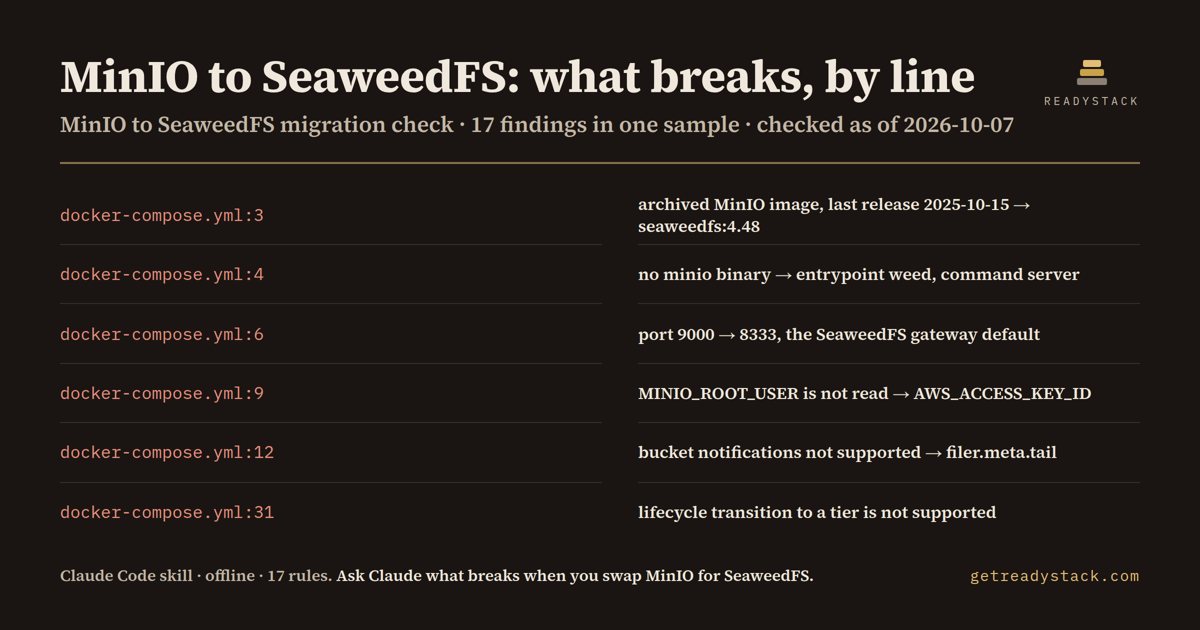
On the bundled docker-compose.yml: 17 findings (1 error, 11 warnings, 5 info) in 1 file from 17 rules - the archived MinIO image, port 9000 vs 8333, MINIO_ROOT_* keys, two bucket notifications.
Get it on Whop - $12 onceGet it on Gumroad
Who it's for
For platform and DevOps teams who run MinIO in docker-compose or Kubernetes and are moving to SeaweedFS.
What breaks, and when
The minio/minio repository is archived and the last community release is RELEASE.2025-10-15T17-29-55Z, so the image gets no updates; on SeaweedFS the MINIO_* keys are not read and bucket notifications stop.
What it printed on the bundled example
== SeaweedFS Migration Lint — 17 findings (1 error, 11 warnings, 5 info) in 1 file · 17 rules
  ERROR docker-compose.yml:3  [minio-image]
        MinIO server image. The minio/minio GitHub repository is archived and its README says it is no longer maintained; the last community release is RELEASE.2025-10-15T17-29-55Z and the community edition is now source-only, so this image gets no updates. Fix: image: chrislusf/seaweedfs:4.48 (Apache-2.0, released 2026-09-28) with entrypoint weed.
  WARN  docker-compose.yml:4  [minio-server-cmd]
        minio server command. SeaweedFS has no minio binary; one process can run master, volume server, filer and the S3 gateway. Fix: entrypoint: weed · command: server -dir=/data -s3 (or weed s3 -filer=filer:8888 for a split setup).
  WARN  docker-compose.yml:4  [minio-console]
        MinIO Console setting. SeaweedFS has no MinIO Console; its web admin is a separate process. Fix: weed admin -masters=master:9333 (Admin UI, default port 23646) and drop the 9001 port mapping.
  WARN  docker-compose.yml:6  [minio-port-9000]
        Port 9000 is MinIO's S3 API port. The SeaweedFS S3 gateway listens on 8333 by default. Fix: Map 8333:8333, or start with -s3.port=9000 to keep the old client port.
What you get
- SKILL.md, an offline Node scanner (scripts/scan.js) and the 17-rule table
- file:line, severity and the SeaweedFS replacement line for every MinIO setting
- Flags notifications, replication, transitions, S3 Select
- CI: node scripts/scan.js . exits 1 on any error
Install
Unzip into ~/.claude/skills/ (all projects) or your-repo/.claude/skills/ (one repo), then ask Claude Code: "We want to move our object storage from MinIO to SeaweedFS. What in this repo has to change? Don't edit anything yet.". Needs Node 16+.
unzip minio-seaweedfs-migration-check.zip -d ~/.claude/skills/
Ask Claude
“We want to move our object storage from MinIO to SeaweedFS. What in this repo has to change? Don't edit anything yet.”
What it does not do
It does not start containers, call MinIO or SeaweedFS, or copy data; it reads text files only. No network calls, no edits without your OK.
FAQ
What is a Claude Code skill?
A folder with a SKILL.md and scripts that Claude Code loads when your request matches it. You ask in plain words and Claude runs the scanner the skill carries.
How is this different from asking Claude without the skill?
The skill carries a dated rule table and a scanner that reads every file, so Claude quotes the exact date and line instead of answering from memory.
Does it send my code anywhere?
It does not start containers, call MinIO or SeaweedFS, or copy data; it reads text files only. No network calls, no edits without your OK.
How do I install it?
Unzip into ~/.claude/skills/ (all projects) or your-repo/.claude/skills/ (one repo), then ask Claude Code: "We want to move our object storage from MinIO to SeaweedFS. What in this repo has to change? Don't edit anything yet.". Needs Node 16+.
What do I get when I buy?
The zip. On Whop it is in your library as a download lesson with the zip attached; on Gumroad it is the product file.