Claude Code skills · updated 2026-10-03
30-Day Content Calendar Skill
30 dated posts from one niche, each with an idea, format, hook and CTA
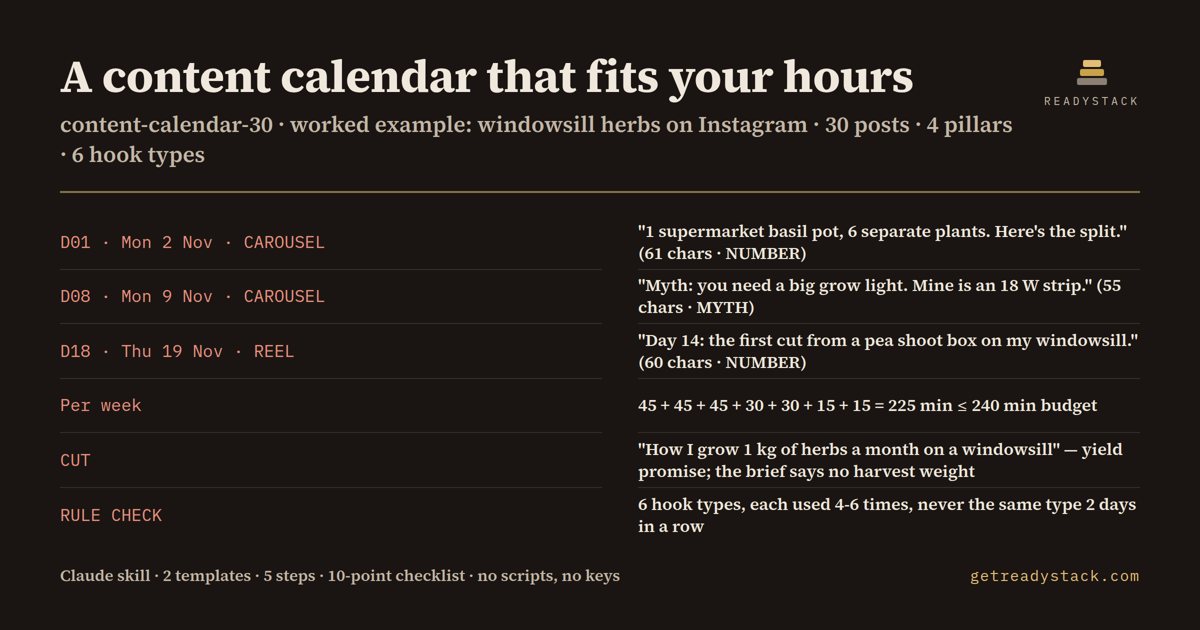
In the included example: 30 posts for a windowsill-herbs Instagram account, Mon 2 Nov to Tue 1 Dec 2026, every hook 65 characters or less, 225 minutes a week against a 240-minute budget.
Get it on Whop - $19 onceGet it on Gumroad
Who it's for
Built for solo creators and small brands planning next month's posts in the hours they have.
What breaks, and when
A month planned without your real hours stalls by week two, or fills with posts you have no time to film.
The worked example it ships
30-DAY POSTING CALENDAR — @smallspacegreens (windowsill herbs and greens in a small apartment)
Mon 2 Nov 2026 → Tue 1 Dec 2026 · 30 posts · 1 a day · Instagram (Reels also to TikTok)
Limits: hook ≤ 70 characters · 4 pillars · 6 hook types, none 2 days in a row · ≤ 240 min a week

1) PILLARS (from the brief)
P1 START — supermarket pots and kitchen scraps brought back to life · 7 posts
P2 LIGHT — windowsill light, the 18 W strip and the Windowsill Wednesday series · 9 posts
P3 EAT   — harvesting and cooking what the sill grows · 7 posts
P4 FIX   — mistakes Maya made and what fixed them · 7 posts

2) WEEKLY RHYTHM + TIME (Maya's minutes per format)
Mon CAROUSEL 30 · Tue REEL 45 · Wed PHOTO 15 (Windowsill Wednesday) · Thu REEL 45
Fri CAROUSEL 30 · Sat PHOTO 15 · Sun REEL 45 (Sunday Sprout day)
Per week: 45 + 45 + 45 + 30 + 30 + 15 + 15 = 225 min ≤ 240 min budget
Days 29-30: 30 + 45 = 75 min · 30 days: 4 × 225 + 75 = 975 min

3) THE CALENDAR
— Week 1 —
D01 · Mon 2 Nov · CAROUSEL · P1 START · Teach
  Idea: Split one supermarket basil pot into separate plants, one slide per step
  Hook: "1 supermarket basil pot, 6 separate plants. Here's the split."  (61 chars · NUMBER)
  CTA:  Save this for your next supermarket pot.
D02 · Tue 3 Nov · REEL · P4 FIX · Show
  Idea: The seedling tray that died from overwatering last spring, and what Maya does now
What you get
- 4 pillars and a weekly rhythm, your minutes per format summed against your budget
- 30 dated posts: idea, format, job (Teach/Show/Ask/Offer), hook ≤ 70 characters, CTA
- 6 hook types, never the same type 2 days in a row, character count written
- Counts, a CUT list with reasons, 2 templates, 1 worked example
Install
Unzip into ~/.claude/skills/ (Claude Code) or upload it as a custom skill in the Claude app, then ask: "Plan my posts for next month". Nothing to run.
unzip content-calendar-30.zip -d ~/.claude/skills/
Ask Claude
“Plan my posts for next month”
What it does not do
It does not write full captions, schedule or publish posts, read your analytics or invent numbers: if something is missing it asks one question.
FAQ
What is a Claude skill?
A folder with a SKILL.md, a method, fill-in templates and a worked example. Claude loads it when your request matches and follows that method instead of improvising.
How is this different from asking Claude without the skill?
The skill carries a fixed method, fill-in templates and a full worked example, so Claude follows the same structure every time instead of improvising a new one.
What does it not do?
It does not write full captions, schedule or publish posts, read your analytics or invent numbers: if something is missing it asks one question.
How do I install it?
Unzip into ~/.claude/skills/ (Claude Code) or upload it as a custom skill in the Claude app, then ask: "Plan my posts for next month". Nothing to run.
What do I get when I buy?
The zip. On Whop it is in your library as a download lesson with the zip attached; on Gumroad it is the product file.