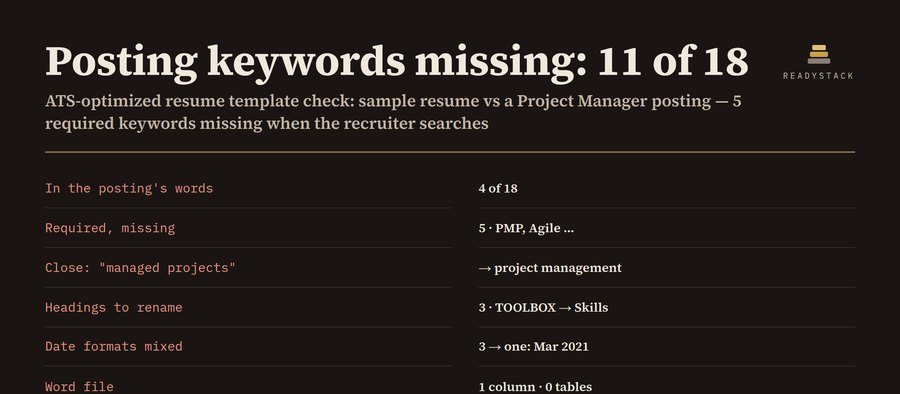
Your resume and the job
Download your ATS-optimized resume
Built from the resume above: standard headings (Summary, Work Experience, Education, Skills), icons and column breaks removed, plain bullets, one column, US Letter, 0.75″ margins. Tick only the keywords you really have — they go into Skills.
Preview: the text an ATS reads, in order
Pro: one resume version per application
- Save every application: company, job title, posting, the resume version you sent, its keyword count
- Status board: saved · applied · interview · offer · closed, with a follow-up date 7 days after you apply
- Keyword bank: which keywords show up across all your saved postings, and which your resume still lacks
- Word file for any saved version, a tracker CSV for Excel or Google Sheets, a JSON backup you can restore
$9 per month or $49 per year. Get Pro — $9 per month $49 per year
Save this application
| Company | Job | Status | Follow up | Keywords |
|---|
Keyword bank across your saved postings
What this checks, and what it does not
Keywords: skills, tools and certifications the posting names, plus 2–3 word phrases it repeats, required ones first. “Exact” = the posting’s words appear in your resume; “close” = only another form (“managed projects” for “project management”, “Excel” for “Microsoft Excel”, PMP without “Project Management Professional”). Layout: non-standard headings, mixed date formats, icon characters, lines split into columns, missing email, phone, City, ST or LinkedIn URL, and any keyword used more than 4 times (stuffing).
It does not log in to any ATS, does not score you against other applicants, and cannot promise an interview. Add only skills you have. Your text never leaves this browser.