· ReadyStack
Worked example
Real numbers from this tool, line by line.
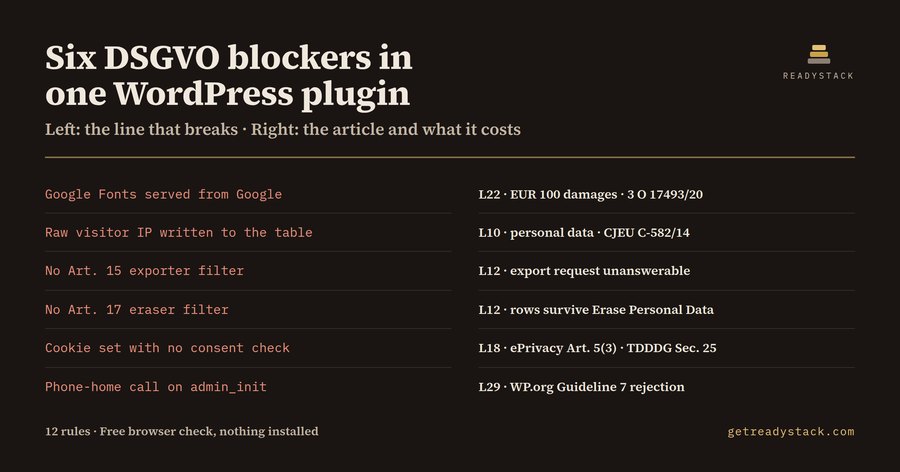
Twelve findings in a 38-line WordPress contact-form plugin — eight of them errors — is what a German agency developer gets back the first time an AI-written plugin is checked against the privacy duties that fall on the plugin author.
It is what the bundled fixture produces. Ask any assistant for "a WordPress form plugin that logs submissions" and you get roughly the same file every time: a custom table, the visitor's IP written straight into it, a cookie so the form is not shown twice, a Google Font for the labels, a charting library from a CDN, a GA tag, and a small call home on admin_init so the author can count installs. Every one of those is a duty the plugin author owns, and nothing in the WordPress toolchain tells you so.
When a site receives an Art. 15 export request, WordPress loops over every callback registered on the wp_privacy_personal_data_exporters filter. If your plugin never registered one, the rows in your table are simply absent from the export the site owner hands over. The same holds for Art. 17: Tools > Erase Personal Data runs the wp_privacy_personal_data_erasers callbacks, and yours does not exist, so your rows quietly survive a deletion request. That API has shipped with WordPress since 4.9.6. Almost nobody wires it up.
The German exposure is sharper still. On 20 January 2022 the Landgericht Muenchen I, in case 3 O 17493/20, awarded a visitor EUR 100 in damages because a site loaded a font from fonts.googleapis.com, which sends the visitor's IP to a US provider without consent. That entire liability, for every site running your plugin, is one line inside wp_enqueue_style. The same reasoning covers jsDelivr, unpkg, cdnjs and code.jquery.com, and it covers a YouTube or Google Maps embed printed directly into the page. An IP address is personal data in the first place because of CJEU Breyer, C-582/14.
Then there is the directory. The WordPress.org Detailed Plugin Guidelines make calling an external endpoint without explicit user consent — phoning home — a standing review blocker, and they require all scripts to be bundled rather than loaded remotely. A rejection does not cost money; it costs your place in the review queue, which is where a launch date goes to die.
So why does PHPCS not catch this? Because the WordPress Coding Standards sniffs are about escaping, nonces, prefixes and formatting. There is no sniff for a missing privacy exporter filter. There is none for a hostname inside an enqueue call. There is none for a hardcoded wp_remote_post URL. And none of them cites an article, which matters the moment a client asks you to put the answer in writing.
WordPress Privacy Lint is a static check for exactly those twelve rules, and nothing else. It reads your PHP and reports each hit with the article and the fix. It makes no network calls. Run it on the bundled clean fixture, which is the same plugin with its duties met, and you get zero findings. That pair is the yardstick: check it yourself before trusting the rule set on your own code.
The free check covers one file completely — all twelve rules, no watermark, no countdown, no locked result — and the same twelve rules run in the browser with nothing installed. The paid tier moves along a different axis: one run across every PHP file in the plugin, plus a dated Markdown and JSON audit report you keep for the WordPress.org review reply and your Art. 30 records. For comparison, a DSGVO code review by a German IT-law firm is commonly billed around EUR 200 per hour.
15 seconds — what it actually does
Questions people ask
What does WordPress Privacy Lint actually do?
It reads WordPress plugin or theme PHP and reports the 12 privacy duties that fall on the plugin author, not on the site owner: missing wp_privacy_personal_data_exporters and erasers filters, raw REMOTE_ADDR storage, server-side Google Fonts, third-party CDN enqueues, analytics without a consent gate, hardcoded phone-home calls, cookies set before consent, and no uninstall cleanup. Every finding carries the article and the fix.
Who is it for?
Freelance and agency WordPress developers who ship plugins and themes to clients in Germany, Austria and the rest of the EU, and anyone submitting to the WordPress.org plugin directory, where phoning home and remote-loaded assets are standing review blockers. It is aimed at the person writing the PHP, including PHP generated by an AI assistant.
Why will a free linter not do this?
PHPCS with the WordPress Coding Standards sniffs checks escaping, nonces, prefixes and formatting. It has no sniff for a missing privacy exporter filter, none for fonts.googleapis.com inside wp_enqueue_style, and none for a hardcoded wp_remote_post URL. It also cites no GDPR article, so you cannot hand its output to a client or a reviewer.
What is free and what needs the licence key?
Free covers one file completely: open any PHP file, run the check, and you get every one of the 12 rules with the article and the fix. The same 12 rules also run in the browser with nothing installed. The licence key adds scope and ownership: one run across every PHP file in the plugin, plus a dated audit report in Markdown and JSON that you keep.
What would this cost me otherwise?
A DSGVO code review by a German IT-law firm is commonly billed around EUR 200 per hour. A Google Fonts Abmahnung is typically settled at about EUR 100 in damages plus the other side's fees, after LG Muenchen I, 3 O 17493/20, awarded that sum on 20 January 2022. A WordPress.org rejection costs you a fresh wait in the review queue.
Why not just ask ChatGPT or another AI chat?
A general AI chat answers from training data with a cutoff date, cannot read your repository and names no rule version. WordPress GDPR Lint - DSGVO privacy checks for PHP themes an checks the file you open against 12 rules from a rule set dated 2026-09-20, and points at the exact line. For a filing, an audit or a client you need that dated result on your own files.
Ask about this tool
One question, answered by the person who built it. Your email only if you want the answer sent.