· ReadyStack
Worked example
Real numbers from this tool, line by line.
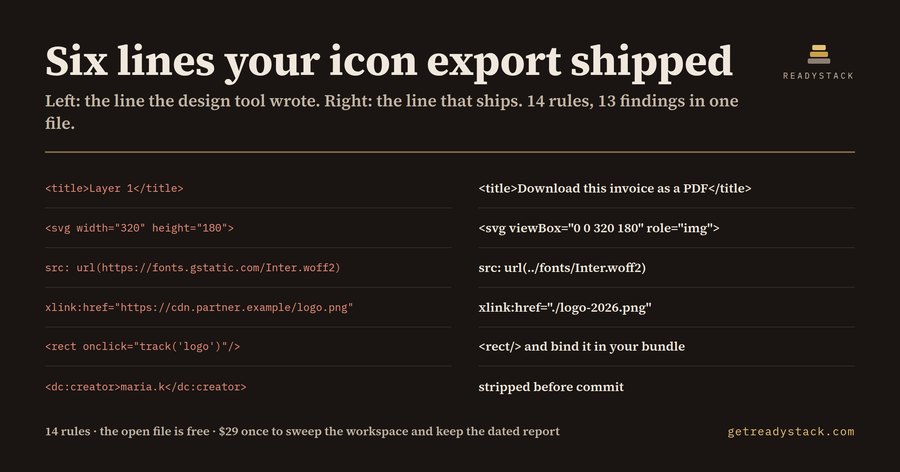
Six lines of one exported icon ship broken to front-end developers shipping icons to EU customers — here they are, printed by the check itself over _fixtures/dirty.svg, a 21-line Illustrator export:
L5   svg_placeholder_title  Design-tool placeholder used as the name — "Layer 1" is what the design tool called it.
L8   svg_remote_font        Remote font pulled from inside the SVG — https://fonts.gstatic.com/s/inter/v13/Inter.woff2 loads on render.
L15  svg_external_href      Reference to a third-party server — https://cdn.partner-analytics.example/logo-2026.png is fetched by the visitor, not by you.
L17  svg_event_handler      Inline event handler attribute — onclick fires without a click.
L18  svg_javascript_uri     javascript: URI — a link executes code.
L20  svg_inline_script      Script element inside the SVG — the asset carries executable code.
Those six are the errors. The same run returns 13 findings in all — six errors and seven warnings — firing 12 of the 14 rules, and each one also prints a one-line fix. The file ships inside the extension so the number can be re-run rather than believed. The companion file _fixtures/clean.svg returns 0.
An SVG is the one image format that is also source code. An SVG can carry a script element, an onclick attribute, a javascript: link, an @font-face rule pointing at a third-party CDN, the name of whoever exported it, and no accessible name at all. Every one of those renders without complaint in a browser preview. The file looks correct right up to the moment someone audits it.
Three things survive a design export more reliably than anything else.
The name. <title>Layer 1</title> is what the design tool called the layer. WCAG 2.2 SC 1.1.1 and EN 301 549 clause 9.1.1.1 want a text alternative, and a screen reader that reaches this asset announces "Layer 1". Worse is the empty <title></title>, which suppresses the filename fallback and announces nothing.
The outbound request. An @font-face rule inside an SVG that points at fonts.gstatic.com sends the visitor's IP address to a third-party server the moment the asset renders, before any consent banner has drawn. LG Munchen I, 20 Jan 2022 (3 O 17493/20) awarded EUR 100 in damages for exactly that embedding, on one page, to one visitor.
The script. An SVG served from your own origin executes its script in your origin. foreignObject is the standard route around sanitizers that only allow-list SVG tags. An onclick on a <rect> fires on a click nobody wired up.
The 14 rules divide 5 / 4 / 3 / 2: five on the accessible name and scaling, four on anything that can execute, three on outbound requests and author metadata, two on build hygiene such as base64 rasters pasted into a vector and duplicate id attributes that break clipPath once the file is inlined. Eight report as errors, six as warnings, and each one carries the standard or the judgment it rests on.
The arithmetic is worth seeing. Delete the script element, the onclick attribute and the javascript: link from that same export and it returns 10 findings, 3 errors. The three loudest problems are gone and the accessible name, the third-party font and the outbound image are all still there. That is the shape of the asset layer: the scary rules are the easy ones.
Checking the file open in front of you is free, in the editor and on a web page that runs the identical engine with nothing uploaded, all 14 rules, no limit and no watermark. That job finishes. The next job is the one that does not fit in a single file: sweeping every SVG in the workspace at once and keeping a dated conformity report you can hand to an auditor. That is the licence key, $29 once. A manual accessibility audit of a component library is quoted in the thousands of dollars, and it looks at the rendered pages rather than at the files underneath them.
15 seconds — what it actually does
Questions people ask
What does SVG Asset Compliance Lint actually do?
It reads an SVG as text and applies 14 rules to it. Five rules cover the accessible name and scaling, four cover anything that can execute, three cover outbound requests and author metadata, and two cover build hygiene. On the sample Illustrator export shipped with the extension it returns 13 findings, 6 of them errors.
Who is this for?
Front-end and design-system developers who commit SVG icon sets, logos and illustrations exported from Figma, Illustrator or Sketch into a repository that serves EU customers. Also useful to accessibility engineers who need a written, dated pass over the asset layer rather than over the rendered pages.
Why do free tools not cover this?
SVGO and Prettier reformat an SVG; they are not asked whether it has an accessible name, whether it fetches a font from a third-party server, or whether it carries an onclick handler. A browser preview renders all of those happily. LG Munchen I, 20 Jan 2022 (3 O 17493/20) awarded EUR 100 in damages for one embedded font on one page.
What is free and what needs a licence key?
The check on the file open in front of you is free and always will be: all 14 rules, no limit, no watermark, in the editor or on the web page. The licence key unlocks a different job, not a bigger one: sweeping every SVG in the workspace at once and writing a dated conformity report file you keep.
What would this cost me otherwise?
A manual accessibility audit of a component library is quoted in the thousands of dollars, and it covers the rendered pages rather than the asset files underneath. The alternative in-house is a developer opening several hundred exported icons one at a time. The extension is 29 dollars once,.
Why not just ask ChatGPT or another AI chat?
A general AI chat answers from training data with a cutoff date, cannot read your repository and names no rule version. SVG Asset Compliance Lint checks the file you open against 14 rules, each naming its legal or official basis, from a rule set dated 2026-09-20, and points at the exact line with the fix. For a filing, an audit or a client you need that dated result on your own files.
Ask about this tool
One question, answered by the person who built it. Your email only if you want the answer sent.