· ReadyStack
Worked example
Real numbers from this tool, line by line.
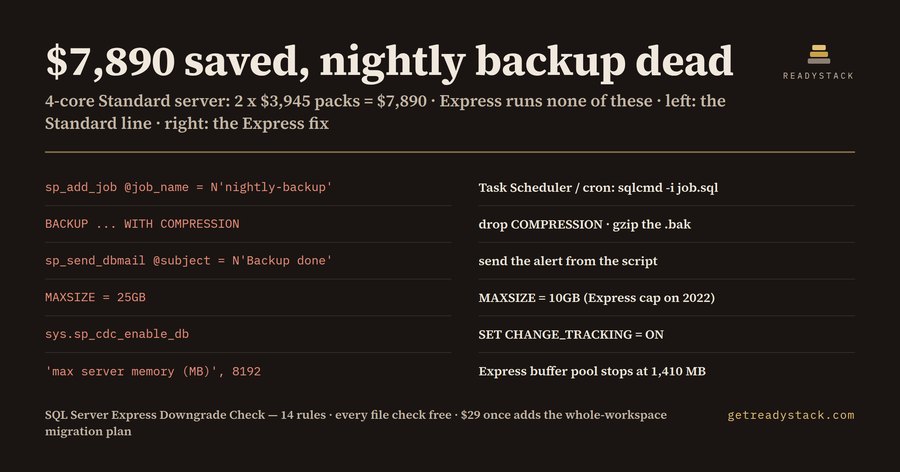
$7,890 saved, nightly backup dead: that is what a DBA or .NET developer in the US, UK or EU gets when they move a 4-core SQL Server Standard server (2 x $3,945 per 2-core pack, SQL Server 2022 list price) to free SQL Server Express without reading the scripts first. We ran SQL Server Express Downgrade Check on a sample maintenance script for a small clinic app, written for Standard. It found 7 lines Express cannot run:
| Line | What the script does | What Express does |
|---|---|---|
| 4 | MAXSIZE = 25GB | Caps the database at 10 GB (SQL Server 2022) |
| 8 | max server memory 8,192 MB | Uses 1,410 MB of buffer pool; 6,782 MB never caches data |
| 11 | sp_cdc_enable_db | No change data capture |
| 13, 14 | sp_add_job / sp_add_jobstep (nightly-backup) | No SQL Server Agent: the job is created and never runs |
| 18 | BACKUP ... WITH COMPRESSION | No backup compression |
| 20 | sp_send_dbmail | No Database Mail: the "backup done" mail never arrives |
None of these lines throws an error on Standard, so the script looks fine until it runs on the new server.
Where the limits come from
Microsoft's own pages, "Editions and supported features of SQL Server 2022" and "... SQL Server 2025", list Express with a 10 GB maximum relational database size on 2022 and 50 GB on 2025, a 1,410 MB buffer pool, and compute limited to the lesser of 1 socket or 4 cores. The same tables mark SQL Server Agent, Database mail, Backup compression, Log shipping, transparent data encryption, change data capture, Resource governor and basic availability groups as "No" for Express.
For containers, Microsoft's environment-variable page says MSSQL_PID chooses the edition, and the Developer edition is for non-production use. The mcr.microsoft.com/mssql/server image runs Developer when MSSQL_PID is not set, so a compose file with no MSSQL_PID is not Express either.
The quiet failures
The expensive one is the Agent job. On Express, sp_add_job creates the job in msdb, but nothing runs it: no Agent service. The nightly backup simply stops, and nobody gets an e-mail about it, because Database Mail is missing too. The fix is plain: save the job step as job.sql and schedule sqlcmd -S .\SQLEXPRESS -E -i job.sql with Windows Task Scheduler or cron, and send the alert from that script.
The second is size. A database set to MAXSIZE = 25GB on Express stops taking inserts at 10 GB on SQL Server 2022. Set MAXSIZE to the cap so growth stops with a clear error, archive old rows, or keep that one database on Standard. If you are moving to SQL Server 2025, the cap is 50 GB; the tool reads a "-- target: 2025" comment or a mssql/server:2025 image and checks against 50 GB instead.
What the check covers
14 rules over .sql scripts, ConfigurationFile.ini, Dockerfile and docker-compose files: Agent jobs, Database Mail, backup compression, the size cap, max server memory, TDE, change data capture, log shipping, availability groups, Resource Governor, AGTSVC lines in setup files, paid MSSQL_PID values or product keys, images with no MSSQL_PID, and cores above 4 in an Express container. Each finding gives the file, the line and the Express replacement line.
Free and full version
The free check covers the open file in VS Code or on the web page, with every finding and every fix, no key. The full version adds the whole workspace in one migration plan, a dated edition report for the company and a CI gate that fails a build adding an Agent job or a paid MSSQL_PID.
15 seconds — what it actually does
Questions people ask
What does SQL Server Express Downgrade Check do?
It reads .sql scripts, ConfigurationFile.ini and docker-compose or Dockerfile files and lists every line SQL Server Express cannot run: SQL Server Agent jobs, Database Mail, backup compression, databases over the 10 GB cap (50 GB on SQL Server 2025), max server memory above 1,410 MB, TDE, change data capture and paid MSSQL_PID values. Each finding gives file, line and the Express replacement line.
Who is it for?
DBAs, .NET developers and small IT teams in the US, UK or EU moving a small database from SQL Server Standard, or from a Developer container that ended up in production, to the free Express edition to cut the licence bill. It also suits consultants who inherit a client's maintenance scripts and must say what breaks before the switch.
Why not just read Microsoft's editions table or ask a chatbot?
The editions table lists missing features but does not read your scripts, and a chatbot cannot see your repository. The failures are quiet: an Agent job is created and never runs, a Database Mail alert is never sent, a compressed backup is rejected. This tool names the exact file and line for each of 14 rules, with the fix.
What is free and what does the full version add?
Free, with no key: the open file, every finding and every Express replacement line, in VS Code or on the web page. The full version is $29 once, one licence key per person or team seat: the whole workspace in one Express migration plan, a dated edition report for the company and a CI gate that fails a build adding an Agent job or a paid MSSQL_PID.
What does staying on SQL Server Standard cost?
Microsoft's SQL Server 2022 list price for Standard is $3,945 per 2-core pack, so a 4-core server is 2 x $3,945 = $7,890 in licences. Express costs nothing but caps each database at 10 GB on 2022 (50 GB on 2025), the buffer pool at 1,410 MB and compute at 4 cores.
When do the Express limits change next?
The last change was SQL Server 2025, which raised the Express database cap from 10 GB to 50 GB; buffer pool (1,410 MB) and compute (lesser of 1 socket or 4 cores) stayed the same, and SQL Server Agent is still not included. Microsoft has announced no newer Express limits; the rules follow the editions pages, re-checked 2026-10-14.
Ask about this tool
One question, answered by the person who built it. Your email only if you want the answer sent.