· ReadyStack
Worked example
Real numbers from this tool, line by line.
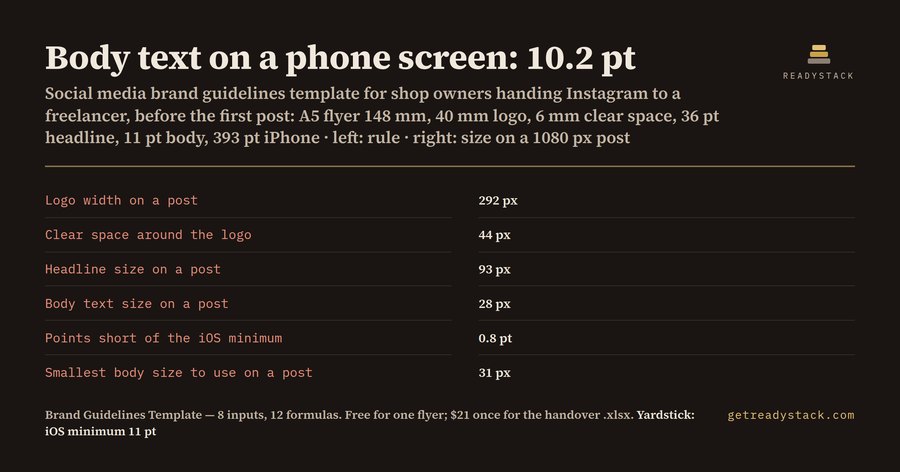
Body text on a phone screen: 10.2 pt. That is what a café or shop owner's A5 flyer, set in 11 pt body text, measures once a freelancer rebuilds it as a 1080 px Instagram post at the same proportions. Apple's Human Interface Guidelines put the iOS minimum text size at 11 pt (17 pt is the default), so the body text is 0.8 pt short before anyone has posted anything.
| Rule for a 1080 px post | Value |
|---|---|
| Pixels per millimetre of flyer | 7.30 |
| Logo width on a post | 292 px |
| Clear space around the logo | 44 px |
| Margin on a post | 73 px |
| Headline size on a post | 93 px |
| Body text size on a post | 28 px |
| Body text on a phone screen | 10.2 pt |
| Points short of the iOS minimum | 0.8 pt |
| Smallest body size to use on a post | 31 px |
Where the numbers come from
The flyer is 148 mm wide (A5). An Instagram post or Story is 1080 pixels wide, so every millimetre on the flyer becomes 1080 / 148 = 7.30 pixels. The 40 mm logo becomes 292 px, the 6 mm clear space 44 px, the 10 mm margin 73 px. Type sizes are in points, and 1 pt is 25.4/72 mm, so the 36 pt headline is 12.7 mm on paper and 93 px on the post. The 11 pt body is 28 px.
A post fills the width of the phone. On a 393 pt wide iPhone screen, 28 px out of 1080 is 10.2 pt. To stay at 11 pt, the body needs at least 31 px.
Why the post and the flyer drift apart
When you hand your Instagram to someone, you usually send a logo and maybe a colour code. Nobody sends the sizes. The freelancer picks a logo width that looks right in Canva, a headline that fills the square, and body text that fits the caption box. Each post looks fine on its own. Side by side with the flyer on the counter, it stops looking like the same shop.
A brand guide fixes that with numbers, not adjectives: this logo width, this clear space, this margin, these two type sizes. The free page works out those numbers from the flyer you already print.
Three flyers, three answers
- A5 café flyer, 11 pt body: 10.2 pt on a phone, 0.8 pt short, use at least 31 px.
- A4 salon price list (210 mm), 48 pt headline, 12 pt body: the logo is 257 px, the headline 87 px, the body 22 px, which reads 8 pt on a phone, 3 pt short. A bigger sheet shrinks more.
- DL rack card (99 mm), 9 pt body: the body becomes 35 px, 12.7 pt on a phone, 0 pt short. A small card already has big type for its width.
What to hand over with the account
- The six pixel rules: logo width, clear space, margin, headline size, body size, smallest body size.
- Your logo as a PNG with a transparent background, plus the vector file your printer used.
- Your colour codes as HEX.
- Your font names, one for headlines and one for body text.
- One flyer and one approved post side by side.
Ask for one test post at these sizes before anything is scheduled.
Free and paid
The page is free: type your flyer's 6 measurements and read the Instagram rules, from 8 inputs and 9 formulas. The paid .xlsx is the sheet you hand over with the account: the same rules plus the Pinterest pin rules for a 1000 x 1500 pin (logo 270 px, headline 86 px, margin 68 px for the A5 example), 12 formulas in all, re-run for each flyer size you print.
15 seconds — what it actually does
Questions people ask
What does this social media brand guidelines template work out?
It runs 12 formulas: pixels per millimetre, logo width, logo clear space, margin, headline size and body size for a 1080 px post or Story, body text size on a phone, points short of 11 pt, smallest body size that reads at 11 pt, then Pinterest logo width, headline size and margin.
Who is this for?
Small-business owners with printed flyers, such as cafés, salons, bakeries, boutiques and trades, who are handing their Instagram to a freelancer, a part-time employee or an agency and want the posts to keep looking like the shop. It also suits the freelancer who has to take over an account without a brand guide.
Why not use a free brand guidelines template?
Free brand guideline templates give you empty boxes for a logo, colours and fonts. None turns the measurements on your printed flyer into pixel sizes for a 1080 px Instagram post, and none checks that your body text still reaches Apple's 11 pt minimum once the flyer is shrunk to a phone screen.
What is free?
The whole Instagram answer on the page, from 8 inputs: flyer width, logo width, logo clear space, margin, headline size, body text size, phone screen width and minimum text size. It shows the first 9 formulas, from pixels per millimetre to the smallest body size that reads at 11 pt. No account is needed.
What does the full version add?
The paid .xlsx keeps the same rules in a file you can hand over with the account, and adds the Pinterest pin rules for a 1000 x 1500 pin: logo width, headline size and margin in pixels. Re-run it for each flyer size you print, such as A5, A4 or US Letter.
Ask about this tool
One question, answered by the person who built it. Your email only if you want the answer sent.