Recruiting workflow template: the delete-by date for every rejected candidate (UK, US, Germany)
UK rejection window now 6 months for rejections from 2026-10-01 (it was 3). Put in when you sent the rejection and where the candidate applied; get the date the claim window ends and the date you can delete their data.
3 inputs. The buffer is your own setting, not law: it covers a claim letter or an Acas early-conciliation notice that arrives just after the window.
Full version — $199 once · get all 6 n8n workflows — rejection emails stamp this date on every rejected row in your Google Sheet, and a daily sweep emails the list when it passes.
Worked example
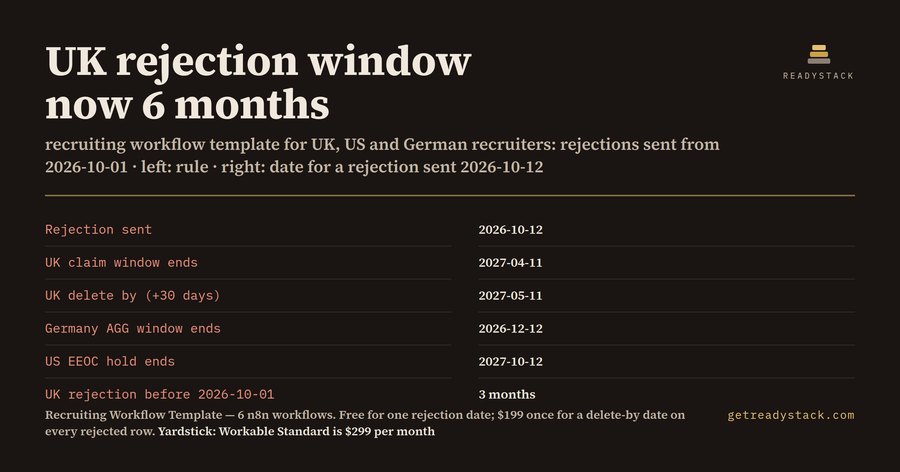
Rejection sent 2026-10-12, buffer 30 days: UK claim window ends 2027-04-11, delete by 2027-05-11 · Germany window ends 2026-12-12, delete by 2027-01-11 · US hold ends 2027-10-12, delete by 2027-11-11. A UK rejection sent 2026-09-15 still has the old 3 months: window ends 2026-12-14.
The rules this uses
UK: Equality Act 2010 s.123(1)(a), as amended by Employment Rights Act 2025 (in force 2026-10-01): a claim must be brought within 6 months starting with the date of the act; 3 months for acts before 2026-10-01. Acas early conciliation and the tribunal's just-and-equitable discretion can extend this.
Germany: AGG s.15(4): a rejected applicant must assert a claim in writing within 2 months of receiving the rejection.
United States: 29 CFR 1602.14: application forms and other hiring records are kept for 1 year from the record or the personnel action, whichever is later; if a charge is filed, keep them until it is finally resolved.
This is a date calculator, not legal advice. When the matching day does not exist in the end month (31st, 29 Feb), the last day of that month is used.
Free n8n workflow: careers form to pipeline sheet
Workflow 1 of 6, complete on its own: your careers form posts to a webhook, the candidate lands as a row in your Google Sheet, gets an acknowledgement email, and your recruiter gets an alert.
In n8n open a new workflow, then the ⋯ menu (top right) ▸ Import from File (or paste the JSON below).
Create your own Google Sheets and SMTP credentials in n8n and attach them to the Sheets and Email nodes.
Run it once by hand; when it works, switch it to Active.
No API key, token or password is in this file — you pick your own. Menu names differ by n8n version and UI language; an older n8n may not show the newest node versions.
Show the workflow JSON (candidate-intake.json)
{
  "name": "Recruiting workflow template: careers form to pipeline sheet",
  "nodes": [
    {
      "parameters": {
        "path": "candidate-intake",
        "httpMethod": "POST",
        "options": {}
      },
      "id": "688ab8cf-59d8-96cc-688a-b8cf59d896cc",
      "name": "Careers form webhook",
      "type": "n8n-nodes-base.webhook",
      "typeVersion": 2,
      "position": [
        0,
        300
      ]
    },
    {
      "parameters": {
        "jsCode": "\n// Cleans one careers-form submission into a pipeline row.\nconst b=$input.first().json.body||$input.first().json;\nconst email=String(b.email||'').trim().toLowerCase();\nif(!/^[^@\\s]+@[^@\\s]+\\.[^@\\s]+$/.test(email)) throw new Error('Application without a valid email: '+email);\nconst c=String(b.country||'').trim().toUpperCase();\nconst country=['UK','GB','UNITED KINGDOM'].includes(c)?'UK':['US','USA','UNITED STATES'].includes(c)?'US':['DE','GERMANY','DEUTSCHLAND'].includes(c)?'DE':'OTHER';\nconst now=new Date().toISOString();\nreturn [{json:{candidate_id:'C-'+Date.now().toString(36).toUpperCase(),submitted_at:now,name:String(b.name||'').trim(),email,role:String(b.role||'').trim(),country,stage:'Applied',stage_since:now.slice(0,10),notified_stage:'Applied',hiring_manager_email:String(b.hiring_manager_email||'').trim(),reject_sent_at:'',delete_after:'',legal_hold:'',purge_flag:''}}];\n"
      },
      "id": "688ab8cf-59d8-96cd-688a-b8cf59d896cd",
      "name": "Clean the application",
      "type": "n8n-nodes-base.code",
      "typeVersion": 2,
      "position": [
        220,
        300
      ]
    },
    {
      "parameters": {
        "operation": "append",
        "options": {}
      },
      "id": "688ab8cf-59d8-96ce-688a-b8cf59d896ce",
      "name": "Add candidate to pipeline sheet",
      "type": "n8n-nodes-base.googleSheets",
      "typeVersion": 4.5,
      "position": [
        440,
        300
      ]
    },
    {
      "parameters": {
        "subject": "=We received your application for {{ $('Clean the application').item.json.role }}",
        "text": "=Hi {{ $('Clean the application').item.json.name }},\n\nThank you for applying for {{ $('Clean the application').item.json.role }}. We review every application and will reply when we have made a decision.\n\nReference: {{ $('Clean the application').item.json.candidate_id }}",
        "toEmail": "={{ $('Clean the application').item.json.email }}",
        "fromEmail": "={{ $env.FROM_EMAIL }}",
        "options": {}
      },
      "id": "688ab8cf-59d8-96cf-688a-b8cf59d896cf",
      "name": "Acknowledge the candidate",
      "type": "n8n-nodes-base.emailSend",
      "typeVersion": 2.1,
      "position": [
        660,
        300
      ]
    },
    {
      "parameters": {
        "subject": "=New applicant: {{ $('Clean the application').item.json.name }} for {{ $('Clean the application').item.json.role }}",
        "text": "={{ $('Clean the application').item.json.name }} ({{ $('Clean the application').item.json.email }}, {{ $('Clean the application').item.json.country }}) applied for {{ $('Clean the application').item.json.role }}.",
        "toEmail": "={{ $env.RECRUITER_EMAIL }}",
        "fromEmail": "={{ $env.FROM_EMAIL }}",
        "options": {}
      },
      "id": "688ab8cf-59d8-96d0-688a-b8cf59d896d0",
      "name": "Alert the recruiter",
      "type": "n8n-nodes-base.emailSend",
      "typeVersion": 2.1,
      "position": [
        880,
        300
      ]
    },
    {
      "parameters": {
        "content": "FREE workflow 1 of 6. Point your careers form at this webhook (POST JSON: name, email, role, country, hiring_manager_email). Pipeline sheet columns (row 1, exact names): candidate_id, submitted_at, name, email, role, country, stage, stage_since, notified_stage, hiring_manager_email, reject_sent_at, delete_after, legal_hold, purge_flag. In 'Add candidate to pipeline sheet' pick your spreadsheet and map columns automatically. Set the environment variables RECRUITER_EMAIL and FROM_EMAIL. How to import: in n8n open a new workflow, use the ... menu (top right) > Import from File and pick this .json. Menu names can differ by n8n version and UI language. No API key, token or password is stored in this file: create your own Google Sheets and SMTP credentials in n8n and attach them to the Sheets and Email nodes. Run it once by hand; when it works, switch the workflow to Active.",
        "height": 220,
        "width": 320
      },
      "id": "688ab8cf-59d8-96d1-688a-b8cf59d896d1",
      "name": "Setup notes",
      "type": "n8n-nodes-base.stickyNote",
      "typeVersion": 1,
      "position": [
        1100,
        100
      ]
    }
  ],
  "connections": {
    "Careers form webhook": {
      "main": [
        [
          {
            "node": "Clean the application",
            "type": "main",
            "index": 0
          }
        ]
      ]
    },
    "Clean the application": {
      "main": [
        [
          {
            "node": "Add candidate to pipeline sheet",
            "type": "main",
            "index": 0
          }
        ]
      ]
    },
    "Add candidate to pipeline sheet": {
      "main": [
        [
          {
            "node": "Acknowledge the candidate",
            "type": "main",
            "index": 0
          }
        ]
      ]
    },
    "Acknowledge the candidate": {
      "main": [
        [
          {
            "node": "Alert the recruiter",
            "type": "main",
            "index": 0
          }
        ]
      ]
    }
  },
  "settings": {
    "executionOrder": "v1"
  },
  "pinData": {},
  "meta": {
    "templateId": "recruiting-workflow-template-n8n"
  }
}
What the full pack adds
Once candidates pile up in that sheet, you need 5 more workflows: hourly stage-change alerts to hiring managers, a daily stuck-candidate digest, rejection emails that write claim_window_end and delete_after per country (UK, US, DE), a daily delete-after sweep that skips legal holds, and a weekly hiring funnel report. For comparison, the Workable ATS Standard plan is listed at $299 per month for 1-20 employees (workable.com/pricing, 2026-10-12).
Get the full version $199
UK rejection window now 6 months (from 2026-10-01). 6 n8n workflows run your pipeline in your own Google Sheet and stamp a delete-by date on every rejected candidate: UK, US, Germany.
One payment, one licence key for this tool. The key is shown right after payment.
Workable ATS Standard plan: $299 per month for 1-20 employees ($3,588 a year), workable.com/pricing, checked 2026-10-12.
For businesses: your name and logo instead of ours, and each visitor’s result + e-mail in your inbox (only when they tick consent) — Pro from $19/month. See Pro →
Email me this result
A copy of what you see above, in your inbox — the tool stays free, nothing here is locked.
UK recruiters and HR managers: a candidate you reject from 2026-10-01 has 6 months to bring an Equality Act claim, not 3, so a rejection sent on 2026-10-12 keeps its claim window open until 2027-04-11.
Rejection sent 2026-10-12
Window or hold ends
Delete by (+30-day buffer)
United Kingdom, Equality Act 2010 s.123 (6 months)
2027-04-11
2027-05-11
Germany, AGG s.15(4) (2 months)
2026-12-12
2027-01-11
United States, 29 CFR 1602.14 (1 year)
2027-10-12
2027-11-11
Those are the numbers our free calculator printed for that one date. A UK rejection sent on 2026-09-15 still runs on the old 3 months and its window ends 2026-12-14. Same job, same sheet, two clocks.
Why this is easy to get wrong
The Employment Rights Act 2025 changed section 123(1)(a) of the Equality Act 2010 from 3 months to 6 months, in force on 2026-10-01, for acts on or after that date. Most recruiting checklists, and most chatbot answers, still say 3 months. If your pipeline deletes rejected UK candidates on a 3-month or 4-month clock, you now delete the file while the candidate can still claim. Then a claim arrives and you have no record of why you said no.
The opposite mistake: nobody ever deletes anything.
Germany is shorter. Under AGG s.15(4) a rejected applicant must assert a claim in writing within 2 months of receiving the rejection. The United States runs on a record-keeping rule rather than a claim window: 29 CFR 1602.14 says application forms and other hiring records are kept for 1 year from the record or the personnel action, whichever is later, and until final disposition if a charge is filed.
What the recruiting workflow template does
It is a pack of 6 ready-to-run n8n workflows that work on your own Google Sheet:
Candidate intake (free): your careers form posts to a webhook, the candidate becomes a row, gets an acknowledgement email, and your recruiter gets an alert.
Stage-change alerts: every hour, the hiring manager hears when you move someone to a new stage.
Stuck-candidate digest: every morning, one email of candidates sitting in an open stage longer than your own limit.
Rejection email and retention clock: every hour, newly rejected candidates get the rejection email, and their row gets the rule used, claim_window_end and delete_after for UK, US or Germany. The clock starts the day the email goes out.
Delete-after sweep: every day, rows past delete_after with no legal hold are flagged and emailed to whoever deletes candidate data.
Weekly funnel report: every Monday, candidates per stage, average days in stage, rejections sent in the last 7 days and records due for deletion.
No API keys are in the files; you attach your own credentials in n8n.
Try it on your own candidate first
The free calculator takes 3 inputs: the date you sent the rejection, the country, and your buffer in days. The buffer is your setting, not the law; it covers a claim letter or an Acas early-conciliation notice that lands just after the window. Put in your own rejection date and you get the date the window ends and the date you may delete.
Free or paid
The intake workflow and the calculator are free and complete. The paid pack is what you need once candidates pile up in that sheet: the alerts, the digest, the retention clock on every row, the sweep and the report. It is one payment, no subscription. For comparison, the Workable ATS Standard plan is listed at $299 per month for 1-20 employees.
15 seconds — what it actually does
Questions people ask
What does this recruiting workflow template do?
It gives you 6 ready-to-run n8n workflows that run a hiring pipeline in your own Google Sheet: careers-form intake with acknowledgement emails, hourly stage-change alerts, a daily stuck-candidate digest, rejection emails that stamp a delete-after date per country (UK, US, Germany), a daily delete-after sweep and a weekly funnel report.
Who is it for?
In-house recruiters, HR managers and small recruitment agencies who already use n8n and hire in the UK, the US or Germany. It suits teams that keep candidates in a spreadsheet instead of an ATS and need each rejected candidate's data kept for the claim window, then deleted on a known date.
Why not use a free template or ask a chatbot?
Generic recruiting templates stop at intake and never date a rejection. Chatbots still quote the UK claim window as 3 months, but from 2026-10-01 the Equality Act s.123 window is 6 months. This pack writes the rule used, the claim-window end and delete_after on every rejected row, and emails you when the date passes.
What is free and what is in the full pack?
Free: workflow 1 of 6, candidate intake (webhook to your sheet, acknowledgement email, recruiter alert), complete on its own, plus the web retention calculator for one candidate. Full pack, 5 workflows: stage-change alerts, stuck-candidate digest, rejection email with retention clock for UK, US and Germany, delete-after sweep with legal holds, weekly funnel report.
How does the cost compare?
The Workable ATS Standard plan is listed at $299 per month for 1-20 employees ($3,588 a year) on workable.com/pricing, checked 2026-10-12. This pack is $199 once, with no subscription, and runs inside your own n8n with your own Google Sheet, so candidate data stays in accounts you already control.
Ask about this tool
One question, answered by the person who built it. Your email only if you want the answer sent.
Same job, next tool
Free in the browser. The full version is a one-time licence.