· ReadyStack
Worked example
Real numbers from this tool, line by line.
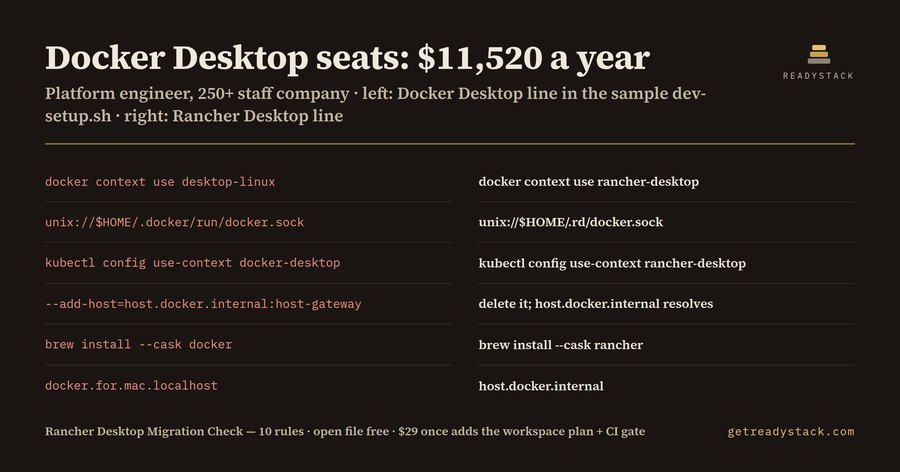
$11,520 a year: that is 40 developers x $24 x 12 months at the Docker Business list price, the bill a platform engineer at a company past 250 employees or US $10,000,000 revenue meets for Docker Desktop. Here is what the Rancher Desktop Migration Check found in the bundled sample dev-setup.sh:
| Line | Docker Desktop line | Rancher Desktop line |
|---|---|---|
| 6 | brew install --cask docker | brew install --cask rancher |
| 7 | open -a Docker | rdctl start |
| 8 | docker context use desktop-linux | docker context use rancher-desktop |
| 9 | unix://$HOME/.docker/run/docker.sock | unix://$HOME/.rd/docker.sock |
| 11 | kubectl config use-context docker-desktop | kubectl config use-context rancher-desktop |
| 14 | --add-host=host.docker.internal:host-gateway | delete it; host.docker.internal resolves |
It flags 9 lines from 10 rules in that file. The other three are a comment that says "Requires Docker Desktop", a hard-coded kubernetes.docker.internal API host, and a database URL on docker.for.mac.localhost.
Why the licence matters now
Docker's pricing FAQ, section 4.2, limits free use of Docker Desktop to non-commercial open source work and to companies with fewer than 250 employees AND less than US $10,000,000 annual revenue. Government entities need a subscription regardless of size. Grow past either line and every developer seat is a paid seat. Docker Business is listed at $24 per user per month, so the cost grows with headcount, not with how much anyone uses the app.
Rancher Desktop, by SUSE, is free and open source under Apache-2.0. With the dockerd (moby) engine selected, the docker CLI and docker compose keep working. That is why most of a repo survives the move untouched, and why a grep for "docker" is useless: it matches hundreds of lines that are fine.
What actually breaks
The breakage sits in a short list of Docker Desktop names that people hard-code into setup scripts, Makefiles, compose files and devcontainers:
- host-gateway. The Rancher Desktop FAQ says the special value host-gateway is specific to Docker Desktop and is not yet supported in Rancher Desktop. Chatbots suggest it constantly. The fix is to delete the extra_hosts or --add-host entry, because host.docker.internal and host.rancher-desktop.internal resolve without it.
- The desktop-linux Docker context. Rancher Desktop's context is rancher-desktop.
- The docker-desktop Kubernetes context, and the kubernetes.docker.internal API host. Select the rancher-desktop context instead.
- The ~/.docker/run/docker.sock socket. Without Administrative Access, Rancher Desktop creates its socket at ~/.rd/docker.sock; with it, at /var/run/docker.sock.
- docker.for.mac.localhost and gateway.docker.internal. Use host.docker.internal.
- Install and start lines: brew install --cask docker, choco install docker-desktop, open -a Docker. Use brew install --cask rancher, the installer from the Rancher Desktop GitHub releases page, and rdctl start.
How to run it
Open a file in VS Code and the problems appear with their line numbers and the replacement line. The free web version runs the same engine on a pasted file. Nothing leaves your machine. A clean, already-migrated script returns zero findings, which is the proof you want before you tell the team the new setup is done.
The full version covers the whole workspace as one dated migration plan, adds the seat-cost exposure report, and adds a CI gate that fails a build when someone adds a new Docker Desktop-only line.
15 seconds — what it actually does
Questions people ask
What does the Rancher Desktop Migration Check do?
It reads compose files, Makefiles, shell scripts, devcontainer.json and README files and flags every line that only works on Docker Desktop: host-gateway, the desktop-linux and docker-desktop contexts, ~/.docker/run/docker.sock, Docker.app installs. Next to each line it prints the exact Rancher Desktop replacement, such as docker context use rancher-desktop or ~/.rd/docker.sock. It runs 10 rules locally.
Who is the Rancher Desktop migration check for?
Platform engineers, DevOps leads and developers at companies with 250 or more employees or more than US $10,000,000 annual revenue, where Docker Desktop needs a paid subscription, who are moving the team to Rancher Desktop. It also fits government teams, which Docker says must buy a subscription, and anyone keeping one repo working on both engines.
Why not just ask a chatbot or grep for docker?
A grep for docker matches hundreds of lines that keep working on Rancher Desktop, because its dockerd engine keeps the docker CLI and docker compose. Chatbots often suggest host-gateway, yet the Rancher Desktop FAQ says the special value host-gateway is specific to Docker Desktop and is not yet supported in Rancher Desktop. This check flags only Docker Desktop-only names, each with a cited fix.
What is free and what needs a licence key?
Free, with no key: the open file, every Docker Desktop-only line with its line number and the Rancher Desktop replacement line. The full version, $29 once with one licence key per person or team seat, adds the whole workspace as a dated migration plan, the seat-cost exposure report and a CI gate that fails a build adding a new Docker Desktop-only line.
What does staying on Docker Desktop cost compared with migrating?
Docker Business lists at $24 per user per month on docker.com/pricing, checked 2026-10-12. For 40 developers that is 40 x $24 x 12 months = $11,520 a year. Rancher Desktop is free and open source under Apache-2.0. The check shows which lines must change before the team can move, so the switch is a planned edit rather than a broken onboarding week.
Ask about this tool
One question, answered by the person who built it. Your email only if you want the answer sent.