· ReadyStack
Worked example
Real numbers from this tool, line by line.
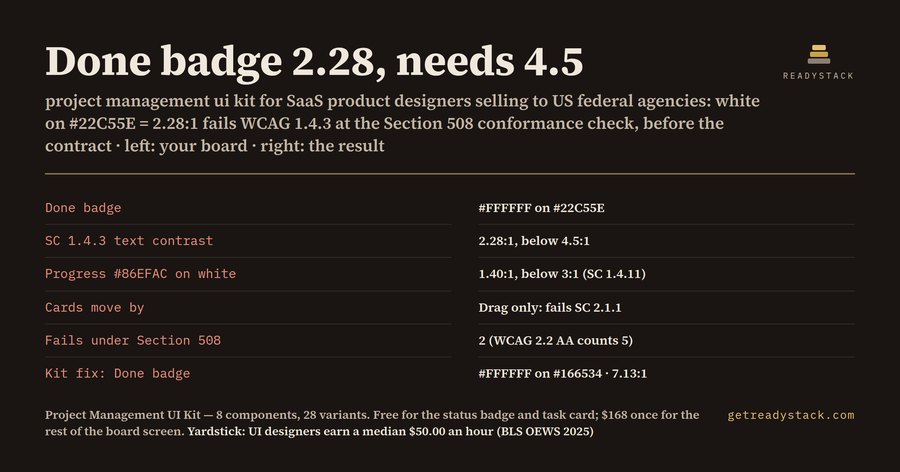
A white-on-#22C55E "Done" badge measures 2.28:1 contrast, and SaaS product designers selling a project management tool to US federal agencies or EU public buyers need 4.5:1. That is the first line of what the free check on this page returns for a typical kanban board:
| Input | Your board | Result |
|---|---|---|
| Status text on badge | #FFFFFF on #22C55E | 2.28:1, fails SC 1.4.3 |
| Progress bar | #86EFAC on #FFFFFF | 1.40:1, fails SC 1.4.11 |
| Moving a card | drag-and-drop only | fails SC 2.1.1 and 2.5.7 |
| Smallest target | 20 px | fails SC 2.5.8 |
| Status shown as | a word plus color | passes SC 1.4.1 |
Count by standard: Section 508 (WCAG 2.0 AA) 2 fails, EN 301 549 (WCAG 2.1 AA) 3 fails, WCAG 2.2 AA 5 fails.
Why these five, on this kind of screen
A kanban board puts most of its meaning in two places: the color of the status and the gesture that moves a card.
Tailwind's green-500 (#22C55E) and amber-500 (#F59E0B) are popular status fills. With white text they measure 2.28:1 and 2.15:1. WCAG success criterion 1.4.3 asks for 4.5:1 for normal-size text. A label that sits on a pastel bar has the same problem from the other side: #86EFAC on white is 1.40:1, and SC 1.4.11 (added in WCAG 2.1) asks for 3:1 for the parts of a graphic you need to read it.
Drag-and-drop is the other one. SC 2.1.1 Keyboard, a Level A criterion since WCAG 2.0, says everything must work from a keyboard. A board where the only way to change a status is to drag the card fails it. WCAG 2.2 added SC 2.5.7 Dragging Movements, which asks for a single-pointer alternative, and SC 2.5.8, which asks for targets of at least 24 by 24 CSS pixels.
Which version your buyer reads
The Revised Section 508 Standards (36 CFR 1194, Appendix A, E207.2) say user interface components shall conform to WCAG 2.0 Level A and AA. That covers 1.4.1, 1.4.3 and 2.1.1, not 1.4.11, 2.5.7 or 2.5.8. EN 301 549, which EU public tenders cite, points to WCAG 2.1 AA and adds 1.4.11. WCAG 2.2 adds the dragging and target-size rules.
What the kit draws for each fail
The project management UI kit has 8 components and 28 variants, and every label in it is 6.47:1 or higher, with the HEX pair listed in the README:
- Status badge: To do, In progress, Blocked, Done, written in words. Done is #FFFFFF on #166534, 7.13:1.
- Task card: default, overdue with the word "Overdue", blocked by a dependency, and a keyboard focus state that says Enter opens Move to.
- Board button: the "Move to" button is the keyboard and single-pointer path that a drag-only board is missing.
- Milestone progress on #1D4ED8, 6.70:1 on white.
- Assignee avatars, filter chips, Board, List and Timeline tabs, and project alerts, including the screen-reader announcement after a task moves.
The badges are 28 px high and the buttons 44 px, above the 24 px minimum.
Free part, and how it gets into Figma
The status badge and the task card are free: one kanban column, complete, 8 variants. You drag the .sketch file onto the Figma file browser, or paste an SVG as a vector, or import the plugin manifest to rebuild the variants with labels. The .sketch holds the named, filled shapes without text; part of the component structure can be simplified on import. Sketch users open the same file.
For scale, BLS OEWS 2025 puts web and digital interface designers at a median $50.00 an hour.
Put your own status colors into the check first. It runs in the browser and tells you which criterion fails before you change a single frame.
15 seconds — what it actually does
Questions people ask
What is in this project management UI kit?
Eight components with 28 variants for kanban and task screens: status badges, task cards, board buttons with a Move to… drag alternative, milestone progress, assignee avatars, filter chips, Board / List / Timeline tabs and project alerts. Every label has a computed contrast of 6.47 or higher, listed in the README table next to its HEX pair.
Who is this kit for?
Product designers and front-end developers building a project-management or task-tracking SaaS that is sold to US federal agencies under Section 508, which points to WCAG 2.0 AA, or to EU public buyers whose tenders cite EN 301 549, which points to WCAG 2.1 AA. Sketch users can open the same .sketch file directly.
Why not use a free kanban kit?
Most free kanban kits signal status by color and leave it there. White text on Tailwind green #22C55E measures 2.28, and WCAG 1.4.3 asks for 4.5. A board you can only change by dragging fails SC 2.1.1 Keyboard. This kit draws the written status labels, the focus state and the Move to… menu.
What do I get for free?
One complete kanban column: the status badge in 4 variants and the task card in 4 variants (default, overdue with a written label, blocked by a dependency, keyboard focus), as plugin, .sketch and SVG. You also get the browser check, which tests your own status colors, progress bar, drag behavior and click-target size against six WCAG success criteria.
How does the price compare with drawing it myself?
BLS OEWS 2025 puts the median pay of web and digital interface designers (SOC 15-1255) at $50.00 an hour. The kit is $168, paid once with no subscription. You can run the free check on your own colors before you pay, so you know which of your states fail first.
Ask about this tool
One question, answered by the person who built it. Your email only if you want the answer sent.