· ReadyStack
Worked example
Real numbers from this tool, line by line.
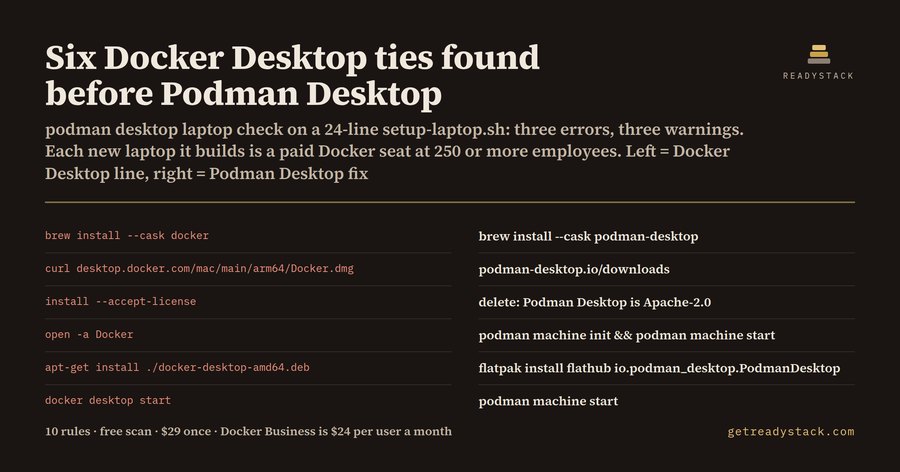
Six Docker Desktop ties turned up in one 24-line setup-laptop.sh, the bootstrap script an IT or platform engineer at a US or European company with 250 or more employees keeps for every new developer laptop. Three are errors and three are warnings:
| Line | Docker Desktop line | Podman Desktop line |
|---|---|---|
| 8 | brew install --cask docker | brew install --cask podman-desktop |
| 11 | curl … https://desktop.docker.com/mac/main/arm64/Docker.dmg | download from podman-desktop.io/downloads |
| 13 | sudo …/Docker.app/Contents/MacOS/install --accept-license | delete the line |
| 15 | open -a Docker | podman machine init && podman machine start |
| 19 | sudo apt-get install -y ./docker-desktop-amd64.deb | flatpak install -y flathub io.podman_desktop.PodmanDesktop |
| 22 | docker desktop start | podman machine start |
Every laptop that script builds gets Docker Desktop. At a company of that size, each one is a paid seat.
What Docker's terms say
Docker's licence page (docs.docker.com/subscription/desktop-license, read 2026-10-10) says Docker Desktop is free for small businesses with fewer than 250 employees and less than US$10 million in annual revenue, for personal use, education and non-commercial open source. Professional use in larger organizations and government entities needs a paid Pro, Team or Business subscription. Docker Engine and the other Moby open-source projects keep their own licences.
Docker's pricing page, read the same day, lists Business at $24 per user per month on the annual plan, Team at $15 for up to 100 users, and Pro at $9. Forty laptops on Business come to $11,520 a year.
Why the setup file, not the Dockerfile
A Dockerfile or a compose file runs the same on Docker Engine, Podman or Colima. The licence is about which machines run Docker Desktop, and that is decided in the files that build laptops: a Brewfile, a winget or Chocolatey manifest, a setup-laptop.sh or bootstrap.ps1.
The trap in a plain search
Search the repository for "docker" and you get noise. brew install docker is the Homebrew formula for the Docker CLI, licensed Apache-2.0, and needs no seat. brew install --cask docker is Docker Desktop; Homebrew renamed that cask docker-desktop and keeps docker as an old token. The search also misses Docker.DockerDesktop in a winget file and the install --accept-license flag, which accepts Docker's agreement for the company with nobody reading it.
Podman Desktop Laptop Check reads the file line by line with 10 rules. It skips comments and leaves the Docker CLI formula, docker-compose, podman and colima alone. If a file states a paid plan, for example # docker-subscription: business, the install errors turn into info lines: the seat is paid, and it still counts.
Moving each line
- macOS: brew install --cask podman-desktop, then podman machine init and podman machine start. Colima users run colima start.
- Windows: winget install -e --id RedHat.Podman-Desktop, or choco install podman-desktop -y.
- Linux: flatpak install -y flathub io.podman_desktop.PodmanDesktop, or the distribution's podman package.
- Scripts that call docker desktop start or open -a Docker switch to podman machine start.
Try it on your own file
Paste a Brewfile, winget manifest or setup script into the free web page, or open it in VS Code and run the check. Each finding shows its line and the replacement. The paid version scans every setup file in the workspace and writes a dated seat report.
15 seconds — what it actually does
Questions people ask
What does Podman Desktop Laptop Check do?
It reads a Brewfile, winget or Chocolatey manifest, or a laptop setup script and flags every line that installs, downloads or starts Docker Desktop: brew install --cask docker, Docker.DockerDesktop, choco install docker-desktop, desktop.docker.com downloads, docker-desktop .deb packages, install --accept-license, open -a Docker and docker desktop start. Each finding has its line number and the Podman Desktop line that replaces it. It has 10 rules.
Who is Podman Desktop Laptop Check for?
It is for IT, platform and developer-experience engineers who keep the files that build new developer laptops at companies with 250 or more employees or 10 million US dollars or more in annual revenue. Docker's licence page says Docker Desktop needs a paid subscription there, so every laptop those files build is one more paid seat.
Why not just search the repo for docker or ask a chatbot?
A search for docker also hits brew install docker, which is the Apache-2.0 Docker CLI formula and needs no seat, while brew install --cask docker is Docker Desktop. It also misses Docker.DockerDesktop in winget files, desktop.docker.com downloads and the unattended install --accept-license flag. A chatbot cannot see the setup files in a repository or give their line numbers.
What is free and what does the full version add?
The free check covers the open file completely: every Docker Desktop line, its line number and the Podman Desktop replacement, in VS Code or on the free web page. The full version scans every setup file in the workspace in one pass and writes a dated Docker Desktop seat report with each Podman Desktop line and the seat cost at Docker's list price, for $29 once.
What does keeping Docker Desktop cost instead?
Docker's pricing page, read on 2026-10-10, lists Docker Business at 24 US dollars per user per month on the annual plan, Docker Team at 15 dollars for up to 100 users, and Docker Pro at 9 dollars. For 40 laptops on Business that is 11,520 dollars a year. Podman Desktop, Rancher Desktop and Colima are free and open source.
When do Docker Desktop's licence terms change next?
Docker has announced no change date. The terms read on 2026-10-10 at docs.docker.com/subscription/desktop-license say Docker Desktop is free for small businesses with fewer than 250 employees and less than 10 million US dollars in annual revenue, personal use, education and non-commercial open source. Each rule in this check records the date its source was read.
Ask about this tool
One question, answered by the person who built it. Your email only if you want the answer sent.