· ReadyStack
Worked example
Real numbers from this tool, line by line.
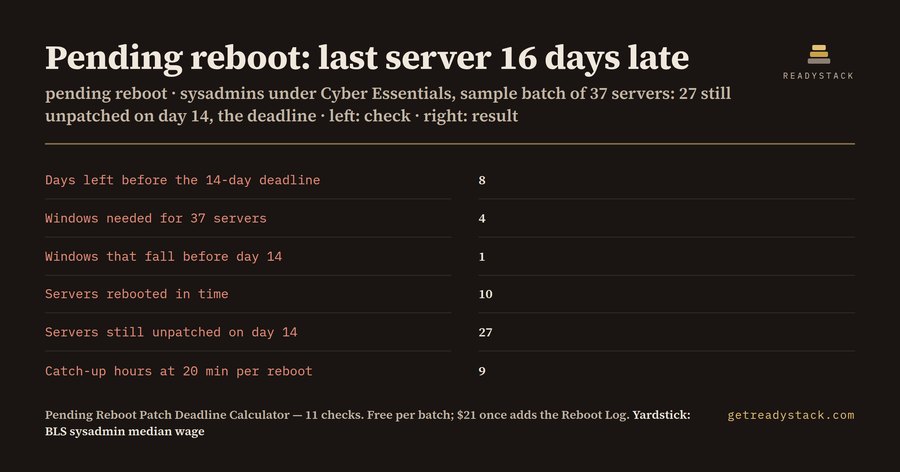
27 of 37 servers are still unpatched on day 14 for a sysadmin whose shop is certified to Cyber Essentials, even though every one of them shows the update as installed. Here is the batch: the patch is 6 days old, 37 servers are pending reboot, the team can reboot 10 per maintenance window, the next window is in 3 days and windows come every 7 days.
| Check | Result |
|---|---|
| Days left before the patch deadline | 8 |
| Maintenance windows needed to reboot every server | 4 |
| Windows that fall before the deadline | 1 |
| Servers rebooted in time | 10 |
| Servers still unpatched at the deadline | 27 |
| Days the last server runs past the deadline | 16 |
| Catch-up hours at 20 minutes per reboot | 9 |
| Catch-up cost at $47.66 an hour | $428.94 |
Only one window lands inside the 14 days. The second window is on day 16, so everything after the first 10 servers is late, and the last server is rebooted on day 30.
Why an installed patch still counts as missing
A patch that is installed but waiting on a reboot is not in effect until the server restarts. The old binaries keep running. Your patch console is honest about this: it says "pending reboot". What it does not tell you is the date your window rhythm will actually reach each of those servers, and whether that date is before or after the line you are measured against.
The two lines
Cyber Essentials v3.2 (NCSC, April 2025) asks for updates, including vulnerability fixes, within 14 days of release where the vendor rates the fix critical or high risk, where the CVSS v3 base score is 7 or above, or where the vendor gives no severity at all. PCI DSS v4 requirement 6.3.3 asks for critical and high-security patches to be installed within one month of release. Set the deadline field to 14 or to 30 and the whole sheet follows.
Run the same 37 servers against 30 days and the answer flips: 24 days are left, 4 windows fall inside the line, and all 37 servers are rebooted in time. Same team, same windows, different rule.
What to do with the number
The calculator also tells you the reboots per in-time window that would clear everyone. In the example that is 37, because only one window fits. That is not a realistic window, so the honest answer is a catch-up window before day 14 for the 27 late servers: 9 hours of work at 20 minutes per reboot including a service check. At $47.66 an hour, the BLS OEWS 2025 median for network and computer systems administrators, that is $428.94. Put in your own rate and minutes.
Change one number and watch it move. Cut the batch to 12 servers and only 2 are late, 2 days over. Move the next window from 3 days to tomorrow and the arithmetic shifts again.
One batch free, a log when there are many
The page answers one patch batch completely, with your own numbers, before you pay anything. When you have three patch releases and 40 servers at once, the paid workbook adds a Reboot Log: 200 rows, one per server, with release date, deadline days, booked window and the date it actually rebooted. It shows Done in time, Done late, Booked in time, Booked LATE, No window booked or OVERDUE as of a date you set, plus the days past deadline. That is the sheet you hand to a Cyber Essentials assessor or a PCI QSA when they ask which servers ran the fix and when.
It is plain formulas, no macros, and it runs offline. Type your six numbers on the page first.
15 seconds — what it actually does
Questions people ask
What does the pending reboot deadline calculator do?
It takes how old the patch is, how many servers are still waiting on a reboot, and your maintenance-window rhythm. It then shows how many servers your normal windows reach before the patch deadline and how many are still unpatched on that day. In the example, 6 days in, 37 servers, 10 reboots per window: 10 in time, 27 late, last one 16 days over.
Who is this pending reboot calculator for?
Sysadmins and MSP engineers whose servers have the update installed but sit in 'pending reboot', in shops held to Cyber Essentials v3.2 (NCSC, April 2025): updates within 14 days of release for critical or high-risk fixes or CVSS v3 7 or above. Also PCI DSS v4 requirement 6.3.3: critical and high-security patches installed within one month of release.
Why not just read the pending reboot list in my patch tool?
Patch tools list servers as pending reboot, but they do not tell you which of them your weekly window will reach after the 14-day line. That depends on your window day, how many reboots fit in one window and how old the patch already is. This calculator does exactly that arithmetic, and the paid sheet does it server by server.
What is free and what is in the paid file?
The web calculator is free and complete for one patch batch: all 11 calculated deadline checks: days left, windows needed, last window day, patch age at the last reboot, days over, windows in time, servers in time, servers still unpatched, reboots per window needed, catch-up hours and catch-up cost. The paid .xlsx adds the Reboot Log sheet, 200 rows with a per-server deadline and status.
What does the catch-up cost figure use?
It multiplies the late servers by your minutes per reboot and an hourly engineer cost. The default rate is $47.66 an hour, the BLS OEWS 2025 median for network and computer systems administrators. In the example, 27 late servers at 20 minutes each is 9 hours, or $428.94 of catch-up work. Change the rate to your own.
Ask about this tool
One question, answered by the person who built it. Your email only if you want the answer sent.