· ReadyStack
Worked example
Real numbers from this tool, line by line.
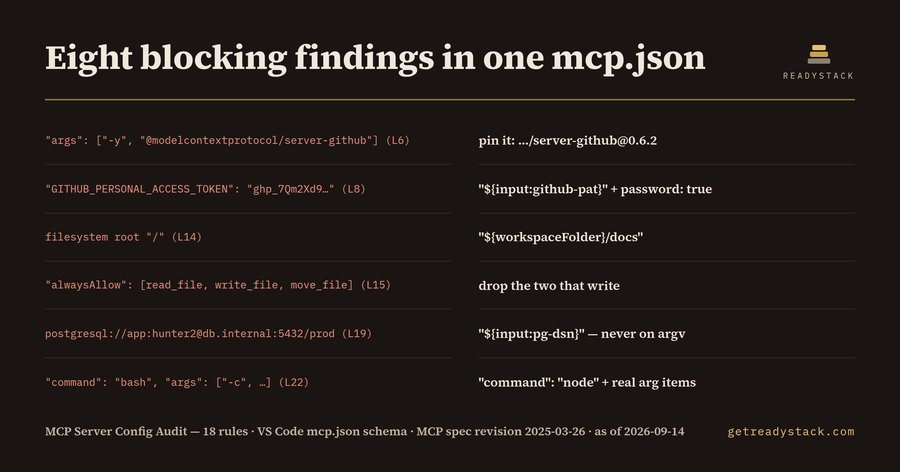
Eight blocking findings in one mcp.json — for developers and platform teams running AI coding agents in VS Code, Cursor or Claude Desktop. The audit's shipped sample fixture _fixtures/dirty.mcp.json (33 lines, five servers — github, filesystem, postgres, ops and analytics) returns 14 findings, 8 of them blocking:
L6 ERROR npx_unpinned — "@modelcontextprotocol/server-github" runs with no version → pin …/[email protected] L8 ERROR secret_inline — env.GITHUB_PERSONAL_ACCESS_TOKEN holds a GitHub token → "${input:github-pat}", password: true L14 ERROR fs_root_broad — the filesystem server is given the root "/" → "${workspaceFolder}/docs" L15 ERROR auto_approve — alwaysAllow: read_file, write_file, move_file → drop the two that write L19 ERROR db_url_credentials — postgresql://app:<password>@db.internal:5432/prod on the command line → "${input:pg-dsn}" L22 ERROR shell_wrapper — launched as bash -c "…" → "command": "node" with real argument items L27 ERROR remote_plaintext_http — http://analytics.internal.example/mcp → https:// L29 ERROR secret_inline — headers.Authorization holds a bearer token → "${input:analytics-token}"
Six more are warnings: docker_mutable_tag L19, no_readonly_db L17, type_missing L17 and L21, absolute_local_path L23, sse_deprecated L26.
The file is valid JSON. That is the problem with agent configs: a linter confirms it parses, and never reads it for what it is, which is a permission grant. An mcp.json says which processes get spawned on your machine, with which credentials, against which directories, and which of their tools run unasked.
Read the eight blockers in order and you have the shape of it. npx with no version, and no lockfile behind it, resolves whatever was published most recently, at every launch: the code your agent runs is chosen by whoever published last. A token written straight into env sits in a file that gets committed, screenshotted and pasted into issues, and stays valid until somebody rotates it — the VS Code schema carries an inputs array and ${input:id} substitution for exactly this reason. A filesystem root of "/" puts every SSH key, browser profile and .env file on the machine inside the agent's reach. An auto-approval list removes the confirmation step, so a tool call the model was talked into by text inside a file or a web page executes with no human in it. A DSN on the command line is a production credential echoed into process listings and agent logs at every start, and that same server has no read-only flag, so a generated UPDATE with a missing WHERE clause lands on the connection that answers questions. bash -c is a shell, with chaining and expansion, not a reviewable executable and arguments. And a plain http:// server carries the literal token from L29 across the network in clear, with every tool argument and result.
The dated warning is L26: MCP specification revision 2025-03-26 replaced HTTP+SSE with Streamable HTTP.
The corrected twin of the same file returns zero findings from the same 18 rules. That is the design: every rule cites what it comes from, and a finding is a line number plus its replacement, not a score.
These files are increasingly written by the assistant about to use them, from examples where the key was inline to keep the example short. Every line individually reads correct.
On cost: freelance application-security engineers commonly bill $100 to $200 an hour, and reading one mcp.json against credential hygiene, pinning, transport and least privilege takes most of an hour the first time.
The free version audits one config completely — all 18 rules, every line number, every replacement, in the editor or in the browser, nothing withheld and nothing uploaded. The paid version changes scope rather than depth: every agent config in a repository and in the user-scope locations for VS Code, Cursor, Claude Desktop and Windsurf in one pass, a non-zero exit code for CI, and a dated evidence report of file, rule and line.
15 seconds — what it actually does
Questions people ask
What does MCP Server Config Audit actually do?
It reads one mcp.json and reports every server entry that leaks a credential or grants more machine than it needs: an API key in env or headers, npx or uvx launching a package with no version, an untagged Docker image, a plaintext endpoint, a bash -c wrapper, an auto-approval list, a filesystem root of slash. On the shipped sample it returns 14 findings, 8 blocking, each with a line number.
Who is this for?
Developers who run AI coding agents in VS Code, Cursor, Windsurf or Claude Desktop and keep an mcp.json beside the code, platform engineers who review the configs their teams commit, and security reviewers who are handed an agent config and asked whether it is safe to merge. It assumes you wrote the file quickly, possibly with an assistant.
Why is a free tool not enough here?
A JSON linter or a schema check says the file is valid, and it is. Nothing in valid JSON knows that npx without a version resolves the newest published package at every launch, that alwaysAllow removes the confirmation step, or that a filesystem root of slash reaches your SSH keys. Secret scanners run after you have already pushed the file.
What is free and what costs money?
Free covers one file completely: all 18 rules, every line number, every replacement, in the editor and in the browser, with nothing withheld and no watermark. The paid version changes scope rather than depth. It audits every agent config in a repository and in user-scope locations at once, fails CI with a non-zero exit code, and exports a dated evidence report.
What would this cost done by hand?
Freelance application-security engineers commonly bill $100 to $200 an hour. Reading one mcp.json against credential hygiene, package pinning, transport and least-privilege questions takes a careful reviewer most of an hour the first time, and the file changes again the next time somebody adds a server to it.
Why not just ask ChatGPT or another AI chat?
A general AI chat answers from training data with a cutoff date, cannot read your repository and names no rule version. MCP Config Lint - mcp.json and claude_desktop_config securit checks the file you open against 18 rules from a rule set dated 2026-09-20, and points at the exact line with the fix. For a filing, an audit or a client you need that dated result on your own files.
Ask about this tool
One question, answered by the person who built it. Your email only if you want the answer sent.