· ReadyStack
Worked example
Real numbers from this tool, line by line.
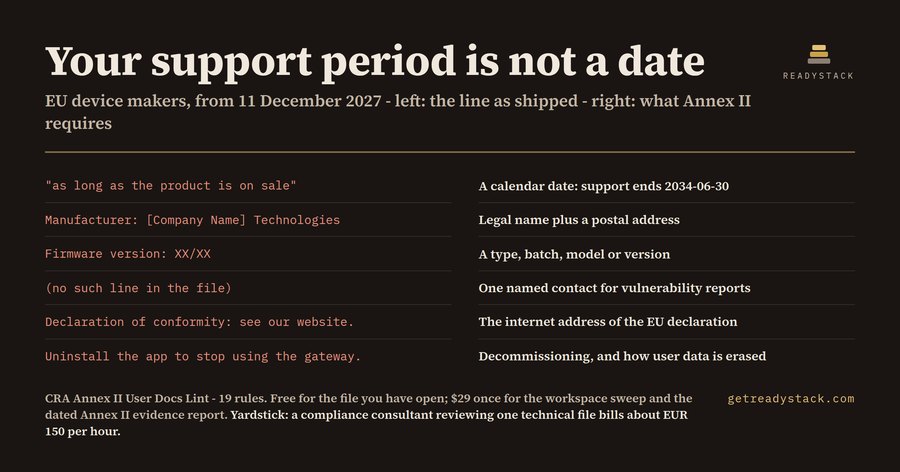
15 findings - 11 errors and 4 warnings - on one page of user documentation that a connected-device maker in Hamburg could have shipped this morning. The page reads well: headings, a product name, a friendly paragraph about taking security seriously. It has no postal address, no place to report a vulnerability, no internet address for the EU declaration of conformity, no word about erasing user data, and no date.
Annex II of the EU Cyber Resilience Act (Regulation (EU) 2024/2847) lists nine pieces of information that have to reach the user with the product: the manufacturer and how to reach them, the contact point for vulnerability reports, what identifies the product, the intended purpose and security environment, the essential functions and security properties, the known and foreseeable risks, the internet address of the EU declaration of conformity, the end date of the support period, instructions for updates and secure decommissioning, and how to get the SBOM.
Nine items is the kind of list an assistant fills in beautifully and wrongly. Ask one and you get all nine headings with confident prose under each. Under the support period heading you get the sentence on our sample page: security updates will be provided as long as the product is on sale. That is a promise, not a date, and Annex II asks for the date until which the user can expect security updates. An assistant cannot know that date, and it cannot know that the words [Company Name] are still in line 3 of the file you are shipping.
CRA Annex II User Docs Lint is 19 rules over one markdown file. It reads the document open in VS Code and puts each finding on its line. On the bundled complete document - a full Annex II page for a door controller - it reports 0 findings. On the bundled assistant-style page it reports 15: the missing address, contact, security environment, risk section, update and decommissioning instructions and SBOM pointer, a declaration of conformity with no address, the open-ended support promise on line 13, and two placeholders on lines 3 and 5.
The rule that needs code rather than prose is the support period. The lint reads the date out of your support line and compares it with today. A past date is reported as expired, with both dates printed. A date less than five years out is flagged for review, because the support period should reflect how long the product is in use. Change the date and the verdict changes - that is the difference between a lint and a template.
Timing is the reason this is not a next-quarter problem. Reporting obligations under the Cyber Resilience Act apply from 11 September 2026. The remaining obligations, the Annex II information duties among them, apply from 11 December 2027. Fines for breaches of the Article 13 obligations reach EUR 15 million or 2.5% of worldwide annual turnover.
What is free is the part that finishes a job on its own: lint the file you have open, all 19 rules, every finding on its line, no key, nothing uploaded, offline. The full version moves on a different axis - scope and ownership: one command sweeps every documentation file in the workspace and writes a dated Annex II evidence report in Markdown and CSV that you keep with your technical file. $29 once, one licence key per person or team seat. For comparison, a compliance consultant reviewing one technical file bills about EUR 150 per hour.
It is a lint over documentation text. It does not certify conformity and it is not legal advice. It does tell you, before you commit, that your support period is a sentence instead of a date.
15 seconds — what it actually does
Questions people ask
What does CRA Annex II User Docs Lint actually do?
It reads the user documentation that ships with your product and checks it against the nine information items in Annex II of the EU Cyber Resilience Act. 19 rules cover the manufacturer block, the vulnerability reporting contact, the declaration of conformity address, the support period end date, update and decommissioning instructions, and SBOM access. Every finding names its line.
Who is it for?
Embedded, IoT and device software teams that CE-mark a product with digital elements for the EU market, plus the technical writers and product-compliance engineers who own the README, the user manual and the technical file. If you ship firmware or a connected app into Europe and someone asks who keeps your Annex II page correct, it is for you.
Why is a free chatbot not enough for this?
A chatbot writes Annex II prose happily, but it cannot know whether your support end date is still in the future, whether your declaration of conformity URL is present, or that '[Company Name]' survived into the shipped file. This runs 19 deterministic rules against your own text with today's date, offline, and reported 15 findings on our sample page.
What is free and what does the full version add?
Free and complete on its own: lint the file you have open, all 19 rules, every finding on its line, no key and no upload. The full version adds scope and ownership - one command sweeps every documentation file in the workspace and writes a dated Annex II evidence report in Markdown and CSV for your technical file. $29 once.
What would this cost without the tool?
A compliance consultant reviewing one technical file bills about EUR 150 per hour, and a documentation pass is rarely one hour. Fines for breaches of the Article 13 obligations reach EUR 15 million or 2.5% of worldwide annual turnover. The extension is $29 once per person or team seat,.
Why not just ask ChatGPT or another AI chat?
A general AI chat answers from training data with a cutoff date, cannot read your repository and names no rule version. CRA Annex II User Docs Lint checks the file you open against 19 rules from a rule set dated 2026-09-20, and points at the exact line. For a filing, an audit or a client you need that dated result on your own files.
Ask about this tool
One question, answered by the person who built it. Your email only if you want the answer sent.